The Ultimate List of Best DevOps Automation Tools for IT Operations in 2026
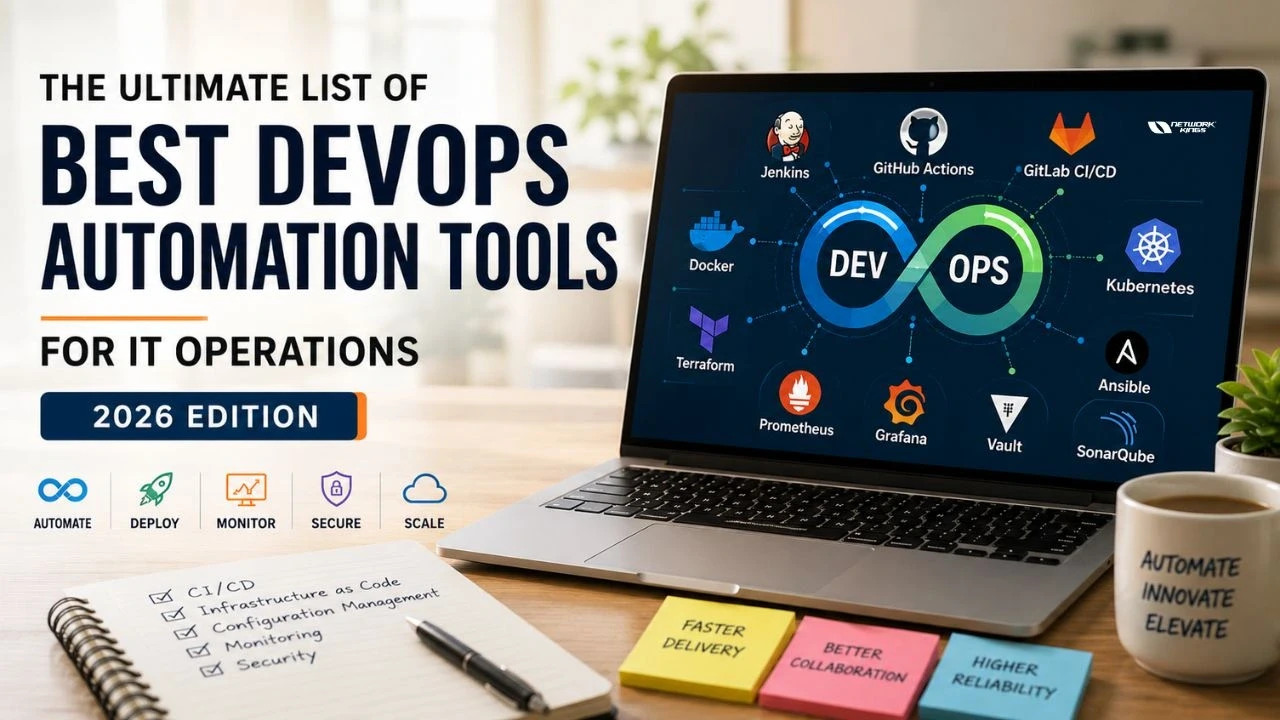
The modern IT landscape is moving faster than ever. Organizations are deploying applications multiple times a day, managing hybrid cloud environments, and supporting millions of users across the globe. In this fast-paced environment, manual processes are no longer sustainable. Businesses need automation, scalability, and consistency—and that’s exactly where DevOps automation tools come into play.
In 2026, DevOps is no longer just a methodology; it has become the operational backbone of cloud-native businesses. From automating infrastructure provisioning to managing CI/CD pipelines and monitoring production workloads, DevOps automation tools help organizations reduce operational complexity while accelerating innovation.
Whether you're a DevOps engineer, cloud architect, system administrator, or IT professional looking to enter the field, understanding the best DevOps tools is essential. This guide explores the most widely adopted DevOps automation tools used by enterprises worldwide and explains how they contribute to efficient IT operations.
What Are DevOps Automation Tools?
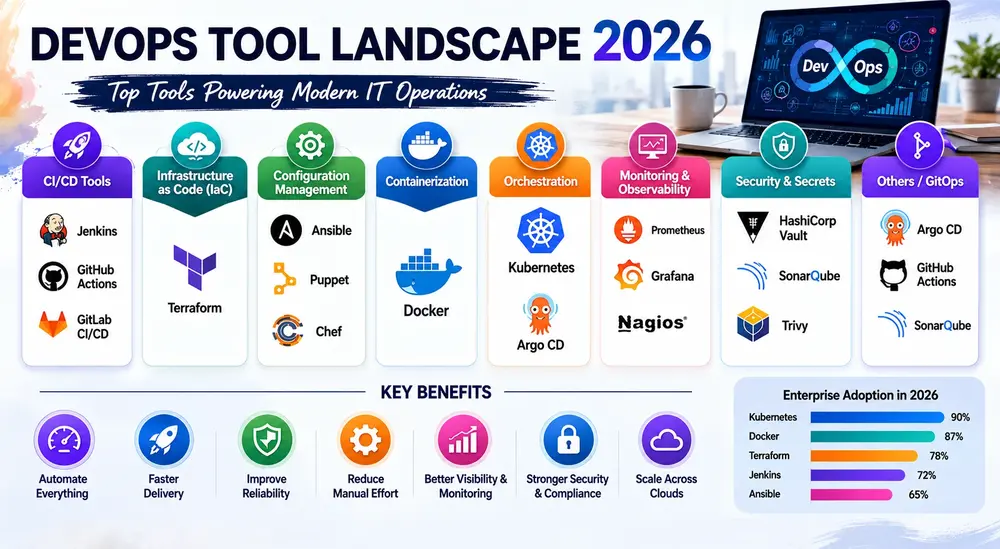
DevOps automation tools are software platforms and frameworks that automate repetitive tasks across the software development lifecycle (SDLC) — from code commit to production deployment and beyond.
They cover:
CI/CD pipelines — automating build, test, and deployment workflows
Infrastructure as Code (IaC) — provisioning cloud resources through declarative configs
Configuration management — maintaining consistent server and application states
Container orchestration — managing containerized workloads at scale
Monitoring and observability — detecting anomalies and tracking system health
Security automation — embedding security checks into pipelines
In short, these tools are what turn a DevOps philosophy into an operational reality.
The Ultimate DevOps Automation Tools List for 2026
1. Jenkins
Category: CI/CD | Open Source: Yes
Jenkins is the grandfather of CI/CD automation. It's been around since 2011 and remains the most widely deployed automation server in the world — not because it's perfect, but because it's extraordinarily flexible.
What it does: Jenkins lets you define automated build, test, and deployment pipelines using either its web UI or a Jenkinsfile (Groovy-based DSL). Its plugin ecosystem — over 1,800 plugins — means you can integrate it with almost any tool in your stack.
Why enterprises use it: Legacy infrastructure compatibility. If you're running on-prem or dealing with heterogeneous environments (mixed Linux, Windows, AIX), Jenkins handles it. It's also self-hosted, which matters for organizations with strict data residency requirements.
Key benefits:
Complete pipeline customization
Massive plugin library
Strong on-prem and hybrid cloud support
No vendor lock-in
Ideal users: System administrators, DevOps engineers managing legacy or hybrid environments, teams needing deep customization.
Honest caveat: Jenkins requires meaningful maintenance overhead. Plugin compatibility issues and UI complexity are real pain points. Many teams are migrating to GitHub Actions or GitLab CI/CD for greenfield projects.
2. GitHub Actions
Category: CI/CD | Open Source: Yes (platform is proprietary SaaS)
GitHub Actions has become the default CI/CD tool for teams already hosting code on GitHub — and for good reason. It's deeply integrated, easy to configure via YAML, and has a massive marketplace of reusable workflows.
What it does: Triggers automated workflows based on repository events (push, pull request, release). You define jobs in .github/workflows/*.yml files, and GitHub handles the runners.
Why enterprises use it: Zero infrastructure overhead on the CI/CD side, native integration with GitHub's security and code review features, and GitHub's Copilot ecosystem. Microsoft's enterprise contracts include generous runner minutes and private runner support.
Key benefits:
Workflow as code, version-controlled alongside your app
15,000+ marketplace actions
Matrix builds for multi-platform testing
Self-hosted runner support
Ideal users: Teams on GitHub, open-source projects, cloud-native teams wanting low-ops CI/CD.
3. GitLab CI/CD
Category: CI/CD | Open Source: Yes (community edition)
GitLab CI/CD is the natural choice for organizations running GitLab — and a genuinely strong Jenkins alternative for teams that want an end-to-end DevSecOps platform without stitching together separate tools.
What it does: Pipelines are defined in .gitlab-ci.yml and run on GitLab Runners. GitLab provides built-in container registry, security scanning, and environment management.
Key benefits:
Full DevSecOps platform in one product
Auto DevOps for zero-config pipeline generation
Strong compliance and audit features
Self-hosted or SaaS options
Ideal users: Enterprises wanting an integrated platform, teams with compliance requirements, organizations already on GitLab SCM.
4. Docker
Category: Containerization | Open Source: Yes
Docker standardized how applications are packaged and shipped. In 2026, container-based deployment isn't a trend — it's the baseline. If your team isn't using Docker, you're building technical debt.
What it does: Docker packages an application and its dependencies into a portable container image. Those images run identically across development laptops, CI runners, and production servers.
Why enterprises use it: Consistency across environments eliminates the "works on my machine" problem. Docker Compose simplifies multi-container local development.
Key benefits:
Environment portability and reproducibility
Lightweight compared to VMs
Vast public image registry (Docker Hub)
Integrates with every major CI/CD tool
Ideal users: Every developer and DevOps engineer. This one is non-negotiable in 2026.
5. Kubernetes
Category: Container Orchestration | Open Source: Yes
Kubernetes is the dominant platform for running containerized workloads at scale. It's complex to learn, but the operational benefits — self-healing deployments, auto-scaling, declarative config — are substantial.
What it does: Kubernetes manages clusters of containers across multiple nodes. It handles scheduling, health checks, rolling updates, service discovery, and resource allocation.
Why enterprises use it: AWS EKS, Google GKE, and Azure AKS have made managed Kubernetes the default for cloud-native production environments. Large organizations run thousands of pods across multiple clusters.
Key benefits:
Auto-scaling based on CPU, memory, or custom metrics
Self-healing — restarts failed containers automatically
Declarative infrastructure via YAML manifests
Massive ecosystem (Helm, Argo CD, Keda, etc.)
Ideal users: Cloud engineers, SREs, platform engineering teams.
6. Terraform
Category: Infrastructure as Code | Open Source: Yes (BSL license for newer versions)
Terraform is the most widely adopted IaC tool for provisioning cloud infrastructure. It uses a declarative HCL (HashiCorp Configuration Language) syntax to define infrastructure across AWS, Azure, GCP, and 100+ other providers.
What it does: You write .tf files describing your desired infrastructure state. Terraform plans the changes, shows a diff, and applies them — creating, modifying, or destroying resources as needed.
Why enterprises use it: Cloud-agnostic provisioning with state management is invaluable for multi-cloud strategies. Terraform Cloud and Enterprise add collaboration, remote state, and policy-as-code.
Key benefits:
Multi-cloud support via providers
State management prevents drift
Modular, reusable configurations
Strong integration with CI/CD pipelines
Ideal users: Cloud engineers, DevOps engineers, infrastructure teams.
7. Ansible
Category: Configuration Management & Automation | Open Source: Yes
Ansible takes a different approach from Terraform — it's agentless, uses SSH, and excels at configuration management and application deployment rather than cloud provisioning (though it can do both).
What it does: Ansible uses YAML-based playbooks to define automation tasks. No agent is required on the target machine — just SSH access and Python.
Why enterprises use it: Red Hat Ansible Automation Platform is a dominant enterprise product. Its low barrier to entry and readable YAML syntax make it accessible to sysadmins who aren't developers.
Key benefits:
Agentless — no software to install on managed nodes
Human-readable playbooks
Idempotent execution
Strong Windows and Linux support
Ideal users: System administrators, DevOps engineers, network automation teams.
8. Puppet
Category: Configuration Management | Open Source: Yes
Puppet is an established configuration management tool used heavily in large enterprises with complex, heterogeneous infrastructure. It uses a declarative language (Puppet DSL) to define desired system states.
Key benefits:
Strong compliance and reporting features
Handles scale well (tens of thousands of nodes)
Puppet Forge for reusable modules
Excellent audit trail
Ideal users: Enterprise IT teams managing large server fleets, regulated industries requiring compliance automation.
9. Chef
Category: Configuration Management | Open Source: Yes
Chef takes a code-first approach to configuration management using Ruby-based "cookbooks" and "recipes." It's powerful but has a steeper learning curve than Ansible.
Key benefits:
Code-first philosophy (Ruby DSL)
Chef InSpec for compliance-as-code
Strong integration with cloud platforms
Chef Automate for enterprise visibility
Ideal users: Development-oriented ops teams, organizations already invested in the Chef ecosystem.
10. Prometheus
Category: Monitoring & Alerting | Open Source: Yes
Prometheus is the de facto monitoring standard for Kubernetes and cloud-native environments. It scrapes metrics from instrumented services and stores them in a time-series database.
What it does: Prometheus collects metrics via HTTP endpoints, stores them with timestamps, and evaluates alerting rules. PromQL (its query language) is powerful for slicing and aggregating metrics.
Why enterprises use it: Cloud-native observability stacks almost universally start with Prometheus. It integrates directly with Kubernetes and pairs with Grafana for visualization.
Key benefits:
Pull-based metrics collection
Powerful PromQL query language
Native Kubernetes integration
Alert manager for routing and silencing
Ideal users: SREs, cloud engineers, platform teams.
11. Grafana
Category: Observability & Visualization | Open Source: Yes
Grafana turns raw metrics, logs, and traces into actionable dashboards. It's the visualization layer that makes Prometheus, Loki, and other data sources useful for on-call engineers.
Key benefits:
Unified observability (metrics, logs, traces)
100+ data source plugins
Alerting with multiple notification channels
Grafana Cloud for managed hosting
Ideal users: DevOps engineers, SREs, anyone who needs to visualize operational data.
12. Argo CD
Category: GitOps / CD | Open Source: Yes
Argo CD implements the GitOps model for Kubernetes — your Git repository is the single source of truth, and Argo CD continuously reconciles your cluster state with what's defined there.
Key benefits:
Declarative, Git-driven deployments
Drift detection and auto-sync
Multi-cluster support
Beautiful UI for deployment status
Ideal users: Platform engineers, DevOps teams running Kubernetes at scale.
13. HashiCorp Vault
Category: Secrets Management | Open Source: Yes (BSL license)
Vault solves the secrets sprawl problem that plagues growing engineering organizations. Hardcoded credentials, .env files checked into Git, and manually rotated API keys are security nightmares that Vault eliminates.
Key benefits:
Dynamic secret generation (rotate on use)
Fine-grained access policies
Audit logging of all secret access
Integrates with Kubernetes, AWS IAM, and more
Ideal users: Security engineers, DevOps engineers handling sensitive credentials, compliance-driven organizations.
14. Nagios
Category: Infrastructure Monitoring | Open Source: Yes
Nagios is the battle-tested infrastructure monitoring tool that predates the cloud era but remains relevant for on-premises and hybrid environments. If you're monitoring bare metal or legacy systems, Nagios still delivers.
Key benefits:
Mature plugin ecosystem (thousands of checks)
Network, host, and service monitoring
Flexible alerting
Strong community and documentation
Ideal users: IT operations teams managing traditional infrastructure, organizations with on-prem data centers.
15. SonarQube
Category: Code Quality & Security | Open Source: Yes (community edition)
SonarQube integrates into CI/CD pipelines to catch code quality issues, security vulnerabilities, and technical debt before they reach production. In a DevSecOps model, it's essential.
Key benefits:
Static code analysis for 30+ languages
Security hotspot detection (OWASP, CWE)
Quality gate enforcement in CI/CD
Technical debt tracking over time
Ideal users: Development teams, DevSecOps practitioners, organizations with compliance requirements.
DevOps Automation Tools Comparison Table
Tool | Category | Best For | Open Source | Enterprise Ready |
Jenkins | CI/CD | Legacy/hybrid pipelines | Yes | Yes |
GitHub Actions | CI/CD | Cloud-native, GitHub teams | Yes* | Yes |
GitLab CI/CD | CI/CD | All-in-one DevSecOps | Yes* | Yes |
Docker | Containerization | App packaging & portability | Yes | Yes |
Kubernetes | Orchestration | Container management at scale | Yes | Yes |
Terraform | IaC | Multi-cloud provisioning | Yes* | Yes |
Ansible | Config Management | Agentless automation | Yes | Yes |
Puppet | Config Management | Large-scale server management | Yes | Yes |
Chef | Config Management | Code-first configuration | Yes | Yes |
Prometheus | Monitoring | Cloud-native metrics | Yes | Yes |
Grafana | Observability | Dashboards & visualization | Yes | Yes |
Argo CD | GitOps/CD | Kubernetes GitOps | Yes | Yes |
HashiCorp Vault | Secrets | Credentials & secrets mgmt | Yes* | Yes |
Nagios | Monitoring | On-prem infrastructure | Yes | Yes |
SonarQube | Code Quality | DevSecOps, code scanning | Yes* | Yes |
*Open source with commercial extensions or license restrictions on newer versions.
Which DevOps Automation Tool Should You Learn First?
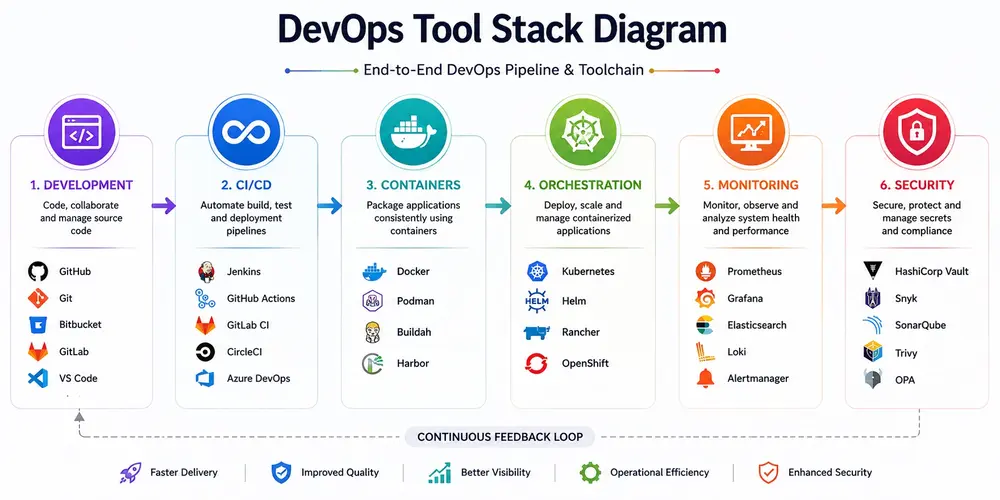
Beginners: Start with Docker — it's foundational, ubiquitous, and gives you an immediate understanding of containers. Follow up with GitHub Actions to learn CI/CD through hands-on pipeline building.
DevOps Engineers: Get proficient in Terraform and Kubernetes. These two cover the infrastructure provisioning and workload orchestration skills most in-demand by employers in 2026.
Cloud Engineers: Terraform plus your cloud provider's native tooling (AWS CloudFormation, Azure Bicep) is the right starting point. Add Argo CD once you're running workloads on Kubernetes.
System Administrators: Ansible is your entry point. Its agentless architecture and readable YAML syntax make it the most sysadmin-friendly automation tool available.
SRE Professionals: Prometheus and Grafana first — you need strong observability before you can meaningfully improve reliability. Add Kubernetes and Argo CD as you mature your platform practices.
Future Trends in DevOps Automation for 2026 and Beyond
AI-Powered DevOps (AIOps)
AI is actively entering the DevOps toolchain. Copilot-style tools now assist in writing pipelines, IaC configs, and incident runbooks. AIOps platforms like Dynatrace and New Relic use ML to detect anomalies and predict incidents before they happen.
GitOps Becomes Standard
The GitOps model — where Git is the single source of truth for infrastructure and application state — is moving from early adopter to mainstream. Tools like Argo CD and Flux are now first-class choices for Kubernetes delivery.
Platform Engineering
Large organizations are building Internal Developer Platforms (IDPs) using tools like Backstage (Spotify's open-source portal) to give developers self-service infrastructure. This reduces the cognitive load on both developers and DevOps teams.
Security Automation (DevSecOps)
Shift-left security is table stakes. Tools like SonarQube, Snyk, Checkov (for IaC scanning), and Vault are being embedded earlier in pipelines. Compliance-as-code is replacing manual audit processes.
Multi-Cloud Automation
Single-cloud strategies are giving way to multi-cloud architectures. Terraform's provider model and Kubernetes' portability make them central to multi-cloud automation strategies.
Infrastructure Automation Maturity
Teams are moving beyond basic IaC to full infrastructure automation — including drift detection, policy enforcement (Open Policy Agent), and automated remediation.
The DevOps automation tools landscape in 2026 is mature, rich, and sometimes overwhelming. The good news: you don't need all of these tools. You need the right ones for your environment, your team's maturity, and your operational goals.
Start foundational — Docker, GitHub Actions, and Terraform will take most teams a long way. Layer in Kubernetes, Prometheus, and Vault as your architecture grows. And always tie your tool choices back to a problem you're actually solving, not a trend you're chasing.
The teams that win in 2026 aren't the ones running the most tools — they're the ones that have automated the right things and freed their engineers to focus on what matters.
FAQs
Which is the best DevOps automation tool?
There is no single best tool. Kubernetes, Terraform, Docker, Jenkins, and Ansible are among the most widely adopted.
Is Jenkins still relevant in 2026?
Yes. Jenkins remains a leading CI/CD solution, particularly in large enterprises with complex automation requirements.
What tools should a DevOps engineer learn first?
Linux, Git, Docker, Jenkins, Kubernetes, Terraform, and Ansible should be the starting point.
Is Terraform better than Ansible?
They solve different problems. Terraform provisions infrastructure, while Ansible configures and manages systems.
Which DevOps tools are used by large enterprises?
Large enterprises commonly use Kubernetes, Terraform, Jenkins, GitLab, Ansible, Prometheus, Grafana, and Vault.
Is Kubernetes mandatory for DevOps careers?
While not mandatory, Kubernetes has become one of the most valuable skills in modern DevOps environments.
What is the future of DevOps automation?
The future centers around AI-powered automation, GitOps, security automation, and multi-cloud infrastructure management.

The founder of Network Kings, is a renowned Network Engineer with over 12 years of experience at top IT companies like TCS, Aricent, Apple, and Juniper Networks. Starting his journey through a YouTube channel in 2013, he has inspired thousands of students worldwide to build successful careers in networking and IT. His passion for teaching and simplifying complex technologies makes him one of the most admired mentors in the industry.