Linux vs Windows Server: Which Is Better for DevOps?
Choosing the right server operating system is one of the most important decisions for any DevOps team. The operating system forms the foundation of your infrastructure, influencing everything from automation and security to cloud deployment and application performance.
When comparing Linux vs Windows Server for DevOps, there is no universal winner. The best choice depends on your organization's technology stack, business requirements, and long-term goals. While Linux dominates modern cloud-native environments, Windows Server remains a strong option for organizations deeply invested in Microsoft technologies.
What Makes an Operating System Important in DevOps
DevOps focuses on collaboration, automation, continuous integration, continuous delivery, and infrastructure scalability. The operating system directly impacts how efficiently teams can automate tasks, manage servers, deploy applications, and maintain security.
A DevOps-friendly operating system should support:
Containerization platforms
Cloud infrastructure
Monitoring solutions
Security management
Scalability requirements
Both Linux and Windows Server support DevOps workflows, but they approach these capabilities differently.
Linux for DevOps
Linux has become the default OS for DevOps infrastructure, and that status is well-earned rather than simply a matter of preference.
Why Linux Dominates DevOps Workflows
The vast majority of open-source DevOps tooling is built natively on Linux. Docker, Kubernetes, Ansible, Terraform, Jenkins, GitLab CI, Prometheus, and Grafana all run best on Linux. When you use these tools on Linux, you are working with them as they were designed to work, without compatibility layers or workarounds.
Linux server administration is also highly scriptable. Bash and Python are deeply integrated into Linux environments, and tools like cron, systemd, and ssh make automating infrastructure tasks straightforward. Engineers who know their way around a Linux terminal can build powerful automation without needing additional software.
From a cloud perspective, Linux dominates. On AWS, Google Cloud, and Azure, Linux-based instances typically outnumber Windows instances significantly. Most container base images are Linux-based, which makes Kubernetes cluster management considerably simpler when your host OS matches your container OS.
Linux Server Advantages at a Glance
No licensing cost for most distributions, including Ubuntu Server, CentOS Stream, Debian, and Rocky Linux.
Lightweight resource footprint, which matters at scale.
Native compatibility with Docker and Kubernetes.
A massive ecosystem of free, open-source DevOps tools.
Strong community support and extensive documentation.
Fine-grained control over every layer of the system.
Windows Server for DevOps
Windows Server is not out of the DevOps conversation. Microsoft has invested heavily over the past decade to make Windows Server a credible platform for modern DevOps workflows, and for certain use cases it remains the right choice.
Where Windows Server Earns Its Place
Organizations that run .NET applications, Active Directory environments, or Microsoft SQL Server workloads often find Windows Server to be the more practical foundation. Replatforming those applications onto Linux introduces compatibility risks and requires additional engineering effort that may not be justified.
Windows Server features like PowerShell, Windows Subsystem for Linux (WSL), and Azure DevOps integration have also narrowed the gap considerably. PowerShell is a genuinely powerful automation tool that many Windows-focused engineers rely on for infrastructure scripting. And with WSL, Windows Server engineers can now run Linux tooling natively without spinning up a separate VM.
Azure DevOps, Microsoft's CI/CD and project management platform, works seamlessly in Windows Server environments and integrates tightly with the broader Microsoft ecosystem including Teams, SharePoint, and Azure Active Directory.
Key Differences Between Linux and Windows Server
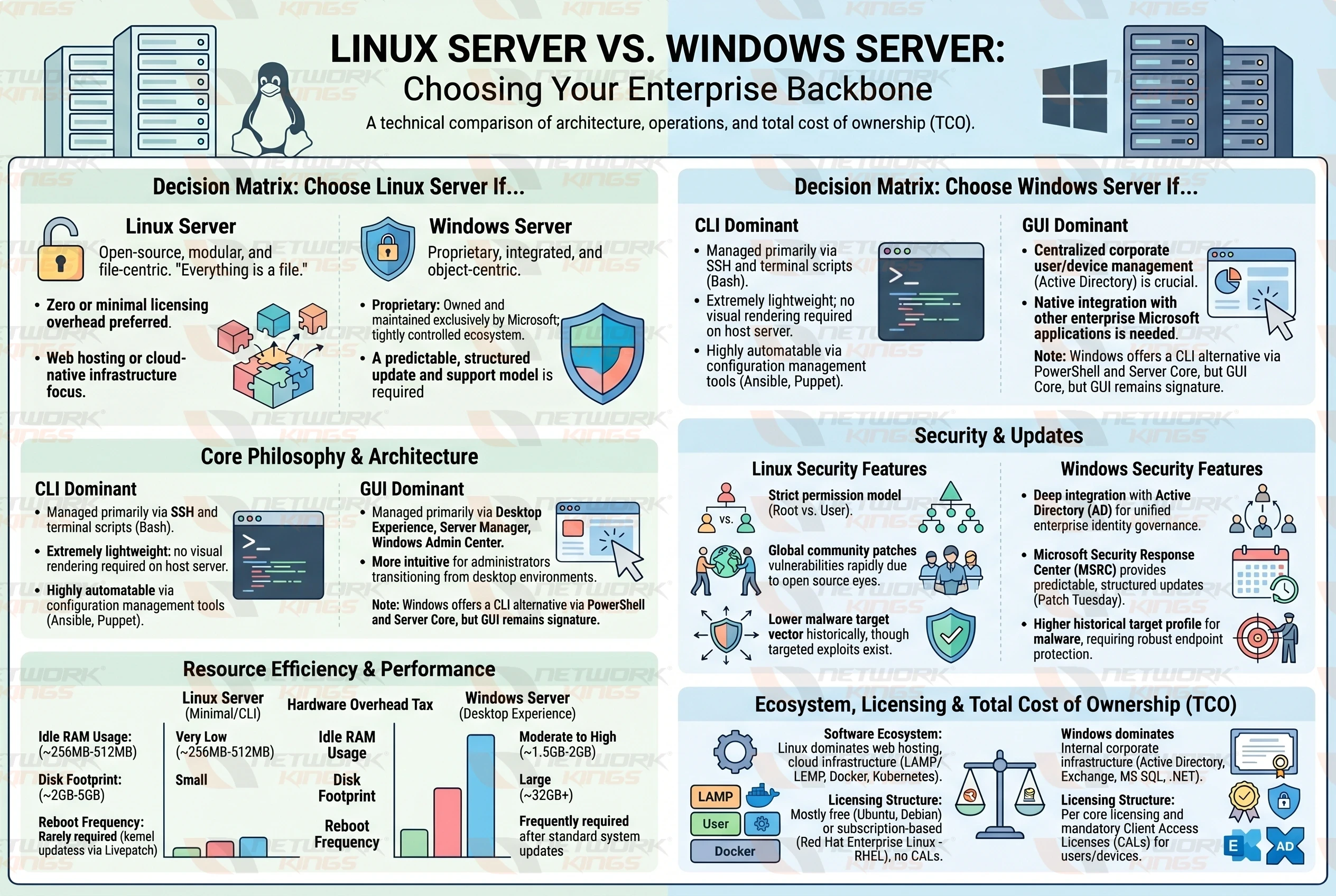
Feature | Linux | Windows Server |
Licensing Cost | Free (most distros) | Paid licensing required |
Default Shell | Bash / Zsh | PowerShell / CMD |
Container Support | Native and mature | Available, improving |
Cloud Adoption | Dominant | Moderate |
DevOps Tool Ecosystem | Extensive native support | Good, some workarounds |
GUI | Optional | Included by default |
.NET / IIS Support | Partial (via .NET Core) | Full native support |
Resource Usage | Lower | Higher |
Learning Curve | Steeper for beginners | Familiar for Windows users |
Community Support | Very large | Strong enterprise support |
Performance Comparison
Linux consistently edges out Windows Server in raw performance benchmarks for server workloads. Its lower memory footprint and minimal background processes mean more of your hardware resources go toward running your application rather than the OS itself.
For containerized environments specifically, this matters significantly. Running Kubernetes on Linux nodes gives you more headroom per node compared to Windows nodes with equivalent hardware.
Windows Server performance is entirely adequate for enterprise workloads, but you will typically need more RAM and CPU headroom to achieve the same application throughput.
Security Comparison
Both operating systems have strong security track records when properly hardened, but they achieve security in different ways.
Linux security is built on a permissions model that is granular, auditable, and well-documented. Tools like SELinux, AppArmor, and auditd give administrators deep visibility into system activity. Because Linux is open-source, vulnerabilities are typically identified and patched faster through community scrutiny.
Windows Server security relies heavily on Active Directory, Group Policy, and Microsoft Defender. For organizations that already manage Windows infrastructure, this is familiar and well-integrated. However, Windows historically presents a larger attack surface and requires more active patch management.
For a DevOps team building cloud-native infrastructure, Linux's security tooling integrates more naturally with platforms like HashiCorp Vault, open-source SIEM tools, and zero-trust network architectures.
Cost and Licensing Considerations
This is one of the clearest differentiators. Linux server distributions like Ubuntu Server, Debian, and Rocky Linux are free to download, use, and run in production. Commercial support is available from vendors like Red Hat or Canonical if needed, but it is optional.
Windows Server requires per-server or per-core licensing, which adds up quickly at scale. In large cloud environments running hundreds of instances, licensing costs for Windows Server can become a substantial line item. This is one reason that organizations optimizing for cost efficiency trend toward Linux as their primary DevOps operating system.
Cloud and Container Support
Cloud and container support is where Linux's lead is most pronounced. Docker was built on Linux. Kubernetes was built on Linux. Nearly every managed Kubernetes service, including Amazon EKS, Google GKE, and Azure AKS, defaults to Linux nodes.
Windows containers exist and are supported on Kubernetes, but they are treated as a secondary workload type with more constraints. If your DevOps infrastructure strategy is built around containers and microservices, Linux is the natural foundation.
That said, Azure offers strong native support for Windows Server workloads, and if your team runs Azure-centric infrastructure, Windows Server fits the ecosystem well.
Automation and Scripting Capabilities
Linux has traditionally held the advantage here. Bash scripting, combined with tools like Ansible, Puppet, Chef, and Terraform, gives Linux administrators an extensive automation toolkit with minimal setup.
PowerShell on Windows Server has matured significantly and is now cross-platform, which means you can even run PowerShell on Linux. For teams heavily invested in Windows environments, PowerShell Desired State Configuration (DSC) provides infrastructure-as-code capabilities comparable to Ansible.
The honest answer is that both platforms can support robust automation. The practical advantage Linux holds is that most of the community tooling, tutorials, and templates are written with Linux as the assumed environment.
When Linux Is the Better Choice
Linux for DevOps makes the most sense when:
You are building cloud-native, containerized applications.
Your team uses open-source tooling like Docker, Kubernetes, Ansible, or Terraform.
Cost efficiency at scale is a priority.
Your workloads run on public cloud platforms.
You want the broadest compatibility with the DevOps tool ecosystem.
Your team has Linux server administration experience or is willing to build it.
When Windows Server Is the Better Choice
Windows Server for DevOps is the more practical option when:
Your applications are built on the .NET Framework (not .NET Core) or rely on IIS.
Your organization runs Active Directory and requires deep integration.
You use Microsoft SQL Server as your primary database.
Your team's existing expertise is Windows-centric.
You are heavily invested in the Azure ecosystem and Microsoft tooling.
Regulatory requirements or vendor support contracts mandate Windows environments.
Which Platform Is Best for Modern DevOps Teams
For most modern DevOps teams building new infrastructure, Linux is the stronger foundation. Its open-source ecosystem, cloud compatibility, lower cost, and native container support align closely with where DevOps is heading as a discipline.
However, "Linux is better for DevOps" is not a universal truth. If your organization runs Windows-dependent applications, has a Windows-skilled team, and works primarily within the Microsoft ecosystem, forcing a move to Linux creates unnecessary complexity without a clear payoff.
The most pragmatic approach many mature DevOps organizations take is a hybrid one. Linux for containerized cloud workloads and CI/CD infrastructure, Windows Server where the application or business requirement genuinely demands it.
Choose based on your workload, your team's skills, and your toolchain. The best DevOps operating system is the one your team can operate, automate, and secure with confidence.
Final Thoughts
The Linux vs Windows Server debate in DevOps does not have a single winner that applies to every organization. Linux holds a clear edge in cloud-native, open-source, and container-heavy environments. Windows Server holds its ground where Microsoft application stacks, Active Directory, and enterprise tooling are in play.
If you are entering DevOps or building a new environment from scratch, investing time in Linux server administration skills will serve you well across the broadest range of environments and employers. If you are optimizing an existing Windows-centric organization, lean into PowerShell, Azure DevOps, and WSL to modernize without disrupting what already works.
Understand both platforms at a working level, know when to use each, and you will be a more effective engineer regardless of which environment you find yourself in.
Frequently Asked Questions
1. Is Linux better than Windows Server for DevOps?
For most DevOps use cases, particularly cloud-native and containerized workloads, Linux is the preferred choice due to its open-source tooling ecosystem, lower cost, and native Docker and Kubernetes support. Windows Server remains the better fit for Microsoft-dependent application stacks.
2. Which Linux distribution is best for DevOps?
Ubuntu Server is the most widely used Linux distribution in DevOps environments due to its strong community support, LTS releases, and compatibility with major cloud platforms. Rocky Linux and Debian are also popular choices for enterprise production environments.
3. Can you run Docker on Windows Server?
Yes, Windows Server supports Docker containers, including Windows containers and Linux containers via WSL 2. However, Linux remains the more mature and widely supported host OS for Docker and Kubernetes workloads.
4. Is PowerShell good for DevOps automation?
PowerShell is a capable automation tool, particularly in Windows and Azure environments. It is now cross-platform and can run on Linux as well. However, Bash and Python combined with tools like Ansible remain more commonly used in general DevOps automation workflows.
5. What operating system does AWS or Azure prefer for DevOps workloads?
Both AWS and Azure support Linux and Windows Server. However, Linux-based instances make up the majority of compute workloads on both platforms, and managed Kubernetes services on both clouds default to Linux nodes.
6. Is Windows Server more secure than Linux for server use?
Both platforms can be made highly secure with proper configuration and hardening. Linux offers granular, auditable permissions and benefits from open-source community scrutiny. Windows Server has robust enterprise security tools through Active Directory and Microsoft Defender. Neither is inherently more secure by default.

The founder of Network Kings, is a renowned Network Engineer with over 12 years of experience at top IT companies like TCS, Aricent, Apple, and Juniper Networks. Starting his journey through a YouTube channel in 2013, he has inspired thousands of students worldwide to build successful careers in networking and IT. His passion for teaching and simplifying complex technologies makes him one of the most admired mentors in the industry.