DTP vs VTP: Understanding Cisco's Layer 2 Protocols
In Cisco-based enterprise networks, efficient VLAN management and trunk link configuration are essential for maintaining a scalable and organized infrastructure. Two important Cisco Layer 2 protocols that often create confusion among networking students and professionals are Dynamic Trunking Protocol (DTP) and VLAN Trunking Protocol (VTP).
Although both protocols operate within Layer 2 switching environments and deal with VLAN-related functions, they serve entirely different purposes. DTP automates trunk link negotiation between switches, while VTP simplifies VLAN database management across a switched network.
For CCNA candidates, network engineers, and IT professionals, understanding the differences between DTP and VTP is crucial for designing secure and efficient campus networks. This guide explains how both protocols work, their configurations, advantages, limitations, and practical deployment scenarios to help you confidently implement Cisco switching technologies.
What Is DTP (Dynamic Trunking Protocol)?
Dynamic Trunking Protocol is a Cisco proprietary Layer 2 protocol that automatically negotiates whether a switch port should operate as a trunk or an access port. It eliminates the need to manually configure trunking on both ends of a link by allowing the two connected switches to agree on a port mode through negotiation.
DTP operates at Layer 2 and sends negotiation frames between switches to determine trunk status. These frames are sent every 30 seconds by default. When a port configured with DTP connects to another DTP-capable port, they exchange these frames and decide together whether to form a trunk.
DTP is enabled on Cisco switch ports by default. This is important to know because it has security implications that network engineers must address, especially in environments following security hardening guidelines.
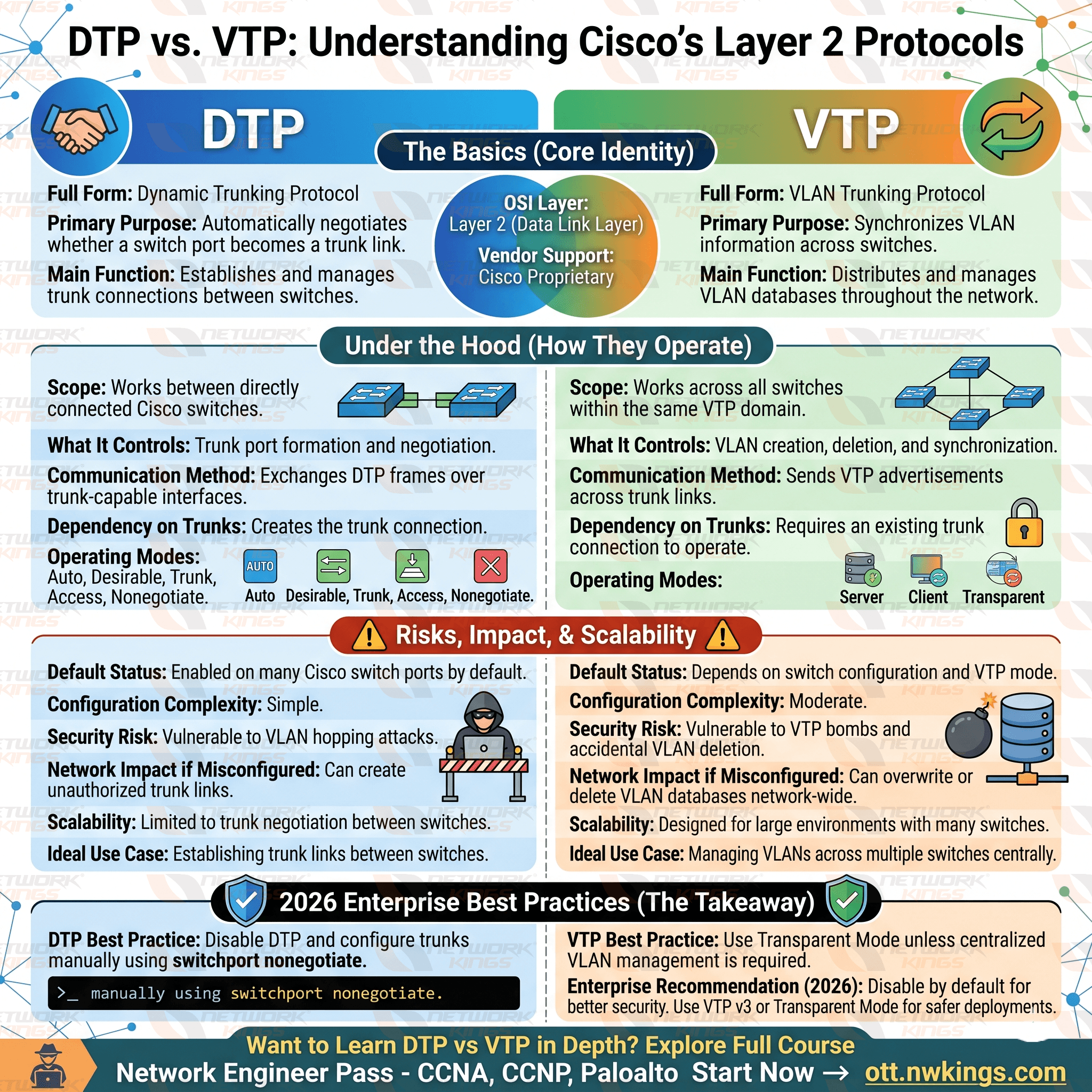
DTP Modes and Configurations
DTP supports several port modes, and knowing each one is critical for correct DTP configuration:
Dynamic Auto: The port is willing to become a trunk but will not initiate the negotiation. It becomes a trunk only if the other side actively requests it.
Dynamic Desirable: The port actively tries to negotiate a trunk link. It will form a trunk if the other side is set to trunk, dynamic auto, or dynamic desirable.
Trunk: The port is manually set as a trunk and still sends DTP frames unless you explicitly disable them.
Access: The port is manually set as an access port and will not negotiate a trunk.
Nonegotiate: Used with trunk or access mode to stop DTP frame transmission entirely. This is the recommended approach for securing ports.
To configure DTP behavior on a Cisco switch interface:
Switch(config)# interface GigabitEthernet0/1
Switch(config-if)# switchport mode dynamic desirable
To disable DTP completely on a trunk port:
Switch(config-if)# switchport mode trunk
Switch(config-if)# switchport nonegotiate
Key Features of DTP
Cisco proprietary protocol, not supported on non-Cisco devices
Operates at Layer 2 using multicast MAC address 01:00:0C:CC:CC:CC
Automatically negotiates IEEE 802.1Q or ISL encapsulation
Enabled by default on most Cisco Catalyst switches
Can be a security vulnerability if left unconfigured on edge ports
What Is VTP (VLAN Trunking Protocol)?
VLAN Trunking Protocol is another Cisco proprietary Layer 2 protocol, but its purpose is completely different from DTP. VTP is designed to simplify VLAN management across multiple switches by allowing VLAN configuration changes made on one switch to propagate automatically to all other switches in the same VTP domain.
Without VTP, if you have 30 switches in your network and you need to add a new VLAN, you would have to log into each switch individually and create that VLAN manually. VTP solves this by letting you manage VLANs centrally from a single switch, and those changes sync across the domain automatically.
VTP advertisements are sent over trunk links, which is why DTP and VTP often appear together in conversations about Cisco switching. VTP needs trunks to operate, but it is an entirely separate protocol doing a completely different job.
VTP Modes
VTP operates in one of three primary modes, with a fourth available in newer versions:
Server mode: The switch can create, modify, and delete VLANs. It advertises its VLAN database to other switches in the domain. This is the default mode on Cisco switches.
Client mode: The switch receives VTP updates and synchronizes its VLAN database, but cannot make VLAN changes locally.
Transparent mode: The switch does not participate in VTP synchronization. It passes VTP advertisements along but maintains its own independent VLAN database.
Off mode (VTP version 3 only): The switch completely ignores VTP advertisements and does not forward them.
VTP Versions
VTP has evolved through three versions:
VTP version 1 is the original, widely supported, and the default on most older Cisco switches. It only supports normal-range VLANs (1-1005).
VTP version 2 added support for Token Ring VLANs and improved consistency checking. It is largely backward-compatible with version 1 in most environments.
VTP version 3 is the most robust. It extends support to extended-range VLANs (1006-4094), adds an MST instance database, introduces a primary server concept to prevent unauthorized updates, and supports the "off" mode for VTP.
Key Features of VTP
Simplifies large-scale VLAN management across the network
Requires all switches to share the same VTP domain name
Uses revision numbers to determine which switch has the most current VLAN database
Propagates only over trunk links
Version 3 adds enhanced security and extended VLAN range support
DTP vs VTP: Comparison Table
Feature | DTP | VTP |
Full Name | Dynamic Trunking Protocol | VLAN Trunking Protocol |
Primary Purpose | Negotiates trunk or access mode on switch ports | Propagates VLAN database across switches |
Operating Layer | Layer 2 | Layer 2 |
Scope | Per-port (link-level) | Domain-wide (network-level) |
Configuration Requirement | Enabled by default; modes per interface | Requires matching domain name and version |
Cisco Proprietary | Yes | Yes |
Security Risk | VLAN hopping via unauthorized trunk negotiation | Database wipe from rogue VTP server |
Disable Recommendation | Use nonegotiate on access and edge ports | Use transparent mode or VTPv3 where possible |
Typical Use Case | Automating trunk link setup between switches | Centralizing VLAN management in a campus LAN |
Dependency | Works independently | Requires trunk links (often relies on DTP) |
Version Support | Single version | Versions 1, 2, and 3 |
Operates On | Individual switch interfaces | VTP domain across multiple switches |
Common Misconceptions About DTP and VTP
Many beginners assume DTP and VTP perform the same function because both are Cisco switching protocols related to VLAN environments.
However, their responsibilities are completely different.
DTP determines whether a physical link becomes a trunk.
VTP manages VLAN information after the trunk already exists.
Think of DTP as building the highway and VTP as distributing traffic rules across that highway.
Understanding this distinction is essential for mastering CCNA networking concepts.
Real-World Use Cases in Cisco Enterprise Environments
In a typical campus network with a core, distribution, and access layer design, DTP was historically used to automate trunk formation between switches in the distribution and core layers. Many network engineers have moved away from relying on DTP and instead configure trunks manually with nonegotiate to improve predictability and security.
VTP is still commonly deployed in medium to large campus networks where the VLAN database needs to stay consistent across dozens of switches. A network engineer makes a VLAN change on the VTP server, and within seconds that change propagates to all VTP client switches in the domain.
However, there is a well-known risk with VTP: if a switch with a higher revision number is introduced into the network, even accidentally, it can overwrite the VLAN database across the entire domain. This is sometimes called the "VTP bomb" scenario and it has caused major outages in real environments. VTP version 3 addresses this with the primary server concept, where only a designated primary server can make VLAN changes.
Best Practices for DTP and VTP in Modern Networks
DTP Best Practices
Disable DTP on all ports that do not need to negotiate trunk links. Use switchport nonegotiate on trunk ports and switchport mode access on end-user and edge ports.
Never rely on dynamic auto or dynamic desirable in production environments where security matters. Trunk links between switches should be configured manually and explicitly. This removes ambiguity and prevents unauthorized trunk negotiation.
VTP Best Practices
Use VTP version 3 when possible. It is more secure, supports extended VLANs, and gives you the primary server protection that earlier versions lack.
Set access layer switches to VTP transparent mode if you do not need centralized VLAN propagation across those devices. Always configure a VTP domain password to prevent unauthorized switches from joining the domain and pushing VLAN updates.
Before introducing a new switch into a VTP domain, reset its revision number by temporarily switching it to transparent mode and then back to client or server mode. This simple step has saved many networks from accidental VLAN database overwrites.
Document your VTP domain name, version, and password in your network runbooks. When something goes wrong at 2 AM, you will be glad you did.
Final Thoughts
Understanding DTP vs VTP is fundamental for anyone working with Cisco switching environments. While both are Cisco Layer 2 protocols, they address different aspects of network operations. Dynamic Trunking Protocol simplifies trunk establishment between switches, whereas VLAN Trunking Protocol centralizes VLAN management across an enterprise network.
Modern network designs often favor manual trunk configuration with DTP disabled for security reasons while using VTP Version 3 where centralized VLAN administration is beneficial. By understanding the strengths, limitations, and best practices of both protocols, CCNA students and network engineers can build scalable, secure, and efficient Cisco infrastructures.
Frequently Asked Questions
What is the main difference between DTP and VTP?
DTP (Dynamic Trunking Protocol) negotiates whether a switch port operates as a trunk or access port. VTP (VLAN Trunking Protocol) propagates VLAN database information across all switches within the same VTP domain. DTP works at the port level; VTP works at the network domain level.
Is DTP enabled by default on Cisco switches?
Yes. Most Cisco Catalyst switches have DTP enabled by default, with ports set to either dynamic auto or dynamic desirable depending on the platform. This is why it is important to explicitly configure port modes and disable DTP negotiation with switchport nonegotiate where it is not needed.
Can VTP work without DTP?
VTP requires trunk links to propagate VLAN information, but those trunks do not have to be formed using DTP. You can manually configure trunk links and VTP will still operate over those trunks. DTP and VTP are independent protocols.
What happens if a switch with a higher VTP revision number is added to a domain?
If a switch with a higher revision number joins a VTP domain, it will advertise its VLAN database to other switches, which may overwrite the existing VLAN database across the domain. This is a serious risk if the rogue switch has an outdated or different VLAN configuration. VTP version 3 significantly reduces this risk through its primary server mechanism.
Should I use VTP in modern network designs?
It depends on your environment. For smaller networks or those using modern automation and SDN controllers, VTP may add complexity without much benefit. For traditional campus networks with many switches, VTP version 3 with proper safeguards can still be a practical and efficient tool.
How do I disable DTP on a Cisco switch port?
Configure the port with a static mode and add the switchport nonegotiate command:
switchport mode trunk
switchport nonegotiate
This stops the port from sending or responding to DTP frames entirely.

The founder of Network Kings, is a renowned Network Engineer with over 12 years of experience at top IT companies like TCS, Aricent, Apple, and Juniper Networks. Starting his journey through a YouTube channel in 2013, he has inspired thousands of students worldwide to build successful careers in networking and IT. His passion for teaching and simplifying complex technologies makes him one of the most admired mentors in the industry.