Understanding Ports and Protocols for Cybersecurity and Networking
Introduction: Why Ports and Protocols Matter in Today's Connected World
If you're diving into networking or cybersecurity, you've probably heard this a hundred times: "You need to understand ports and protocols." But here's the truth—this isn't just another buzzword thrown around in IT training. Ports and protocols are literally the DNA of network communication. They're what allow your email to reach your inbox, your streaming service to deliver video, and—critically—what attackers exploit when they breach systems.
As a cybersecurity professional, SOC analyst, or IT student pursuing your CCNA, Security+, or CEH certification, mastering this concept isn't optional. It's the foundation that separates someone who troubleshoots blindly from someone who understands why a network behaves the way it does. Whether you're analyzing suspicious network traffic in Wireshark, configuring firewall rules, setting up VPN tunnels, or conducting penetration testing, you're working directly with ports and protocols every single day.
So let's break this down in a way that sticks—starting from fundamentals and moving to real-world applications you'll encounter in your career.
What Are Ports and Protocols?
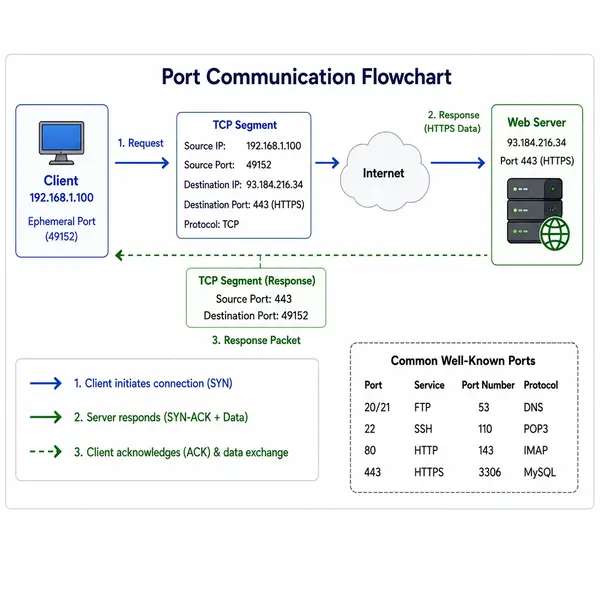
A protocol is a defined set of rules that determines how devices communicate across a network. A port is a logical communication endpoint used by applications and services to send and receive data.
Think of protocols as languages and ports as doors. The protocol defines how communication happens, while the port determines where the communication should go.
For example:
HTTPS uses port 443
DNS uses port 53
Without ports and protocols, devices would not know how to exchange information correctly.
The TCP/IP Model: Where Ports Live
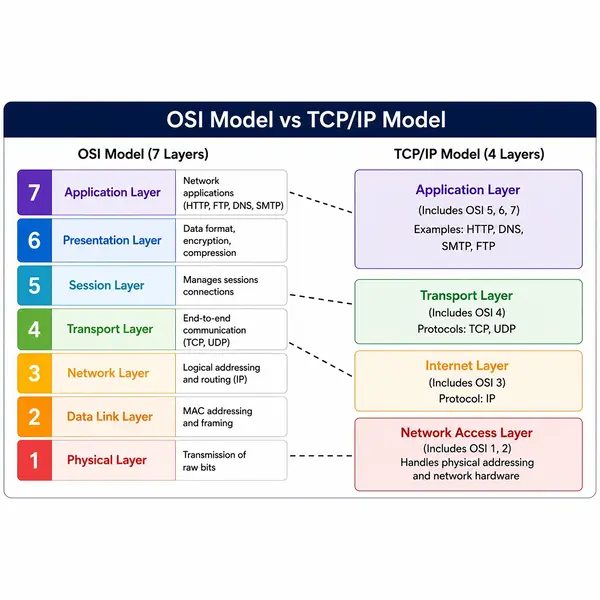
Ports primarily operate at Layer 4 (Transport Layer) of the OSI model, handled by two major protocols:
TCP (Transmission Control Protocol): Reliable, ordered delivery. TCP ensures every data packet arrives intact and in sequence. It's like sending a certified letter—you get confirmation of delivery. Examples: HTTP/HTTPS, FTP, SSH, SMTP.
UDP (User Datagram Protocol): Fast, connectionless delivery. UDP doesn't verify packet arrival or order. It's like shouting across a room—speed matters more than perfection. Examples: DNS, DHCP, online gaming, VoIP.
Key Difference: TCP is slower but more reliable; UDP is faster but doesn't guarantee delivery. This trade-off matters enormously in cybersecurity—UDP-based services are often targeted in DDoS attacks because they don't maintain connection states.
How Ports Work in Network Communication
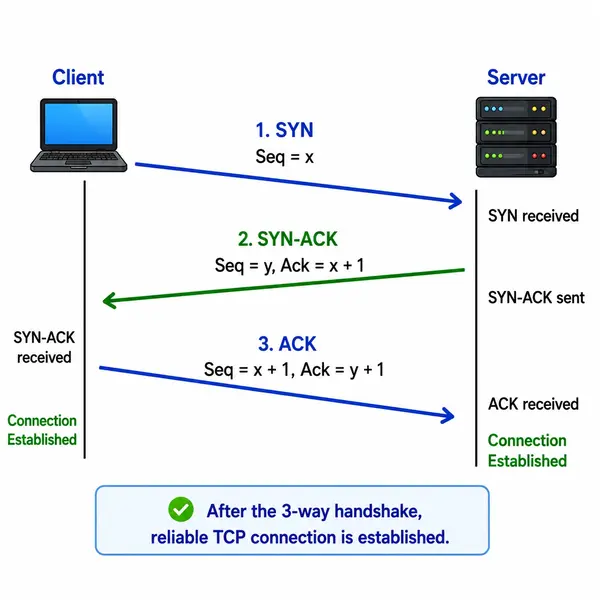
When you open a web browser and type "https://example.com," your device doesn't just magically connect. Here's the actual process:
Your browser initiates a TCP connection to the destination server on port 443 (HTTPS)
A TCP three-way handshake (SYN, SYN-ACK, ACK) establishes the connection
The HTTPS protocol takes over, encrypting the data
Your browser sends an HTTP GET request
The server responds with the requested web page
This happens in milliseconds. But notice something critical: the port (443) and protocol (HTTPS) are inseparable. They work together to ensure your communication is both routed correctly and secured properly.
For SOC analysts, this is crucial. When you're investigating unusual network traffic in your SIEM or using Nmap to scan for open ports during penetration testing, you're looking at these port-protocol pairs. Seeing web traffic on port 53 (should be DNS)? That's suspicious. SSH running on a non-standard port? That's worth investigating.
Common Networking Protocols and Their Functions
Let me walk you through the protocols you absolutely need to know, whether you're studying for CCNA or working as an IT professional:
DNS (Domain Name System): Translates domain names to IP addresses. Port 53, both TCP and UDP. Think of DNS as the Internet's address book.
DHCP (Dynamic Host Configuration Protocol): Automatically assigns IP addresses to devices. Port 67/68, UDP. Without DHCP, you'd manually configure every device's IP address—a nightmare at scale.
HTTP/HTTPS: Web traffic. Port 80 (HTTP, unencrypted) and 443 (HTTPS, encrypted). The "S" is critical—HTTPS adds SSL/TLS encryption, protecting your data from eavesdropping.
FTP/SFTP: File transfer. FTP uses ports 20/21 and sends credentials in plaintext (dangerous!). SFTP runs over SSH on port 22 and is encrypted—always choose SFTP.
SSH (Secure Shell): Remote access and command execution. Port 22, encrypted. This is your go-to for server administration. It's everywhere in enterprise environments.
Telnet: The insecure predecessor to SSH. Port 23. Avoid it—credentials travel in plaintext. You might see it on older equipment, but modern systems have moved on.
SMTP/POP3/IMAP: Email protocols. SMTP (port 25/587) sends mail; POP3 (port 110) and IMAP (port 143) retrieve it. The secure versions (SMTPS, POP3S, IMAPS) use ports 465, 995, and 993, respectively, with SSL/TLS encryption.
SNMP: Network management. Port 161, UDP. Used for monitoring network devices. SNMPv3 is secure; earlier versions are vulnerable to attacks.
LDAP: Directory services. Port 389 is often used for authentication in enterprise networks. LDAPS (secure) uses port 636.
RDP (Remote Desktop Protocol): Windows remote access. Port 3389, TCP. This is frequently attacked by threat actors—never expose it directly to the internet without VPN protection.
SMB (Server Message Block): File and printer sharing. Ports 139 and 445. WannaCry and other ransomware exploited SMB vulnerabilities; proper firewall rules are essential here.
VPN: Creates encrypted tunnels between networks. Doesn't use a specific port; it depends on the VPN protocol (OpenVPN uses 1194, IPsec uses 500/4500).
Reference Table: Common Ports and Protocols
Protocol | Port(s) | TCP/UDP | Purpose | Security Status |
HTTP | 80 | TCP | Web browsing | Unencrypted ❌ |
HTTPS | 443 | TCP | Secure web browsing | Encrypted ✅ |
SSH | 22 | TCP | Secure remote access | Encrypted ✅ |
Telnet | 23 | TCP | Remote access (legacy) | Unencrypted ❌ |
SMTP | 25/587 | TCP | Send email | 25: Unencrypted, 587: Encrypted |
DNS | 53 | TCP/UDP | Domain name resolution | Unencrypted ❌ |
DHCP | 67/68 | UDP | IP address assignment | Unencrypted ❌ |
FTP | 20/21 | TCP | File transfer (legacy) | Unencrypted ❌ |
SFTP | 22 | TCP | Secure file transfer | Encrypted ✅ |
POP3 | 110 | TCP | Retrieve email | Unencrypted ❌ |
IMAP | 143 | TCP | Retrieve email | Unencrypted ❌ |
SNMP | 161 | UDP | Network management | Unencrypted (v1/v2) ❌ |
LDAP | 389 | TCP | Directory services | Unencrypted ❌ |
RDP | 3389 | TCP | Windows remote access | Encrypted ✅ |
SMB | 139/445 | TCP | File sharing | Unencrypted ❌ |
IMAPS | 993 | TCP | Secure email retrieval | Encrypted ✅ |
POP3S | 995 | TCP | Secure email retrieval | Encrypted ✅ |
SMTPS | 465 | TCP | Secure email sending | Encrypted ✅ |
LDAPS | 636 | TCP | Secure directory services | Encrypted ✅ |
Secure vs. Insecure Protocols: A Critical Distinction
Notice a pattern in that table? Unencrypted protocols are becoming obsolete. Here's why:
Insecure protocols (HTTP, FTP, Telnet, SNMP v1/v2) transmit credentials and data in plaintext. An attacker on the same network can capture credentials using tools like Wireshark or tcpdump. This isn't theoretical—it happens constantly.
Secure protocols use encryption (SSL/TLS), ensuring that even if someone captures your network traffic, they can't read it without the encryption keys. For enterprises, the rule is simple: if an encrypted alternative exists, use it.
In your enterprise environment, your firewall and intrusion detection systems (IDS) should be blocking unencrypted versions of these protocols altogether.
Ports and Protocols in Cybersecurity Roles
For SOC Analysts
Your SIEM and log aggregation tools (Splunk, ELK Stack) are constantly monitoring traffic patterns. Understanding ports and protocols lets you spot anomalies: Why is internal traffic hitting port 445 (SMB) between random servers? Why is someone accessing port 22 from an unauthorized IP? These questions only make sense when you understand what those ports do.
For Penetration Testers
Nmap is your reconnaissance tool. Running nmap -sV 192.168.1.1 reveals open ports and service versions. You're looking for outdated services, misconfigurations, and exposed management interfaces. Port knowledge is literally your starting point.
For Firewall Administrators
Firewall rules are built around ports and protocols. You whitelist legitimate ports (HTTPS 443, SSH 22) and block suspicious ones. You implement NAT (Network Address Translation) to hide internal IP addresses behind a public gateway. You configure port forwarding to route traffic to the right internal servers. All of this requires understanding ports and protocols deeply.
For Incident Response Teams
When a breach happens, your first questions involve ports and protocols. What ports were compromised? Which protocols were exploited? Were unencrypted protocols involved? Answering these questions quickly determines your response strategy.
Port Scanning and Network Reconnaissance
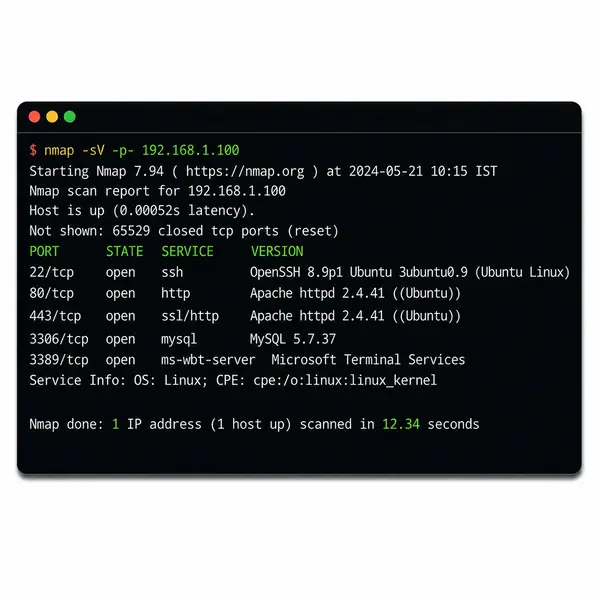
If you're learning Nmap, port scanning is your first hands-on experience with ports. Nmap reveals which ports are open, closed, or filtered on a target system. Different scan types tell you different things:
TCP Connect Scan (
-sT): Full three-way handshake; slow but accurateSYN Scan (
-sS): Doesn't complete connections; faster and stealthierUDP Scan (
-sU): Probes UDP ports; slower but necessary for discovering UDP servicesService Detection (
-sV): Identifies the application running on each port
Running nmap -sV -p- 192.168.1.100 on a test machine during your CCNA labs reveals real-world port configurations. This hands-on experience is invaluable.
Common Mistakes Beginners Make (And How to Avoid Them)
Mistake 1: Memorizing port numbers without understanding the protocol. Port 443 is meaningless if you don't know it's HTTPS over TLS.
Mistake 2: Assuming all protocols are secure. SNMP v1/v2 seems okay until someone sniffs your network configuration.
Mistake 3: Not testing in a lab environment. Theory is important, but hands-on practice with Wireshark, Nmap, and virtual networks cements understanding.
Mistake 4: Ignoring port security in enterprise environments. Open ports equal attack surface. Every port should serve a purpose; unnecessary ports should be closed.
Mistake 5: Conflating ports with protocols. Port 80 can technically run anything; it's just a number. The protocol (HTTP) determines how data is structured and transmitted.
Best Practices for Securing Open Ports in Enterprise Environments
Default Deny: Block all ports by default; only open what's necessary
Use Encryption: Disable unencrypted protocols (Telnet, FTP, HTTP)
Non-Standard Ports: Run SSH on a non-standard port to reduce automated attack noise (though security researchers debate this)
VPN Protection: Expose management ports (RDP, SSH) only through VPN
Monitor Unusual Activity: Alert on unexpected connections to sensitive ports
Keep Services Updated: Outdated services have known vulnerabilities
Network Segmentation: Isolate sensitive services on separate network segments
Career Relevance: Why Ports and Protocols Matter for Your Future
Whether you're pursuing CCNA, CompTIA Security+, CEH, or Network+ certification, this knowledge is tested extensively. More importantly, it's applied daily in real jobs:
Junior Network Administrator: €40,000-€55,000. Configures switches, routers, and manages IP addressing
CCNA-Certified Network Engineer: €55,000-€75,000. Designs networks, troubleshoots complex issues
SOC Analyst: €50,000-€70,000. Monitors network traffic, investigates alerts
Security Architect: €80,000-€120,000. Designs firewall rules, VPN infrastructure, and network security
Penetration Tester/Ethical Hacker: €70,000-€120,000. Conducts security assessments using Nmap, Metasploit, and custom tools
The common thread? Deep understanding of ports and protocols.
Memorization Tips for Certifications
Learn port ranges: 0-1023 (well-known), 1024-49151 (registered), 49152-65535 (dynamic)
Use mnemonics: "All Ports Start Here" (APSH) for the first few ports
Group by function: Email protocols together (SMTP, POP3, IMAP), then memorize ports as a set
Practice in labs: Configure services in a home lab, then use Nmap to verify ports—active learning sticks better
Create flashcards: Focus on ports 20-25, 53, 80, 110, 143, 389, 443, 3389, 445
Understanding ports and protocols isn't a one-time study session; it's a foundation you'll build on throughout your IT career. Start by familiarizing yourself with the common ports and protocols in that table. Then, set up a home lab with virtual machines, practice with Nmap and Wireshark, and watch actual traffic patterns.
This knowledge directly translates to certifications, career advancement, and the ability to make meaningful security decisions in your organization. Whether you're scanning networks, analyzing security alerts, or architecting enterprise infrastructure, ports and protocols are always relevant.
Your next move? Set up Wireshark on your lab network, capture some real traffic, and see these protocols in action. Theory becomes expertise when you can observe it yourself.
Frequently Asked Questions (FAQs)
1. Why are ports and protocols important in cybersecurity?
Ports and protocols control how network communication occurs. Cybersecurity teams use them for traffic analysis, firewall policies, intrusion detection, and identifying attack vectors during threat investigations.
2. What is the core difference between TCP and UDP?
TCP is connection-oriented and ensures reliable packet delivery, while UDP is connectionless, faster, and commonly used for low-latency applications like DNS, VoIP, and streaming.
3. Which ports are most critical for networking and security professionals?
Key ports include 22 (SSH), 53 (DNS), 80/443 (HTTP/HTTPS), 389 (LDAP), 445 (SMB), and 3389 (RDP). These are heavily used in enterprise networking and security operations.
4. Why are protocols like Telnet and FTP considered insecure?
Telnet and FTP transmit credentials in plaintext without encryption, making them vulnerable to packet sniffing and man-in-the-middle attacks. Secure alternatives include SSH and SFTP.
5. How do SOC analysts use ports and protocols in real-world environments?
SOC analysts monitor unusual port activity, detect unauthorized services, analyze network logs, and investigate suspicious traffic patterns using SIEM and packet analysis tools.
6. Which tools are commonly used for port and protocol analysis?
Professionals commonly use Nmap for port scanning, Wireshark for packet capture analysis, Netstat for connection monitoring, and firewall logs for traffic inspection.
7. How can organizations secure open ports in enterprise networks?
Best practices include implementing firewall filtering, disabling unused services, enforcing VPN access, using encrypted protocols, continuous monitoring, and regular vulnerability assessments.

The founder of Network Kings, is a renowned Network Engineer with over 12 years of experience at top IT companies like TCS, Aricent, Apple, and Juniper Networks. Starting his journey through a YouTube channel in 2013, he has inspired thousands of students worldwide to build successful careers in networking and IT. His passion for teaching and simplifying complex technologies makes him one of the most admired mentors in the industry.