Understanding Packet Flow Through Cisco ASA: A Complete Guide
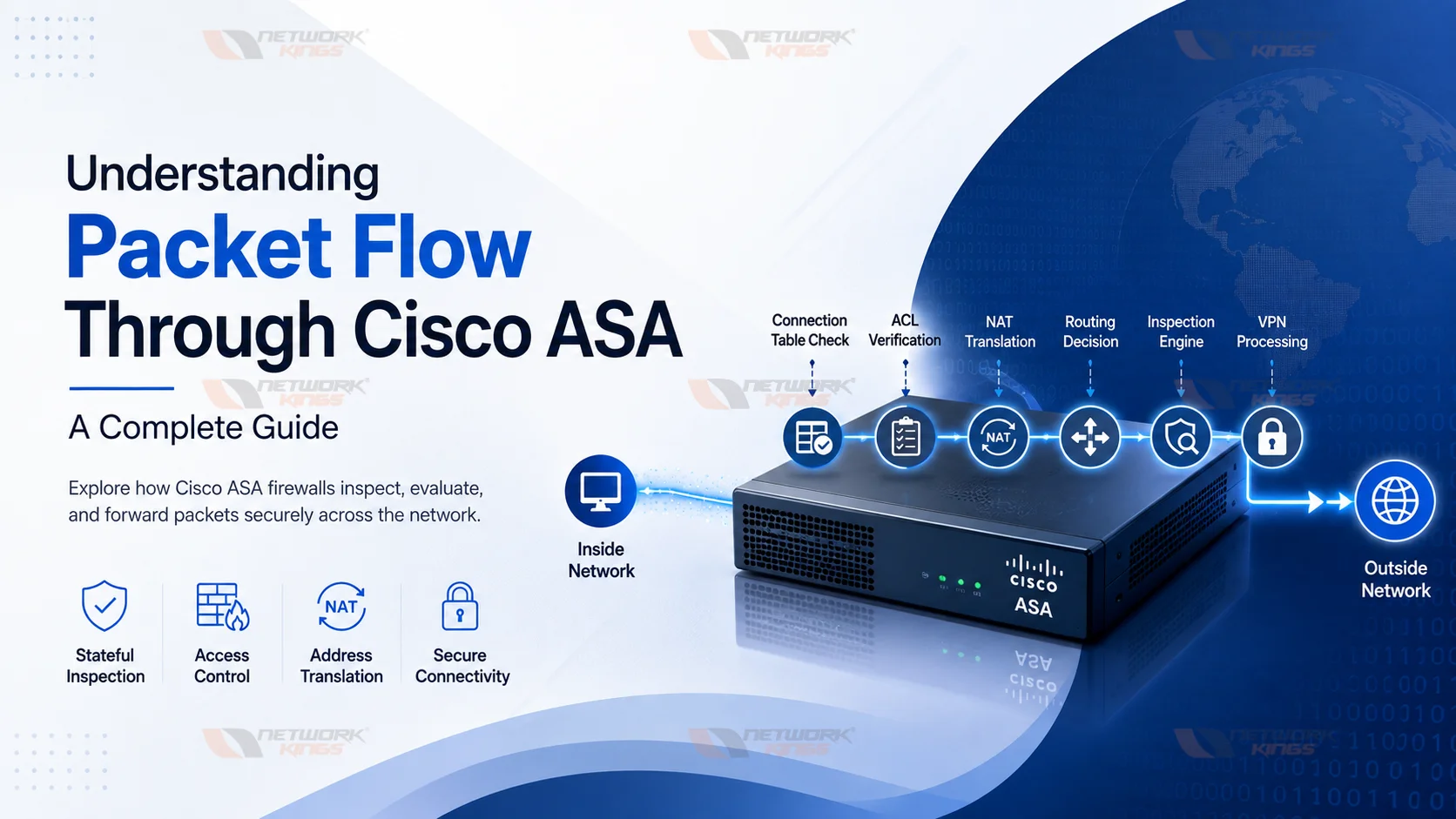
Enterprise firewalls do much more than simply allow or block traffic. Every packet entering a Cisco ASA passes through multiple security checks before it reaches its destination. Understanding Packet Flow Through Cisco ASA is one of the most valuable skills for network engineers, firewall administrators, and Cisco certification candidates because it helps explain why traffic is permitted, denied, or unexpectedly dropped.
Whether you are troubleshooting application connectivity, configuring a VPN, validating Network Address Translation (NAT), or reviewing Access Control Lists (ACLs), knowing how Cisco ASA processes packets can dramatically reduce troubleshooting time.
What Is Cisco ASA
Cisco ASA, short for Adaptive Security Appliance, is a stateful enterprise firewall designed to secure networks against unauthorized access while allowing legitimate communication. It combines firewall capabilities, VPN services, NAT, routing, intrusion prevention, and application inspection into a single security platform.
Modern enterprise environments use Cisco ASA to protect:
Data centers
Corporate offices
Remote users
Branch networks
Internet-facing applications
Unlike a traditional packet-filtering firewall, the Cisco ASA Firewall is stateful. It tracks every active connection and maintains session information inside the Cisco ASA Connection Table, allowing return traffic without requiring separate rules.
This stateful architecture improves both security and performance while simplifying firewall policy management.
What Is Packet Flow
Packet flow is simply the path a packet takes through the firewall, along with every decision the ASA makes along that path. Each packet is evaluated against security levels, access control lists, NAT rules, routing tables, and inspection policies before it is either forwarded or dropped.
Understanding this sequence matters because ASA does not process these checks randomly. It follows a defined order, and knowing that order tells you exactly where to look when traffic fails.
Cisco ASA Version Differences
Understanding the differences between Cisco ASA software versions is essential because packet processing behavior changed significantly with the introduction of ASA 8.3.
Feature | ASA 8.2 and Earlier | ASA 8.3 and Later |
NAT Configuration | Static and Global NAT commands | Object NAT and Twice NAT |
ACL Address Reference | ACLs use translated (mapped) IP addresses | ACLs use real (original) IP addresses |
NAT Complexity | Simpler but less flexible | More powerful and scalable |
Enterprise Recommendation | Legacy deployments only | Recommended for modern networks |
How Packet Flow Works Through Cisco ASA
Interface Arrival and Security Level Check
When a packet arrives on a physical or logical interface, ASA first identifies the security level assigned to that interface. Security levels range from 0 to 100, with higher numbers representing more trusted zones. By default, traffic from a higher security level to a lower one is permitted, while traffic moving the opposite direction requires explicit permission through an ACL.
Connection Table Lookup
Before doing any heavy processing, ASA checks its connection table to see if the packet belongs to an existing session. If a match is found, the packet is treated as return or continuation traffic and moves through an accelerated path, skipping redundant policy checks. This is the heart of stateful inspection and one of the biggest performance advantages of a stateful firewall over a stateless one.
ACL Verification
If no existing connection matches, ASA evaluates the packet against the access control list applied to the ingress interface. The ACL determines whether the packet is permitted to continue based on source, destination, protocol, and port. A deny here means an immediate drop, so this is often the first place engineers check when troubleshooting blocked traffic.
NAT Processing
Cisco ASA next applies NAT translation rules. Depending on ASA software version and configuration, NAT can influence how the ACL and routing lookups interpret addresses, which is why NAT and ACL mismatches are such a common source of confusion. Getting the translated versus real address relationship right is critical for accurate troubleshooting.
Routing Lookup
Once translation is resolved, ASA performs a routing table lookup to determine the correct egress interface. Without a valid route, even a packet that passed ACL and NAT checks will fail to reach its destination.
Inspection Engine
ASA then applies its inspection policy, examining protocols like HTTP, FTP, SIP, and others at a deeper level. This step can dynamically open secondary connections, verify protocol conformity, and apply application layer awareness that basic ACLs cannot provide.
VPN Processing
If the traffic is destined for a VPN tunnel, ASA applies the relevant IPsec or SSL VPN policy at this stage, encrypting or decrypting as needed before forwarding.
Packet Forwarding
Finally, the packet exits through the appropriate interface toward its destination, with the connection recorded in the state table for future packets in the same session.
Cisco ASA Packet Flow Diagram
Incoming Interface
↓
Connection Table Check
↓
ACL Verification
↓
NAT Translation
↓
Routing Decision
↓
Inspection Engine
↓
VPN Processing
↓
Outgoing Interface
Packet Flow Example
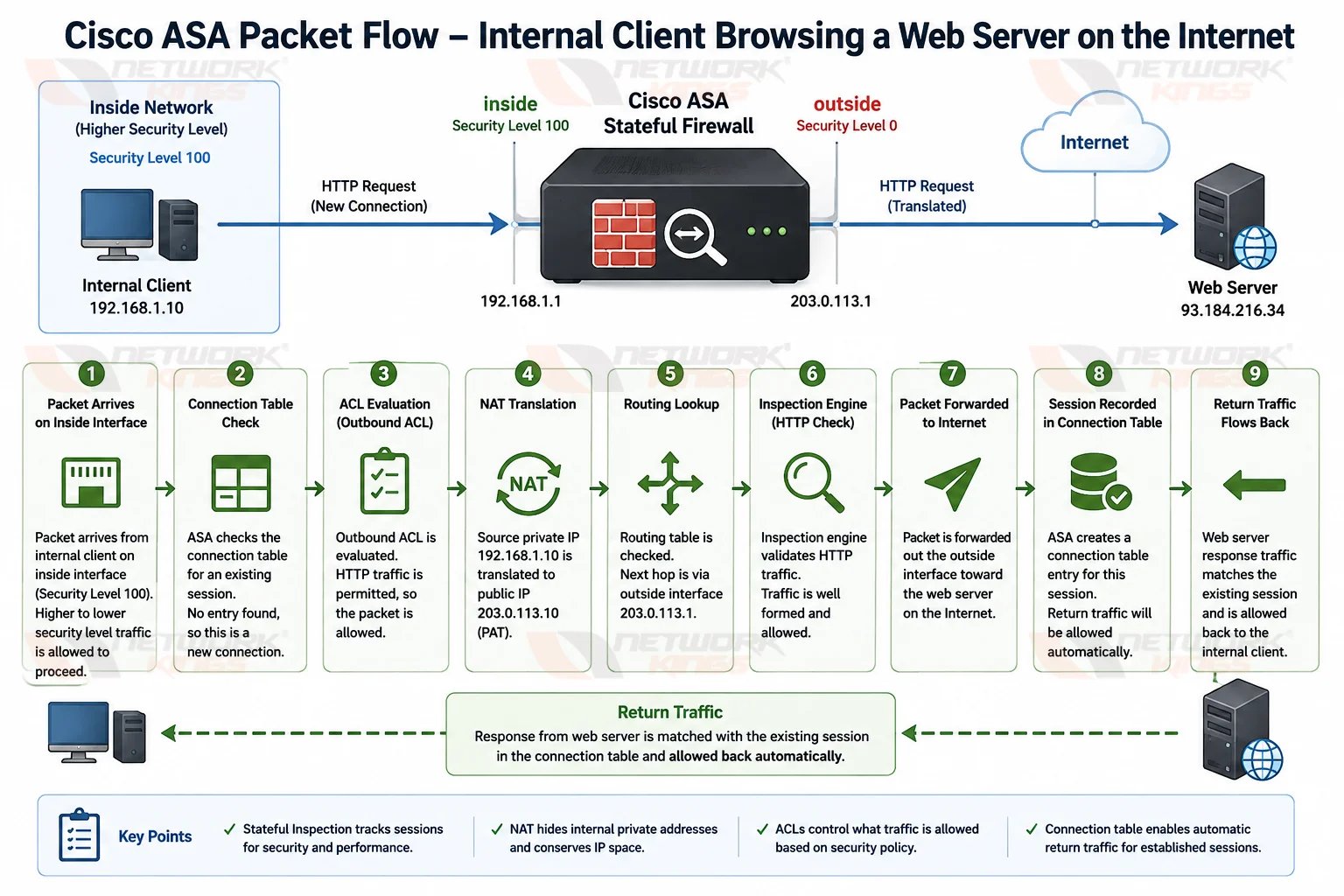
Picture a client on the internal network browsing to a web server on the internet. The packet arrives on the inside interface at a higher security level than the outside interface, so it is allowed to proceed. ASA checks the connection table, finds no existing session, and evaluates the outbound ACL, which permits HTTP traffic. NAT translates the internal private address to a public address, the routing table selects the outside interface, and the inspection engine confirms the HTTP traffic is well formed. The packet exits toward the web server, and ASA records the session so the return traffic flows back automatically.
Common Packet Flow Problems
Problem | Cause | Recommended Solution |
ACL denies traffic | Missing permit rule | Review inbound ACL configuration |
NAT mismatch | Incorrect translation rule | Verify NAT order and object definitions |
Missing route | Routing table incomplete | Add or correct static or dynamic routes |
Asymmetric routing | Return traffic follows another path | Ensure bidirectional routing consistency |
Security level issue | Incorrect interface trust design | Review interface security policies |
VPN conflict | Crypto ACL mismatch | Validate VPN encryption domains |
Cisco ASA Packet Flow Best Practices
Document security levels clearly for every interface, and audit ACLs regularly to remove stale or overly broad rules. Keep NAT statements consistent with how ACLs reference addresses, and verify routing tables whenever new subnets are introduced. Test changes with packet-tracer before assuming a configuration is correct in production.
Comparison Table
Stage | Purpose | Result |
Connection Table | Identify existing sessions | Fast path or full policy evaluation |
ACL Verification | Enforce access policy | Permit or deny |
NAT Translation | Map real to translated addresses | Correct address used for routing |
Routing Lookup | Select egress interface | Path to destination |
Inspection Engine | Validate application behavior | Allow, modify, or drop |
Troubleshooting Tips
Command | What It Diagnoses |
| Simulates a packet through the full policy path |
| Displays active connections in the state table |
| Shows current NAT translations |
| Reveals ACL hit counts and rule order |
| Confirms routing table entries |
| Lists packets dropped by the accelerated security path |
One common point of confusion is the difference between Cisco Packet Tracer and the ASA packet-tracer command. Cisco Packet Tracer is a network simulation application used for learning, while packet-tracer is a diagnostic command on Cisco ASA that simulates how the firewall processes a specific packet.
Common Mistakes to Avoid
Assuming routing occurs before ACL evaluation.
Forgetting to verify NAT rules during troubleshooting.
Ignoring existing connection table entries.
Overlooking interface security policies.
Applying overly broad ACL rules without proper testing.
Confusing Cisco Packet Tracer software with the ASA
packet-tracercommand.
Conclusion
Understanding packet flow through Cisco ASA gives you a reliable framework for troubleshooting, securing, and optimizing enterprise networks. Once you know the order of operations, from security levels through ACLs, NAT, routing, inspection, and VPN processing, diagnosing firewall issues becomes methodical instead of guesswork. Keep practicing with packet-tracer and the connection and NAT tables, and you will build the kind of practical fluency that separates a competent engineer from an exceptional one. Keep exploring Cisco security technologies, and the deeper concepts will keep paying off in every network you manage.
FAQs
What is Cisco ASA packet flow?
It is the sequence of checks, including security levels, ACLs, NAT, routing, and inspection, that a packet passes through as it moves through the firewall.
How does Cisco ASA process packets?
ASA evaluates each packet against the connection table, then applies ACL, NAT, routing, and inspection policies before forwarding it.
Does NAT happen before ACL on Cisco ASA?
The relationship depends on ASA software version and configuration, but administrators must ensure ACL and NAT statements reference addresses consistently.
What is stateful inspection?
It is a firewall technique that tracks active connections so return traffic is automatically permitted without a separate inbound rule.
What is packet-tracer in Cisco ASA?
It is a diagnostic command that simulates a packet through the ASA policy engine, showing exactly where it is permitted or dropped. Note that this is different from Cisco Packet Tracer, the network simulation training tool.
Why is my ASA dropping packets?
Common causes include ACL denials, missing routes, NAT mismatches, or drops flagged in the accelerated security path visible with show asp drop.

The founder of Network Kings, is a renowned Network Engineer with over 12 years of experience at top IT companies like TCS, Aricent, Apple, and Juniper Networks. Starting his journey through a YouTube channel in 2013, he has inspired thousands of students worldwide to build successful careers in networking and IT. His passion for teaching and simplifying complex technologies makes him one of the most admired mentors in the industry.