Understanding Different Types of Servers and How They Work
Modern websites, mobile apps, emails, cloud storage, online banking, and streaming platforms all rely on servers to deliver information quickly and securely. Every time you open a website, send an email, or save a file to the cloud, a server is working behind the scenes to process your request and return the data you need.
Understanding the different Types of Servers is essential for anyone learning networking, cloud computing, system administration, or enterprise IT. Each server is designed for a specific purpose, from hosting websites and managing databases to storing files and handling network services. Choosing the right server can improve performance, strengthen security, and support future business growth.
In this guide, you'll learn what servers are, how they work, the major server types used in modern IT environments, and how organizations choose the right server for their needs.
Quick Summary
Topic | Description |
What is a Server? | A computer or software that provides services, resources, or data to other devices called clients. |
Primary Purpose | Process requests and deliver information across a network. |
Common Types | Web, Application, Database, File, Mail, DNS, DHCP, FTP, Proxy, Cloud, VPS, Dedicated, and more. |
Used By | Businesses, schools, hospitals, government agencies, cloud providers, and websites. |
Benefits | Centralized management, scalability, security, reliability, and resource sharing. |
What Is a Server
A server is a computer or software program that provides resources, data, or services to other computers, known as clients, over a network. This relationship is called client-server architecture.
When you type a web address into your browser, your device (the client) sends a request to a server. The server processes that request and sends back a response, usually a web page, file, or piece of data. This back-and-forth is known as the request-response model, and it happens in a fraction of a second, thousands of times a minute, across the internet.
Servers can be physical machines sitting in a data center, virtual machines running on shared hardware, or cloud instances hosted by providers like AWS or Azure.
This communication follows the client-server architecture, one of the most fundamental concepts in networking.
Server vs Client
Server | Client |
Provides services or resources | Requests services or resources |
Usually runs continuously | Operates when used by a person |
Handles multiple users simultaneously | Typically serves one user |
Stores centralized data | Consumes data from servers |
A single server may support hundreds, thousands, or even millions of client devices depending on its hardware, software, and network capacity.
Why Servers Are Important
Servers enable organizations to centralize resources, improve security, and deliver services efficiently across networks. Whether it's a small business sharing files or a global cloud provider supporting millions of users, servers make reliable communication and data management possible.
Some of the key benefits include:
Centralized storage for files and applications
Faster access to shared resources
Improved collaboration among users
Better security through controlled access
High availability for critical services
Simplified backups and disaster recovery
Efficient resource utilization
Easy scalability as organizations grow
Remote access for distributed teams
Centralized software updates and management
Because servers are designed for continuous operation, they include enterprise-grade components such as redundant power supplies, ECC memory, RAID storage, and advanced cooling systems to maximize uptime.
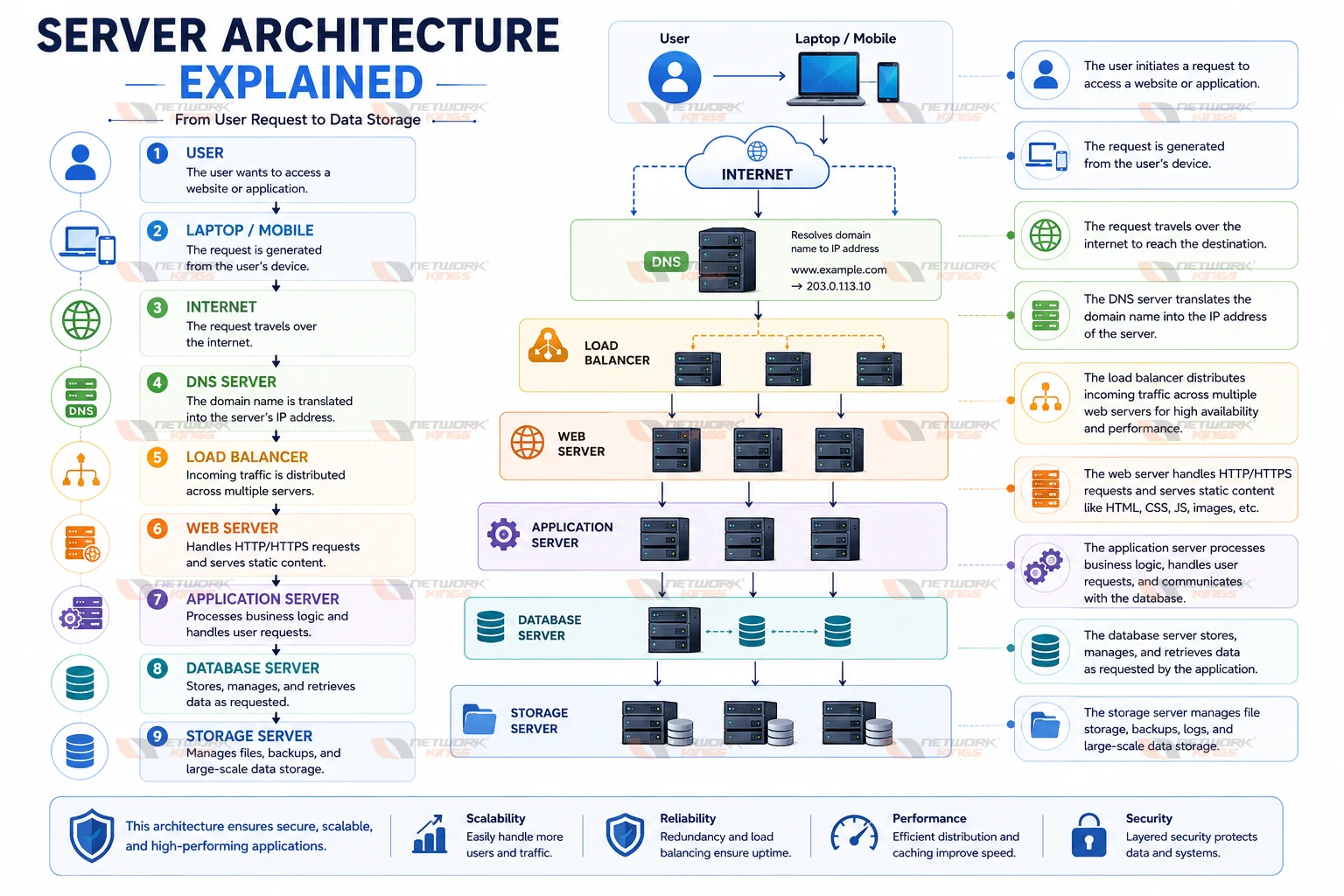
Server Architecture Explained
Most enterprise environments follow a client-server architecture, where client devices communicate with one or more servers to access applications and data.
A simplified workflow looks like this:
Essential Server Hardware Components
Although server software performs the logical tasks, the underlying hardware determines overall performance, reliability, and scalability.
Component | Purpose |
CPU (Processor) | Executes instructions and processes requests |
RAM (Memory) | Temporarily stores active data for fast access |
Storage (SSD/HDD) | Stores operating systems, applications, and user data |
RAID Controller | Provides redundancy and improves storage reliability |
Network Interface Card (NIC) | Connects the server to the network |
Motherboard | Connects all hardware components |
Power Supply Unit (PSU) | Delivers stable electrical power |
Cooling System | Prevents overheating during continuous operation |
GPU (Optional) | Accelerates AI, machine learning, and graphics workloads |
Why Enterprise Servers Use ECC Memory
Enterprise servers commonly use Error-Correcting Code (ECC) memory instead of standard RAM. ECC memory detects and corrects data corruption automatically, making it essential for mission-critical workloads such as databases, virtualization, and financial systems.
Different Types of Servers
Organizations use different types of servers depending on the services they need to provide. Some businesses deploy a dedicated server for each function, while others consolidate multiple services on a single machine using virtualization or cloud technologies.
The following are the most common server types used in enterprise networks, data centers, and cloud environments.
Web Server
A web server stores and delivers websites using HTTP and HTTPS protocols. Whenever someone visits a website, the web server receives the browser's request, processes it, and sends back HTML pages, images, CSS files, JavaScript, and other web resources.
Popular web server software includes Apache HTTP Server, Nginx, and Microsoft IIS.
Real-world example:
An e-commerce website uses a web server to display product pages and process customer requests.
Common industries:
E-commerce
Education
Government
Media
SaaS companies
Application Server
An application server hosts business applications and executes application logic between users and databases. Unlike a web server that mainly serves web pages, an application server processes business operations such as login authentication, payment processing, and inventory management.
Popular platforms include Apache Tomcat, WildFly, JBoss, IBM WebSphere, and Oracle WebLogic.
Real-world example:
An online banking application processes transactions through an application server before storing information in the database.
Industries using application servers include:
Banking
Healthcare
Enterprise software
ERP systems
Insurance
Database Server
A database server stores, manages, retrieves, and secures structured data for applications and users. It processes SQL queries, performs indexing, manages transactions, and ensures data consistency.
Common database platforms include:
MySQL
Microsoft SQL Server
PostgreSQL
Oracle Database
MariaDB
Real-world example:
When you log into an online shopping website, the database server retrieves your account details, order history, and saved addresses.
Industries using database servers include:
Retail
Finance
Telecommunications
Healthcare
Government
File Server
A file server provides centralized storage for documents, images, videos, spreadsheets, and shared folders. Instead of storing files on individual computers, organizations keep them on a central server where authorized users can securely access, edit, and share information.
File servers often support protocols such as SMB and NFS.
Real-world example:
A company's employees access shared project documents from a central file server rather than saving them locally.
Industries using file servers include:
Corporate offices
Schools
Engineering firms
Legal organizations
Government departments
Print Server
A print server manages one or more network printers by receiving print jobs from users, organizing them into a queue, and sending them to the appropriate printer. This eliminates the need for every computer to connect directly to each printer and allows administrators to monitor usage, enforce printing policies, and reduce printing delays.
Common environments include Windows Server Print Services and Linux CUPS (Common UNIX Printing System).
Real-world example:
In a corporate office, hundreds of employees can print documents to shared printers through a centralized print server without manually configuring each printer on every workstation.
Industries using print servers include:
Educational institutions
Corporate offices
Hospitals
Government organizations
Manufacturing companies
Mail Server
A mail server sends, receives, stores, and manages email communication within an organization or across the internet. It works with email protocols such as SMTP for sending messages and IMAP or POP3 for retrieving them. Mail servers also handle spam filtering, user authentication, and mailbox management.
Common mail server software includes:
Microsoft Exchange Server
Postfix
Exim
Zimbra
Sendmail
Real-world example:
When an employee sends an email to a colleague, the mail server routes the message to the recipient's mailbox and stores it until it is accessed.
Industries using mail servers include:
Businesses
Educational institutions
Government organizations
Financial services
Healthcare
DNS Server
A Domain Name System (DNS) server converts human-readable domain names into IP addresses. Instead of remembering an IP address like 142.250.183.206, users simply type a domain name such as www.google.com. The DNS server finds the correct IP address and directs the browser to the appropriate web server.
Without DNS servers, users would need to memorize numerical IP addresses for every website they visit.
Common DNS server software includes:
BIND
Microsoft DNS
PowerDNS
Unbound
Real-world example:
Typing www.example.com into your browser triggers a DNS lookup before the website loads.
Industries using DNS servers include nearly every organization connected to the internet.
DHCP Server
A Dynamic Host Configuration Protocol (DHCP) server automatically assigns IP addresses and network settings to devices joining a network. This removes the need for administrators to configure each device manually.
Besides assigning IP addresses, DHCP servers provide:
Subnet mask
Default gateway
DNS server information
Lease duration
Real-world example:
When you connect your laptop to your office Wi-Fi, the DHCP server automatically provides an available IP address within seconds.
Popular DHCP implementations include:
Windows Server DHCP
ISC DHCP
Cisco DHCP Services
FTP Server
An FTP server allows users to upload, download, and manage files over a network using the File Transfer Protocol (FTP). Modern organizations often prefer secure alternatives such as FTPS or SFTP to protect sensitive data during transmission.
Common FTP server software includes:
FileZilla Server
vsftpd
ProFTPD
Cerberus FTP Server
Real-world example:
A web developer uploads website files from a local computer to a hosting server using an FTP client.
Industries using FTP servers include:
Web hosting
Software development
Media companies
Manufacturing
Data exchange services
Proxy Server
A proxy server acts as an intermediary between client devices and external servers. Instead of users connecting directly to the internet, their requests pass through the proxy server first.
Organizations use proxy servers for:
Internet filtering
Security
Bandwidth optimization
User authentication
Web caching
Activity monitoring
Popular proxy software includes:
Squid Proxy
HAProxy
Blue Coat ProxySG
Real-world example:
Many schools and businesses block social media websites using a proxy server.
Reverse Proxy Server
A reverse proxy sits in front of one or more web servers. Instead of protecting users, it protects backend servers while improving performance and security.
Reverse proxy servers perform tasks such as:
Load balancing
SSL termination
Web application firewall integration
DDoS mitigation
Traffic routing
Caching
Common reverse proxy platforms include:
Nginx
HAProxy
Traefik
Apache HTTP Server
Real-world example:
Large e-commerce websites distribute customer traffic across multiple servers using reverse proxy technology.
Physical Server
A physical server is a dedicated hardware machine installed inside a data center or server room. All processing power, memory, and storage belong to one physical device.
Advantages include:
Maximum performance
Hardware control
High reliability
Dedicated resources
Common use cases:
Enterprise databases
High-performance computing
Large virtualization hosts
Financial institutions
Virtual Server
A virtual server is created using virtualization software that divides one physical server into multiple independent virtual machines.
Popular virtualization platforms include:
VMware vSphere
Microsoft Hyper-V
KVM
Oracle VirtualBox
Benefits include:
Better hardware utilization
Lower costs
Easier backup
Faster deployment
Improved scalability
Many enterprises now run hundreds of virtual servers on a small number of physical hosts.
Cloud Server
A cloud server is hosted by a cloud provider instead of an organization's own data center. Computing resources are delivered on demand and can scale almost instantly.
Popular cloud providers include:
Amazon Web Services (AWS)
Microsoft Azure
Google Cloud Platform
Benefits include:
Pay-as-you-go pricing
High availability
Automatic scaling
Global deployment
Managed infrastructure
Real-world example:
A startup launches its application on cloud servers instead of purchasing expensive physical hardware.
Virtual Private Server
A Virtual Private Server (VPS) is a virtual machine hosted on a shared physical server while providing dedicated resources for each customer.
A VPS offers a balance between shared hosting and dedicated hosting.
Ideal for:
Small businesses
Bloggers
Developers
Growing websites
Medium-sized applications
Dedicated Server
A dedicated server is rented or owned by a single organization and is not shared with other users.
Advantages include:
Complete administrative control
High performance
Better security
Custom hardware configuration
Predictable performance
Dedicated servers are commonly used by:
Large enterprises
Gaming companies
Streaming platforms
Financial institutions
High-traffic websites
Comparison of Different Types of Servers
Server Type | Primary Function | Common Software | Typical Users | Real-World Example |
Web Server | Hosts websites | Apache, Nginx, IIS | Website owners | E-commerce website |
Application Server | Runs business logic | Tomcat, WebLogic | Enterprises | Banking application |
Database Server | Stores structured data | MySQL, SQL Server | Businesses | Customer database |
File Server | Centralized file storage | Windows Server, Samba | Offices | Shared company documents |
Mail Server | Email communication | Exchange, Postfix | Organizations | Corporate email |
DNS Server | Resolves domain names | BIND, Microsoft DNS | ISPs, Businesses | Website lookup |
DHCP Server | Assigns IP addresses | Windows DHCP | Enterprise networks | Office Wi-Fi |
FTP Server | Transfers files | FileZilla Server | Developers | Website deployment |
Proxy Server | Filters internet traffic | Squid | Businesses | Web filtering |
Reverse Proxy | Protects backend servers | Nginx, HAProxy | Enterprises | Load-balanced web applications |
Physical Server | Dedicated hardware | Various | Data centers | Enterprise infrastructure |
Virtual Server | Virtual machine hosting | VMware, Hyper-V | Businesses | Virtualized data center |
Cloud Server | On-demand cloud computing | AWS, Azure | Startups, Enterprises | Cloud-hosted applications |
VPS | Virtual hosting | KVM, VMware | Small businesses | Hosting websites |
Dedicated Server | Exclusive hardware | Various | Large organizations | High-traffic applications |
How Servers Work
Although different servers perform different tasks, they all follow the same basic client-server communication model. Whenever you access a website, open an application, or download a file, your device sends a request to a server, which processes the request and returns the appropriate response.
Here's a simplified example of what happens when you visit a website:
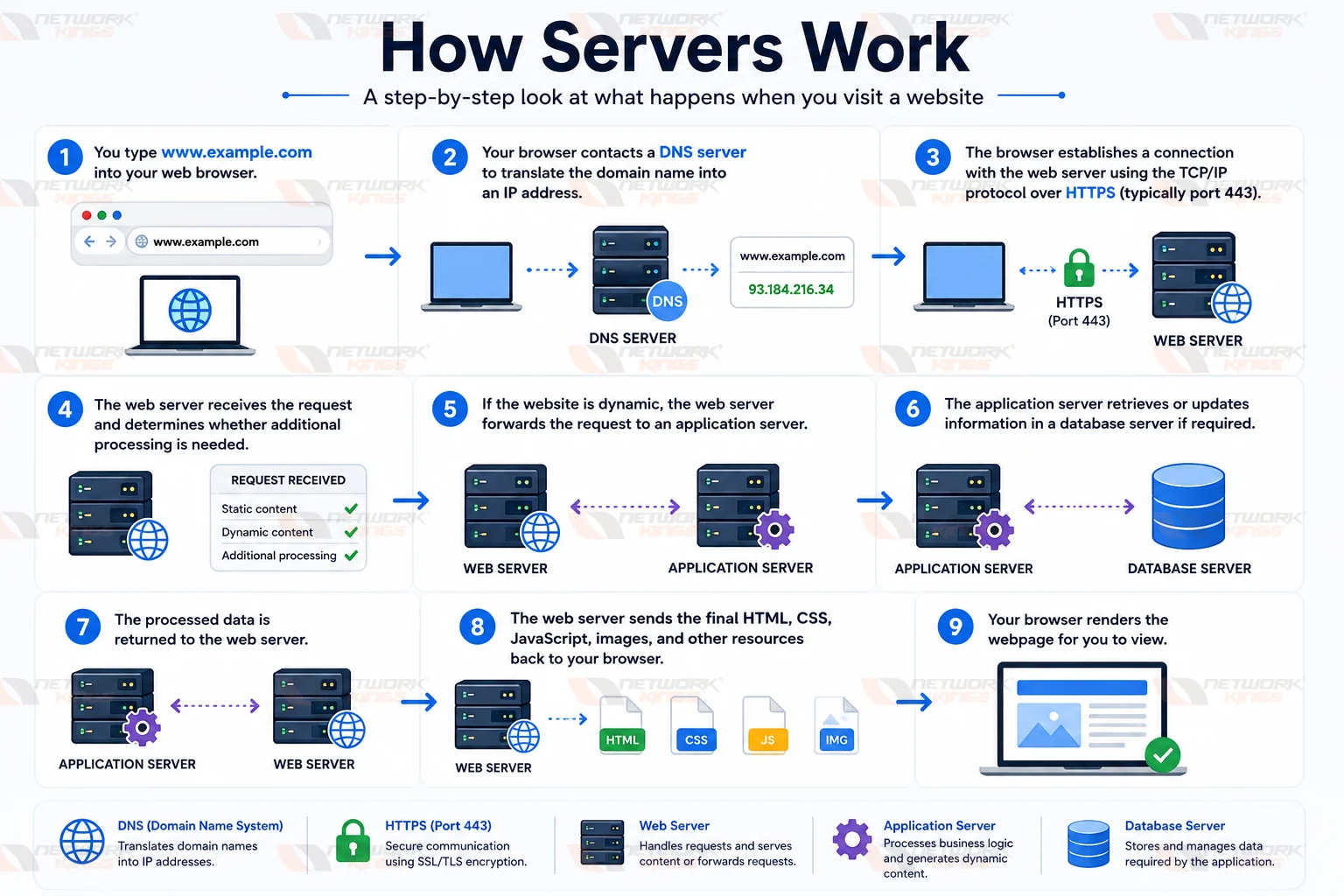
This entire process usually takes only a fraction of a second, even though multiple servers may be involved behind the scenes.
Key Components Used During Server Communication
IP Address identifies the destination server on the network.
DNS translates domain names into IP addresses.
TCP/IP ensures reliable communication between devices.
Ports allow different network services to run simultaneously.
HTTPS encrypts data exchanged between the client and server.
An operating system manages server hardware, software, memory, storage, and processes.
Understanding this workflow makes it easier to troubleshoot networking issues and understand how enterprise applications function.
Common Server Communication Protocols
Servers rely on standardized protocols to exchange information securely and efficiently. Each protocol is designed for a specific purpose.
Protocol | Purpose | Common Use |
HTTP | Transfers web pages | Website browsing |
HTTPS | Secure web communication | Online banking, e-commerce |
FTP | File transfer | Uploading website files |
SFTP | Secure file transfer | Enterprise file sharing |
SSH | Secure remote administration | Linux server management |
DNS | Name resolution | Converting domains to IP addresses |
DHCP | Automatic IP assignment | Office and home networks |
SMTP | Sending email | Mail servers |
POP3 | Downloading email | Email clients |
IMAP | Synchronizing email | Business email |
LDAP | Directory services | Active Directory integration |
SMB | File sharing | Windows networks |
NFS | Network file sharing | Linux environments |
SNMP | Network monitoring | Device management |
RDP | Remote desktop access | Windows administration |
These protocols form the foundation of enterprise networking and enable seamless communication between servers and client devices.
Common Server Ports
Each network service listens on a specific port number. Ports allow multiple services to operate simultaneously on the same server without conflicts.
Service | Protocol | Default Port |
HTTP | TCP | 80 |
HTTPS | TCP | 443 |
FTP | TCP | 21 |
SSH | TCP | 22 |
DNS | TCP/UDP | 53 |
SMTP | TCP | 25 |
POP3 | TCP | 110 |
IMAP | TCP | 143 |
DHCP Server | UDP | 67 |
DHCP Client | UDP | 68 |
LDAP | TCP | 389 |
Microsoft SQL Server | TCP | 1433 |
MySQL | TCP | 3306 |
PostgreSQL | TCP | 5432 |
Oracle Database | TCP | 1521 |
SMB | TCP | 445 |
RDP | TCP | 3389 |
Knowing common port numbers is valuable for system administrators, network engineers, and cybersecurity professionals when configuring firewalls, troubleshooting connectivity issues, or securing enterprise networks.
Physical Server vs Virtual Server vs Cloud Server
Choosing the right deployment model depends on your organization's budget, scalability requirements, performance expectations, and maintenance capabilities.
Feature | Physical Server | Virtual Server | Cloud Server |
Hardware Ownership | Organization owns hardware | Shared physical hardware | Cloud provider owns hardware |
Initial Cost | High | Moderate | Low |
Scalability | Limited | High | Very High |
Performance | Excellent | Very Good | Excellent |
Maintenance | Managed by organization | Managed by organization | Mostly managed by provider |
Resource Allocation | Dedicated | Shared but isolated | Elastic and on demand |
Best For | Large enterprises | Medium and large businesses | Startups, cloud-native applications, growing businesses |
When to Choose Each Option
Choose a physical server if you need maximum performance, strict compliance, or complete hardware control.
Choose a virtual server when you want efficient hardware utilization while reducing infrastructure costs.
Choose a cloud server when flexibility, rapid deployment, and global scalability are your top priorities.
How to Choose the Right Server
Selecting the right server involves more than simply choosing the most powerful hardware. The ideal server depends on your organization's current requirements and future growth plans.
Consider the following factors before making a decision:
Number of users who will access the server
Type of applications being hosted
Storage and backup requirements
Expected website or application traffic
Security and compliance needs
Budget for hardware and maintenance
Required uptime and availability
Disaster recovery strategy
Scalability for future expansion
Remote management capabilities
For example, a small business with a basic website may only require a VPS or cloud server, while a multinational financial institution may deploy multiple dedicated servers, database clusters, and load-balanced application servers across several data centers.
Common Server Operating Systems
The operating system plays a critical role in server performance, security, and application compatibility.
Linux Server
Linux is the most widely used server operating system worldwide due to its stability, security, flexibility, and open-source ecosystem.
Common Linux distributions include:
Ubuntu Server
Red Hat Enterprise Linux (RHEL)
Rocky Linux
AlmaLinux
Debian
SUSE Linux Enterprise Server
Linux is commonly used for web hosting, cloud infrastructure, DevOps, virtualization, and enterprise networking.
Windows Server
Windows Server is popular in organizations that rely on Microsoft technologies.
It provides built-in support for:
Active Directory
Group Policy
Microsoft SQL Server
IIS Web Server
Hyper-V
Remote Desktop Services
Windows Server is commonly deployed in enterprise environments with Microsoft-centric infrastructures.
UNIX
UNIX remains an important operating system in industries that demand exceptional reliability and performance.
It is frequently found in:
Telecommunications
Banking
Scientific research
Government organizations
High-performance computing
Although Linux has become more widespread, UNIX continues to power many mission-critical enterprise systems.
Key Features of Popular Server Types
Server Type | Primary Protocol | Main Purpose | Typical Environment |
Web Server | HTTP, HTTPS | Website hosting | Internet and intranet |
Application Server | HTTP, TCP | Business applications | Enterprise software |
Database Server | SQL, TCP | Data storage | Business systems |
Mail Server | SMTP, IMAP, POP3 | Email services | Organizations |
DNS Server | DNS | Name resolution | Every network |
DHCP Server | DHCP | IP address assignment | Local area networks |
FTP Server | FTP, SFTP | File transfer | Web hosting and enterprise |
Proxy Server | HTTP, HTTPS | Internet filtering | Corporate networks |
The Future of Servers
Server technology continues to evolve as organizations adopt cloud-native architectures, automation, and artificial intelligence. The following trends are shaping the future of enterprise infrastructure.
AI-Optimized Servers
Artificial intelligence and machine learning workloads require specialized servers equipped with high-performance GPUs, AI accelerators, and large memory capacities.
Edge Computing
Instead of processing data exclusively in centralized data centers, edge computing brings servers closer to users and connected devices. This reduces latency and improves application performance for IoT, autonomous systems, and real-time analytics.
Containerization and Kubernetes
Containers package applications with their dependencies, making deployment more consistent across environments. Kubernetes automates container orchestration, scaling, and management, enabling organizations to build resilient and portable applications.
Serverless Computing
Serverless platforms allow developers to run code without managing underlying infrastructure. Cloud providers automatically provision resources, scale workloads, and charge only for actual usage.
Green Data Centers
Energy efficiency has become a priority for many organizations. Modern data centers use renewable energy, advanced cooling technologies, and energy-efficient hardware to reduce environmental impact.
ARM-Based Servers
ARM processors are increasingly used in cloud environments because they offer excellent performance while consuming less power compared to traditional x86 processors.
Conclusion
Understanding the different Types of Servers is essential for anyone working with networking, cloud computing, cybersecurity, DevOps, or enterprise IT. From web servers that deliver websites to database servers that store critical information and cloud servers that power modern applications, each server plays a vital role in today's digital ecosystem. By learning how these servers work and where they are used, you can make informed decisions when designing, managing, or expanding IT infrastructure, whether for a small business, a large enterprise, or a cloud-native environment.
FAQs
1. What are the different types of servers?
The most common types of servers include web servers, application servers, database servers, file servers, mail servers, DNS servers, DHCP servers, FTP servers, proxy servers, reverse proxy servers, physical servers, virtual servers, cloud servers, VPS, and dedicated servers.
2. Which server is most commonly used?
Web servers are among the most widely used because they host websites and web applications that people access every day.
3. What is the difference between a web server and an application server?
A web server primarily delivers web content such as HTML pages and images, while an application server executes business logic, processes user requests, and communicates with databases.
4. What is a DNS server?
A DNS server translates domain names into IP addresses so that users can access websites using easy-to-remember names instead of numerical addresses.
5. Can one server perform multiple functions?
Yes. A single server can act as a web server, database server, file server, and mail server simultaneously. However, large organizations often separate these roles to improve performance, security, and reliability.
6. What is the difference between a physical server and a virtual server?
A physical server is dedicated hardware, whereas a virtual server is a software-defined machine running on shared physical hardware using virtualization technology.
7. Why are cloud servers becoming more popular?
Cloud servers offer on-demand scalability, lower upfront costs, global availability, automated management, and flexible pricing, making them suitable for businesses of all sizes.
8. Which operating system is best for servers?
Linux is the most widely used server operating system because of its stability, security, flexibility, and cost-effectiveness. Windows Server is preferred in Microsoft-based enterprise environments.
9. What is a dedicated server?
A dedicated server is a physical server exclusively allocated to a single customer or organization, providing complete control over hardware resources and configuration.
10. How do I choose the right server?
Evaluate your workload, number of users, application requirements, budget, security needs, scalability, and long-term growth plans before selecting a server.

The founder of Network Kings, is a renowned Network Engineer with over 12 years of experience at top IT companies like TCS, Aricent, Apple, and Juniper Networks. Starting his journey through a YouTube channel in 2013, he has inspired thousands of students worldwide to build successful careers in networking and IT. His passion for teaching and simplifying complex technologies makes him one of the most admired mentors in the industry.