Public IP Address vs Private IP Address: What's the Difference?

If you have ever set up a home Wi-Fi network, configured a gaming console, or tried to troubleshoot a "connection failed" error, you have probably run into the terms public IP address and private IP address. They sound similar, but they play completely different roles in how your devices talk to each other and to the wider internet.
Understanding the difference matters more than most people realize. It affects your network security, how your smart devices connect, how remote work tools function, and even how cloud servers are configured. Whether you are a home user, an IT beginner, or someone managing a small office network, knowing how these two IP address types work will help you make smarter, safer decisions about your network.
What Is an IP Address
An IP address, short for Internet Protocol address, is a unique identifier assigned to a device connected to a network. Similar to a home mailing address, an IP address ensures that data reaches the correct destination.
When you access a website, send an email, stream a video, or connect to a cloud service, devices use IP addresses to communicate with each other.
Today, two major versions of Internet Protocol are commonly used:
IPv4, which uses a 32-bit addressing system such as 192.168.1.1
IPv6, which uses a 128-bit addressing format designed to accommodate the growing number of internet-connected devices
Both IPv4 and IPv6 support efficient communication across Local Area Networks (LANs), Wide Area Networks (WANs), and the public internet.
What Is a Public IP Address
A public IP address is the address your network uses to communicate with the internet. It is assigned by your Internet Service Provider (ISP) and is visible to every website, server, or service you connect to outside your local network.
Think of it as your home's street address. It is how the outside world finds you. When you check "what is my IP" on Google, the number that shows up is your public IP address.
Public IP addresses are unique across the entire internet. No two devices anywhere in the world can have the same public IP address at the same time. They are commonly used for:
Hosting websites and cloud servers
Running a home security camera system accessible remotely
Setting up a business email server
Allowing remote desktop access into an office network
Because a public IP address is exposed to the internet, it is also more vulnerable to scanning, probing, and potential attacks, which is why security measures like firewalls become so important.
What Is a Private IP Address
A private IP address is used inside a local network and is not directly reachable from the internet. Your router assigns these addresses to every device connected to your home or office Wi-Fi, including laptops, phones, printers, and smart TVs.
Private IP addresses fall within specific reserved ranges, such as:
10.0.0.0 to 10.255.255.255
172.16.0.0 to 172.31.255.255
192.168.0.0 to 192.168.255.255
Unlike public IP addresses, private IP addresses can be reused across different networks. Your neighbor's laptop might have the same private IP address as yours, and that is completely normal because these addresses only need to be unique within their own local network.
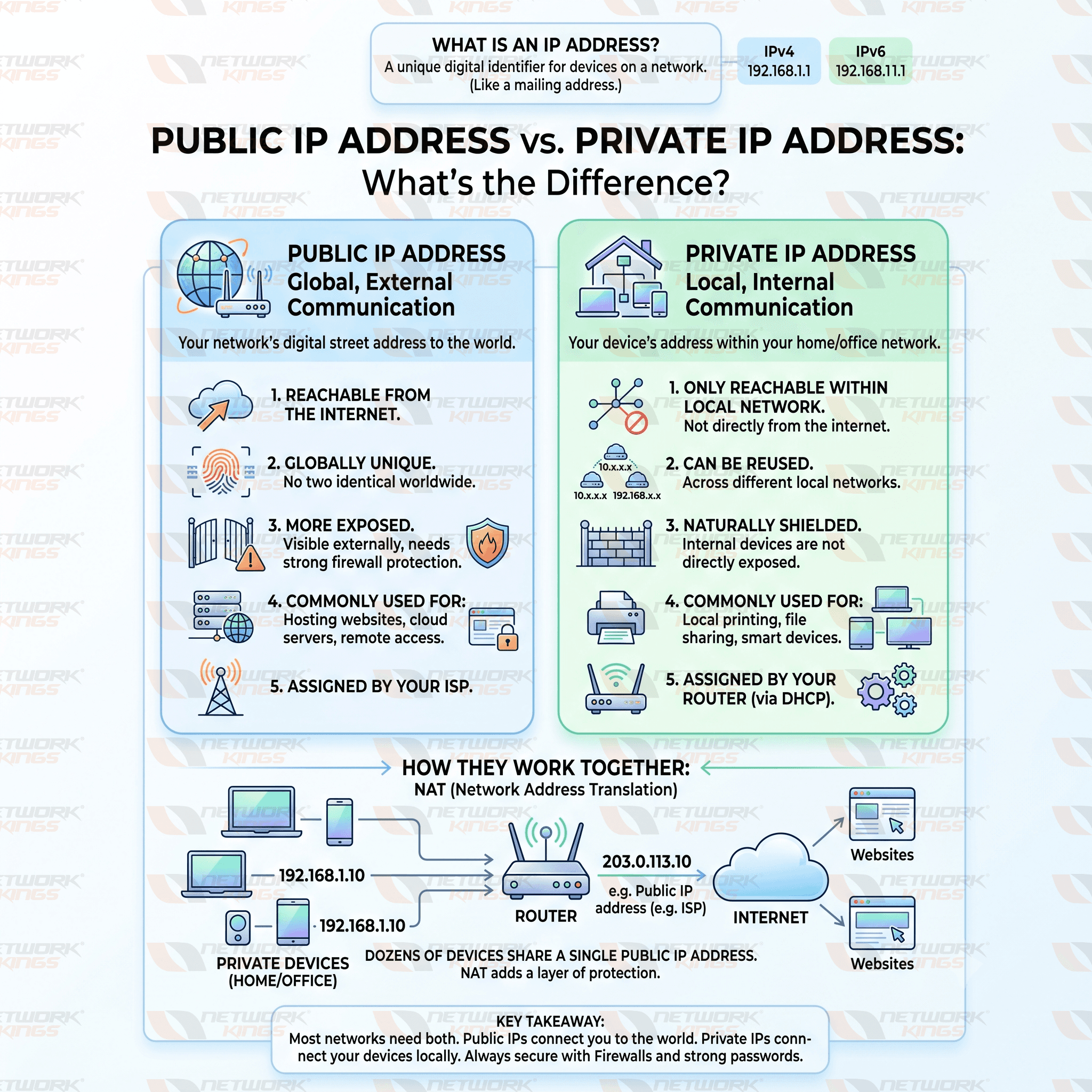
Public IP Address vs Private IP Address: Key Differences
Feature | Public IP Address | Private IP Address |
Accessibility | Reachable from the internet | Only reachable within the local network |
Uniqueness | Globally unique | Can repeat across different networks |
Security | More exposed, needs protection | Naturally shielded from direct internet access |
Internet connectivity | Required for direct internet communication | Relies on NAT to reach the internet |
Assignment method | Assigned by the ISP | Assigned by a router or DHCP server |
Cost implications | May involve additional ISP fees for static IPs | Typically free, included with router setup |
Usage scenarios | Web hosting, remote access, servers | Home and office device networking |
Device visibility | Visible externally to other networks | Hidden from external networks |
Routing capability | Routable across the internet | Not routable on the public internet |
How Public and Private IP Addresses Work Together
Most home and business networks use both address types simultaneously, and this is made possible through Network Address Translation, commonly known as NAT.
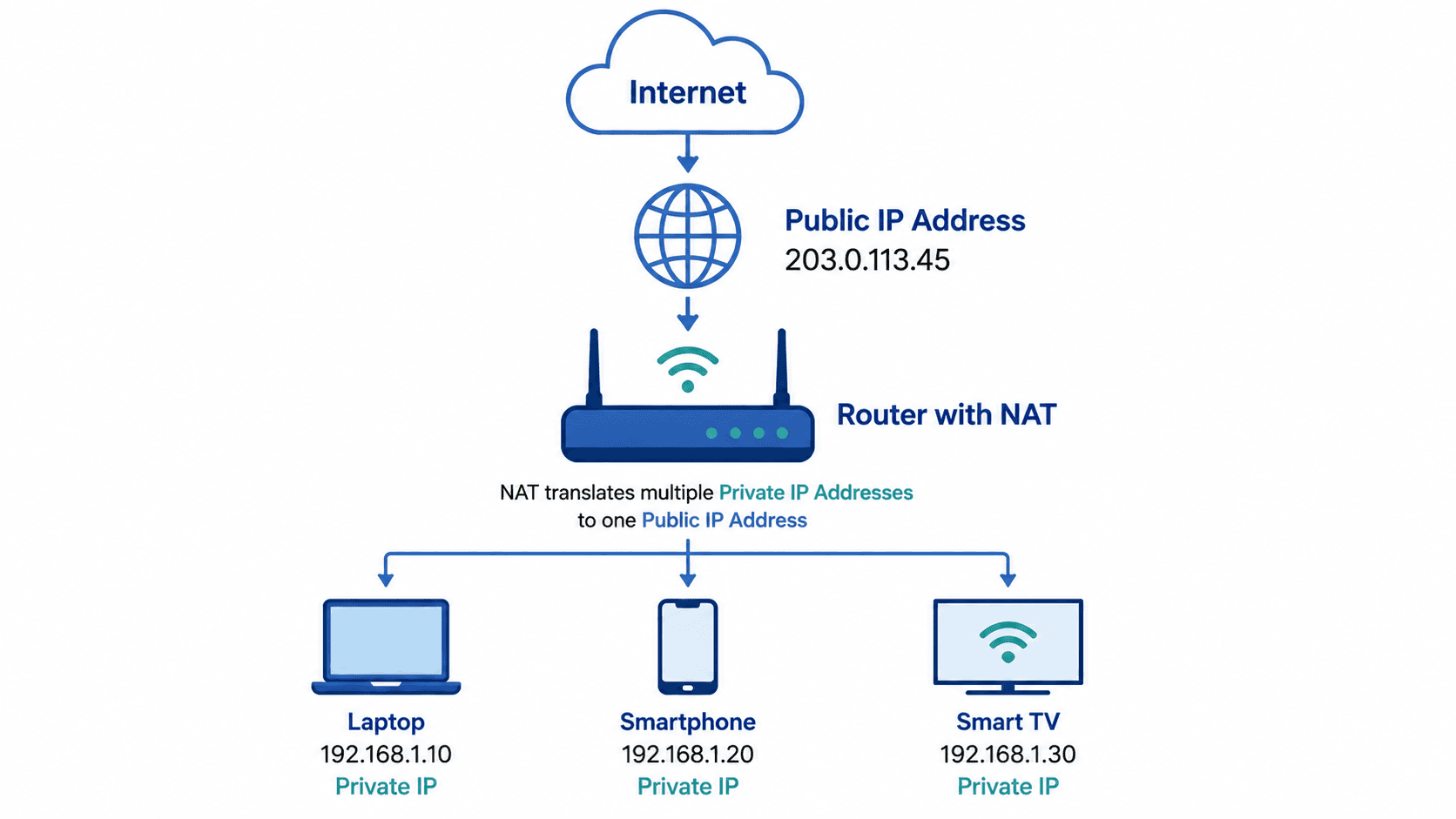
Here is how it works in practice. Your router receives one public IP address from your ISP. Every device inside your home, from your laptop to your smart thermostat, gets its own private IP address from the router. When any of those devices sends a request to the internet, the router translates the private IP address into the shared public IP address, sends the request out, and then routes the response back to the correct device.
This system allows dozens of devices to share a single public IP address while remaining organized internally. It also adds a layer of protection since devices on the private network are not directly exposed to the internet.
The diagram below shows how a single Public IP Address connects multiple devices with Private IP Addresses to the internet using Network Address Translation (NAT).
Security Considerations
Public IP addresses are more exposed to potential threats because they are visible and reachable from anywhere in the world. This makes firewalls essential for filtering incoming traffic and blocking suspicious activity.
Private IP addresses offer a built-in layer of security since outside devices cannot directly access them without going through NAT and the router's configuration. However, that does not mean private networks are risk-free. Weak Wi-Fi passwords, outdated router firmware, or misconfigured port forwarding can still create vulnerabilities.
Using a VPN adds another layer of protection by encrypting your traffic and masking your public IP address from websites and services you interact with. For businesses handling sensitive data, combining firewalls, VPNs, and regular network audits is considered a best practice for reducing exposure.
Common Real-World Examples
Home Wi-Fi networks typically have one public IP address from the ISP and multiple private IP addresses for each connected device.
Corporate offices often use private IP ranges internally while relying on a public IP address, or several, for external-facing services like company websites.
Cloud servers are usually assigned a public IP address so they remain accessible for hosting applications, websites, or APIs.
Remote work environments depend on both address types, using private IPs for internal office resources and public IPs combined with VPNs for secure remote access.
Gaming systems sometimes require port forwarding, which involves directing traffic from a public IP address to a specific private IP address for smoother multiplayer connections.
Smart devices and IoT gadgets almost always operate on private IP addresses within the home network, communicating with the internet through the router's public IP.
Which IP Address Type Do You Need
Most networks need both. Private IP addresses handle internal communication between devices, keeping your network organized and somewhat shielded from outside access. Public IP addresses handle the connection between your network and the broader internet.
If you are hosting a server, running a business website, or need remote access to your network, a public IP address becomes necessary. For everyday browsing, streaming, and connecting personal devices at home, your router's private IP addressing combined with NAT handles everything seamlessly.
Conclusion
Public and private IP addresses serve very different but equally important purposes. Public IP addresses connect your network to the wider internet, while private IP addresses organize and manage devices within your local network. Together, with the help of NAT, routers, and firewalls, they create a system that is both functional and reasonably secure.
Understanding this distinction is not just technical trivia. It plays a real role in network security, troubleshooting connectivity issues, setting up remote access, and configuring cloud services. Whether you are managing a home network or overseeing IT infrastructure for a business, knowing how these two address types work together gives you a stronger foundation for building safer, more reliable networks.
Frequently Asked Questions (FAQs)
Can two devices have the same private IP address?
Yes, as long as they are on different local networks. Private IP addresses only need to be unique within their own network, not globally.
Is a public IP address safer than a private IP address?
No, private IP addresses are generally safer since they are not directly reachable from the internet. Public IP addresses require additional security measures like firewalls.
How do I find my public IP address?
You can search "what is my IP" on Google, or check your router's admin dashboard for the WAN IP address listed there.
What is NAT in networking?
NAT, or Network Address Translation, allows multiple devices with private IP addresses to share a single public IP address when communicating with the internet.
Can a device have both a public and private IP address?
Yes. A device connected to a home or office network typically has a private IP address locally, while the router itself holds the public IP address used for internet communication.
Does changing my router change my public IP address?
Not always. Your public IP address is usually tied to your ISP account, though restarting your modem or router can sometimes trigger a new dynamic IP assignment.
Why do private IP addresses start with numbers like 192.168 or 10.0?
These ranges are reserved specifically for private networking use, as defined by networking standards, ensuring they are never used as public internet addresses.
Can I make my private IP address public?
Not directly, but techniques like port forwarding allow specific traffic from a public IP address to reach a device using a private IP address.

The founder of Network Kings, is a renowned Network Engineer with over 12 years of experience at top IT companies like TCS, Aricent, Apple, and Juniper Networks. Starting his journey through a YouTube channel in 2013, he has inspired thousands of students worldwide to build successful careers in networking and IT. His passion for teaching and simplifying complex technologies makes him one of the most admired mentors in the industry.