How Basic Linux Commands Help You Become a Better System Administrator
Linux quietly runs most of the internet. It powers the majority of public cloud servers, sits at the core of enterprise data centers, and drives everything from Kubernetes clusters to embedded devices. If you manage infrastructure today, you are managing Linux, whether you realize it or not.
Basic Linux commands help you become a better system administrator by giving you direct, fast control over files, processes, permissions, and services, without depending on a graphical interface that may not exist on a remote server. They let you diagnose problems in seconds, automate repetitive work, and manage systems at scale, which is exactly what employers expect from a competent Linux administrator.
This article breaks down the essential Linux commands every administrator should know, why the command line still matters in a cloud-first world, and how mastering these fundamentals accelerates your career.
Why Command Line Skills Still Matter
Graphical tools are convenient, but most production servers do not have a desktop environment installed. Cloud instances, containers, and headless servers are managed almost exclusively through a terminal, often over SSH.
The command line is also faster once you know it. A skilled Linux administrator can restart a service, check a log, and confirm the fix, all in the time it takes a GUI tool to load. Automation tools like Ansible, shell scripts, and cron jobs are built around command-line utilities, so understanding the commands themselves is what makes automation possible in the first place.
There is a reliability argument too. Commands behave consistently across Ubuntu Server, Red Hat Enterprise Linux, Debian, and most other distributions. Learn the syntax once, and it works almost everywhere you go.
Essential Linux Commands Every System Administrator Should Know
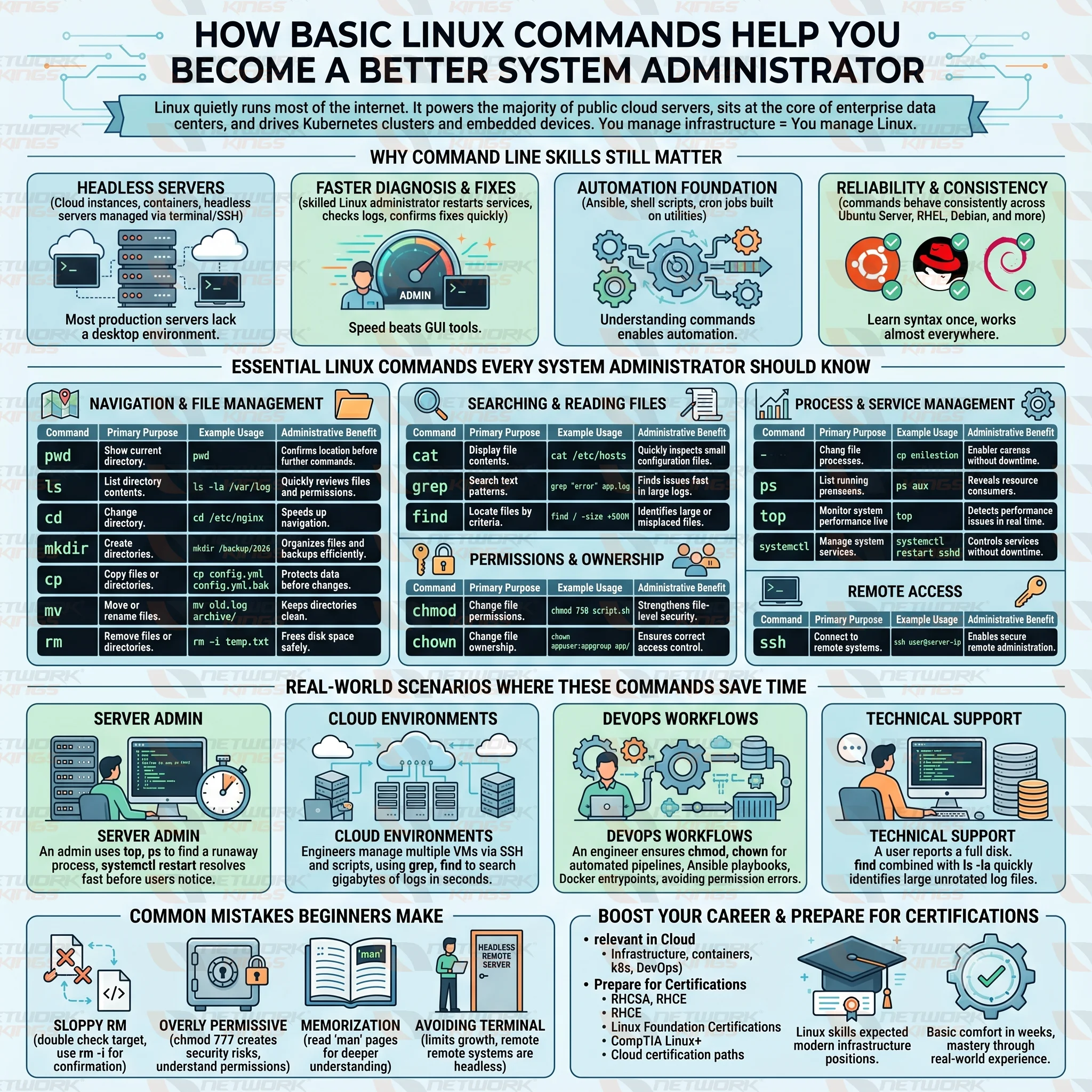
Every experienced Linux administrator relies on a core set of commands daily. These cover navigation, file management, permissions, process monitoring, and service control.
Navigation and File Management
Commands like pwd, ls, and cd Form the backbone of file system navigation. Before you can fix anything, you need to know where you are and what exists around you.
mkdir, cp, mv, and rm Handle the everyday work of organizing directories, duplicating configuration backups, relocating files, and cleaning up disk space. These sound basic, but sloppy use of rm in particular is one of the most common causes of accidental data loss on a live server.
Searching and Reading Files
cat displays file contents quickly, which is useful for short configuration files. grep Searches text for patterns, and it becomes indispensable when scanning log files for error messages across thousands of lines. find Locates files based on name, size, age, or permissions, which is often the fastest way to track down a misplaced or oversized file on a busy server.
Permissions and Ownership
chmod and chown Control who can read, write, or execute a file, and who owns it. Misconfigured permissions are a frequent root cause of both application failures and security vulnerabilities, so understanding these commands is central to solid security administration.
Process and Service Management
ps and top Show what is running on a system and how much CPU or memory it consumes, which is often the first step in troubleshooting a slow or unresponsive server. systemctl Manages services on most modern distributions, letting you start, stop, restart, and check the status of anything from a web server to a database.
Remote Access
ssh is how administrators connect to remote servers securely. Nearly every other command on this list becomes useful specifically because you can run it remotely through SSH, which is the foundation of managing cloud infrastructure and distributed systems.
Linux Commands Comparison Table
Linux Command | Primary Purpose | Example Usage | Administrative Benefit |
pwd | Show current directory |
| Confirms location before running further commands |
ls | List directory contents |
| Quickly reviews files and permissions |
cd | Change directory |
| Speeds up navigation across the file system |
mkdir | Create directories |
| Organizes files and backups efficiently |
cp | Copy files or directories |
| Protects data before making changes |
mv | Move or rename files |
| Keeps directories clean and organized |
rm | Remove files or directories |
| Frees disk space and clears clutter safely |
cat | Display file contents |
| Quickly inspects small configuration files |
grep | Search text patterns |
| Finds issues fast in large log files |
find | Locate files by criteria |
| Identifies large or misplaced files |
chmod | Change file permissions |
| Strengthens file-level security |
chown | Change file ownership |
| Ensures correct access control |
ps | List running processes |
| Reveals what is consuming system resources |
top | Monitor system performance live |
| Detects performance issues in real time |
systemctl | Manage system services |
| Controls services without downtime |
ssh | Connect to remote systems |
| Enables secure remote administration |
Real World Scenarios Where These Commands Save Time
Server Administration: A production web server suddenly slows down. An administrator who knows top and ps Can identify the runaway process in under a minute, rather than waiting on a monitoring dashboard to update. Pair that with systemctl restart On the affected service, the incident is resolved before most users notice.
Cloud Environments: In cloud environments, engineers frequently manage dozens of virtual machines through SSH sessions and shell scripts. Knowing grep and find means searching gigabytes of logs across multiple servers takes seconds instead of hours of manual scrolling.
DevOps Workflows: DevOps workflows depend on these same fundamentals. Continuous integration pipelines, Ansible playbooks, and Docker entry points are all built on shell commands. An engineer who understands chmod and chown Avoids permission errors that would otherwise break automated deployments.
Technical Support Operations: Technical support teams also lean on basic commands daily. A user reports a full disk, and find combined with ls -la quickly narrows down the culprit, often a forgotten log file or an unrotated backup, without needing specialized tools.
Common Mistakes Beginners Make
New administrators often run rm without double-checking the target directory, which can cause irreversible damage. Using rm -i for confirmation prompts, or testing with ls first, prevents this.
Another common error is applying overly permissive file permissions, such as chmod 777, just to make an error disappear. This solves the symptom while creating a security risk. Take the time to understand what each permission digit represents instead.
Beginners also tend to memorize commands without understanding flags and options. Reading the manual page with man For any unfamiliar command, building a much deeper and more transferable understanding than copying commands from search results.
Finally, many newcomers avoid the terminal altogether in favor of GUI tools, which limits their growth. Since most production systems are headless, this habit eventually becomes a career bottleneck.
Career Growth and Certification Value
Many IT professionals ask whether Linux commands are still relevant in cloud computing. The answer is absolutely yes.
Cloud infrastructure, containers, Kubernetes platforms, and DevOps pipelines continue to rely heavily on Linux operating systems.
Linux command-line expertise helps professionals prepare for certifications such as:
RHCE
Linux Foundation Certifications
CompTIA Linux+
Cloud certification paths
Another common question is whether someone can become a system administrator without Linux knowledge. While some entry-level roles may involve Windows environments, Linux skills are increasingly expected across modern infrastructure positions.
Most learners can become comfortable with basic Linux commands within a few weeks of consistent practice. However, mastery develops through real-world experience and ongoing administrative work.
Final Thoughts
Basic Linux commands are not a formality for beginners to move past quickly. They are the daily working vocabulary of every competent system administrator, DevOps engineer, and cloud professional. Investing time in genuinely understanding navigation, file management, permissions, process control, and remote access pays off in faster troubleshooting, stronger security practices, and long-term career growth.
FAQs
Why are Linux commands important for system administrators?
They provide direct control over servers, allow remote management through SSH, and form the foundation for automation and troubleshooting across virtually every Linux distribution.
Which Linux commands should beginners learn first?
Start with pwd, ls, cd, cat, and grep for navigation and file inspection, then move on to chmod, chown, ps, and systemctl once you are comfortable.
Can you become a system administrator without Linux knowledge?
It is extremely difficult. Since most servers, cloud platforms, and DevOps tools run on Linux, a lack of command-line skills severely limits your career options in infrastructure roles.
How long does it take to learn basic Linux commands?
Most learners become comfortable with core commands within two to four weeks of regular, hands-on practice, though genuine proficiency develops over months of real-world use.
Are Linux commands still relevant in cloud computing?
Yes. Cloud platforms like AWS, Azure, and Google Cloud rely heavily on Linux-based virtual machines and containers, and administrators regularly use SSH and command-line tools to manage them.
What is the most useful Linux command for troubleshooting?
Commands like grep, ps, top, and systemctl are commonly used to identify and resolve system issues.
Can Linux command-line skills help with DevOps careers?
Absolutely. Linux skills are fundamental for automation, CI/CD pipelines, containerization, and infrastructure management.

The founder of Network Kings, is a renowned Network Engineer with over 12 years of experience at top IT companies like TCS, Aricent, Apple, and Juniper Networks. Starting his journey through a YouTube channel in 2013, he has inspired thousands of students worldwide to build successful careers in networking and IT. His passion for teaching and simplifying complex technologies makes him one of the most admired mentors in the industry.