AWS Training Tips for Learning EC2, S3, IAM, and VPC Efficiently

Cloud computing continues to reshape how businesses build, deploy, and manage applications. As organizations increasingly adopt Amazon Web Services (AWS), professionals with strong AWS skills are in high demand across industries. Whether you're pursuing AWS Certification Training, preparing for AWS Solutions Architect Training, or simply looking to strengthen your cloud expertise, mastering core services is essential.
A successful AWS Training journey starts with understanding four foundational services: Amazon EC2, Amazon S3, AWS IAM, and Amazon VPC. These services form the backbone of most AWS environments and provide critical knowledge in computing, storage, security, and networking. Learning them efficiently can accelerate your cloud career and help you gain practical, job-ready skills.
Why These Four AWS Services Matter
Before diving into advanced AWS services, it's important to understand why EC2, S3, IAM, and VPC are considered foundational.
Amazon EC2 enables businesses to deploy scalable virtual machines without investing in physical infrastructure. Amazon S3 serves as highly durable object storage for applications, backups, and data lakes. AWS IAM manages Identity and Access Management, helping organizations control who can access resources. Amazon VPC provides secure networking environments where cloud resources communicate safely.
In real-world environments, these services work together. For example, an e-commerce application may run on EC2 instances, store product images in S3, use IAM for secure access control, and operate within a VPC for network isolation and security.
Recommended Learning Roadmap
Many beginners attempt to learn AWS services randomly, which often leads to confusion. A structured AWS roadmap helps build knowledge progressively.
Start with the AWS Management Console to get comfortable navigating the interface.
Learn IAM basics first, since almost every other service depends on permissions.
Move to EC2 to understand virtual machines, security groups, and instance types.
Study S3 for object storage, buckets, and access policies.
Finish with VPC to tie networking concepts together.
Reinforce everything with small hands-on projects using the AWS Free Tier.
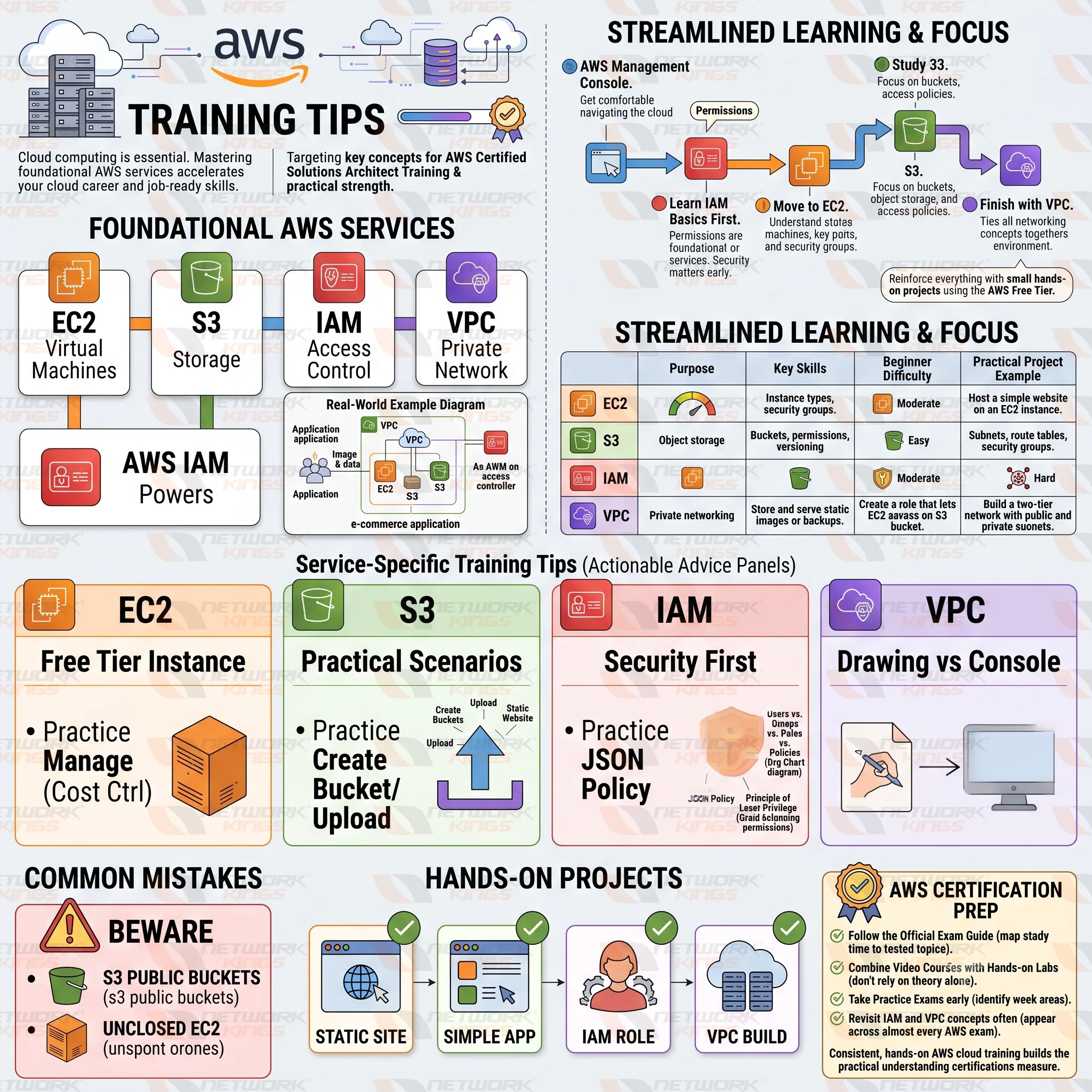
AWS Learning Comparison Table
Service | Purpose | Key Skills to Learn | Beginner Difficulty | Practical Project Example |
EC2 | Virtual servers for compute | Instance types, security groups, key pairs | Moderate | Host a simple website on an EC2 instance |
S3 | Object storage | Buckets, permissions, versioning | Easy | Store and serve static images or backups |
IAM | Identity and Access Management | Users, roles, policies, least privilege | Moderate | Create a role that lets EC2 access an S3 bucket |
VPC | Private networking | Subnets, route tables, security groups | Hard | Build a two-tier network with public and private subnets |
AWS Training Tips for Learning EC2 Efficiently
Treat EC2 as your entry point into virtual machines in the cloud. Launch a free-tier instance early and get comfortable connecting to it through SSH or the console.
Learn the difference between instance types before worrying about advanced configurations.
Practice starting, stopping, and terminating instances so costs stay under control.
Understand security groups since they act as the firewall for your instance.
Try attaching an Elastic IP so you understand static versus dynamic addressing.
Avoid jumping straight into auto scaling or load balancing until the basics of a single instance feel natural.
AWS Training Tips for Mastering S3
An effective AWS S3 Tutorial should focus on practical storage management scenarios.
Begin by creating buckets and uploading files. Learn how bucket policies, versioning, lifecycle rules, and storage classes affect performance and costs.
One of the most valuable exercises is hosting a static website using Amazon S3. This project teaches storage architecture while demonstrating how cloud-native applications can operate efficiently.
Also explore:
S3 versioning for data protection
Lifecycle policies for cost optimization
Cross-region replication for disaster recovery
Access control configurations
Understanding object storage principles is essential for modern cloud computing environments.
AWS Training Tips for Understanding IAM
IAM is less visual than EC2 or S3, which is why many learners rush through it. Do not make that mistake, since weak IAM knowledge is one of the biggest causes of cloud security incidents.
Create separate IAM users instead of using the root account for daily tasks.
Learn the difference between users, groups, roles, and policies.
Practice writing a simple JSON policy by hand instead of only using the visual editor.
Apply the principle of least privilege by granting only the permissions a task actually needs.
Once IAM clicks, everything else in AWS starts to make more sense because permissions touch every service.
AWS Training Tips for Learning VPC Networking
VPC tends to feel intimidating because it borrows heavily from traditional networking concepts.
Start by drawing your network on paper before building it in the console.
Learn the difference between public and private subnets and why both matter.
Practice configuring route tables so you understand how traffic actually moves.
Set up a security group and a network ACL together to see how they differ.
Building a small VPC from scratch, even a basic one, teaches more than reading documentation ever will.
Common Mistakes Beginners Should Avoid
Skipping IAM fundamentals and jumping straight to compute or storage.
Leaving S3 buckets publicly accessible without understanding the consequences.
Forgetting to shut down EC2 instances, which leads to unexpected charges.
Trying to learn VPC networking without any hands-on practice.
Memorizing services for an exam instead of understanding how they interact.
Hands-On Projects to Strengthen AWS Skills
Practical experience separates candidates who pass a certification exam from those who can actually work in the cloud.
Host a static website using S3 and connect it to a custom domain.
Launch an EC2 instance and deploy a simple application on it.
Create an IAM role that allows EC2 to read and write to an S3 bucket without stored credentials.
Build a VPC with public and private subnets and place a database in the private subnet.
These four AWS hands-on labs mirror real architecture patterns used in production environments.
AWS Certification Preparation Tips
If you are working toward AWS Solutions Architect Training or another AWS certification, structure matters as much as content.
Follow the official exam guide so your study time maps directly to tested topics.
Combine video courses with hands-on labs rather than relying on theory alone.
Take practice exams early to identify weak areas before your final review.
Revisit IAM and VPC concepts often, since they appear across almost every AWS exam.
Consistent, hands-on AWS cloud training builds the kind of practical understanding that certifications are designed to measure.
Conclusion
Learning AWS does not require mastering every service at once. Focused AWS training on EC2, S3, IAM, and VPC gives you a practical foundation that mirrors how these services actually work together in real cloud environments. Follow a structured roadmap, prioritize hands-on labs over passive reading, and treat IAM as seriously as compute or storage. Start with the AWS Free Tier today, build the four projects outlined above, and you will be well positioned for both certification success and real-world cloud work.
FAQs
What is the best order to learn EC2, S3, IAM, and VPC?
Most learners find it easiest to start with IAM basics, move to EC2, then S3, and finish with VPC, since networking concepts build on the others.
Is AWS Free Tier enough for hands-on training?
Yes, the AWS Free Tier covers enough EC2 hours, S3 storage, and other resources to complete most beginner projects without cost.
Do I need coding skills to learn AWS?
Basic AWS skills for beginners do not require coding, though familiarity with scripting helps for automation and certification exams later.
How long does it take to learn EC2, S3, IAM, and VPC?
With consistent practice, most beginners can grasp the fundamentals of all four services within four to six weeks.
Which AWS certification should I start with?
The AWS Certified Solutions Architect Associate is a common starting point since it covers EC2, S3, IAM, and VPC in depth.
Why is IAM considered so important in AWS training?
IAM controls access across every other AWS service, so weak IAM knowledge often leads to security misconfigurations elsewhere.
What is the difference between a security group and a network ACL in VPC?
Security groups control traffic at the instance level, while network ACLs control traffic at the subnet level.

The founder of Network Kings, is a renowned Network Engineer with over 12 years of experience at top IT companies like TCS, Aricent, Apple, and Juniper Networks. Starting his journey through a YouTube channel in 2013, he has inspired thousands of students worldwide to build successful careers in networking and IT. His passion for teaching and simplifying complex technologies makes him one of the most admired mentors in the industry.