What is AWS VPC ? A Practical Guide to VPC, Subnets, and Routing
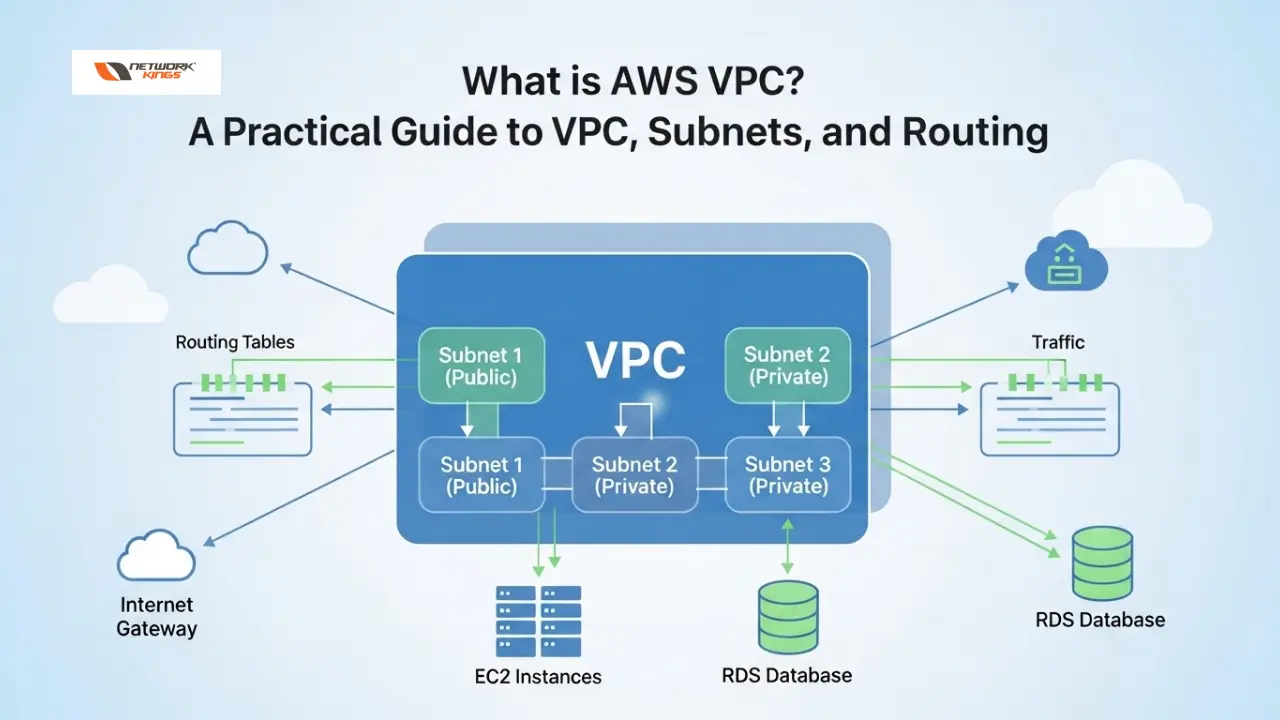
What is VPC ? AWS This question is the starting point for anyone designing networks in Amazon Web Services. A clear understanding of VPC fundamentals, components, and common configurations makes the difference between a secure, scalable cloud network and one that is slow, costly, or insecure.
Table of Contents
Quick answer: What is AWS VPC ?
Why VPC matters
Core concepts and components
Designing a simple 3-tier VPC architecture
Step-by-step checklist to create a VPC
Common troubleshooting scenarios and fixes
Security best practices
Cost considerations
Limits and quotas to watch
Practical example: subnet sizing made simple
Frequently asked questions
Common mistakes and how to avoid them
Sample AWS CLI commands
Checklist before going to production
Summary
Final recommendations
Quick answer: What is AWS VPC ?
What is AWS VPC ? At its core, it is a logically isolated virtual network you create in AWS. It provides full control over IP address ranges, subnets, routing, and network security, and it is the foundation for deploying compute, storage, and managed services in a secure, custom network model.
Why VPC matters
A cloud workload still requires the same networking design principles as on-premises infrastructure: isolation, addressing, routing, and security. A VPC lets you apply those principles in AWS while removing physical hardware constraints. Use cases include public-facing web apps, private back-end systems, hybrid cloud links to on-premises data centers, and secure service-to-service connectivity.
Core concepts and components
Understanding the building blocks is essential. Below are the primary pieces you will use to design any VPC architecture.
VPC (Virtual Private Cloud)
The VPC is the container for your virtual network. When you create a VPC you choose a CIDR block (for example 10.0.0.0/16) that defines the IP address space for resources launched inside it.
CIDR and IP addressing
Choose a CIDR range that avoids overlap with your on-premises networks if you plan to connect later. Common private ranges are 10.0.0.0/8, 172.16.0.0/12, and 192.168.0.0/16. Typical practice is to reserve a /16 for a VPC and split it into smaller subnets per availability zone.
Subnets
Subnets segment the VPC IP space. Subnets are associated with a single Availability Zone. Two common types are:
Public subnet : Routes to an Internet Gateway so resources can have public access (for example, web servers).
Private subnet : No direct route to the Internet Gateway; used for application servers, databases, or backend services.
Route Tables
Route tables determine where traffic from a subnet is sent. Each subnet is associated with one route table. The table contains routes such as local (the VPC), an internet route (0.0.0.0/0 → Internet Gateway), or a route to a NAT gateway or a Virtual Private Gateway.
Internet Gateway (IGW)
An Internet Gateway is a horizontally scaled, redundant gateway that allows communication between instances in your VPC and the internet. Attach an IGW to the VPC and add an internet route in the public subnet route table for external access.
NAT Gateway / NAT Instance
Private subnets often need outbound internet access to download updates or call external APIs without exposing instances to inbound internet connections. A NAT gateway (managed by AWS) or a NAT instance provides this capability. NAT Gateway is preferred for scalability and ease of use.
Security Groups and Network ACLs
Security groups are stateful firewalls applied at the instance level. They allow inbound and outbound rules and automatically permit return traffic. Network ACLs are stateless filters applied at the subnet level and evaluate each packet on inbound and outbound rules independently. Use security groups for host-level protection and NACLs for coarse subnet filtering or additional compliance controls.
VPC Endpoints
To access AWS services without traversing the public internet, use VPC endpoints . There are two types:
Interface endpoints (ENIs) for services accessed over private IPs (for example, Secrets Manager, SSM).
Gateway endpoints for S3 and DynamoDB, which add routes in the route table for direct access.
Peering, Transit Gateway, VPN, Direct Connect
Connect multiple VPCs either directly via VPC Peering (suitable for small numbers of VPCs) or with AWS Transit Gateway (recommended for large-scale hubs). For on-premises connectivity use AWS Site-to-Site VPN or AWS Direct Connect for private, high-throughput links.
Designing a simple 3-tier VPC architecture
Practical architecture helps cement concepts. Below is a typical 3-tier design many teams use for web applications:
1. Public tier : One or more public subnets in two Availability Zones, hosting load balancers or bastion hosts. These subnets have a route to the Internet Gateway.
2. Application tier : Private subnets in the same Availability Zones for app servers that communicate with the public tier only over internal addresses. Outbound access uses a NAT gateway located in a public subnet.
3. Data tier : Private subnets (possibly isolated further with more restrictive security groups and NACLs) for databases and storage. No direct internet access.
Example IP plan using a /16 VPC:
VPC: 10.0.0.0/16
Public subnet AZ-a: 10.0.0.0/24
App subnet AZ-a: 10.0.1.0/24
Database subnet AZ-a: 10.0.2.0/24
Repeat similar subnets for AZ-b with 10.0.10.0/24, 10.0.11.0/24, etc.
Step-by-step checklist to create a VPC
Follow this checklist to create a basic, secure VPC.
Choose a non-overlapping CIDR range for the VPC.
Create the VPC and enable DNS hostnames if you plan to use AWS hostnames.
Create subnets across at least two Availability Zones for high availability.
Create and attach an Internet Gateway to the VPC if you need public access.
Create route tables and add routes: a local route is automatic; add 0.0.0.0/0 → IGW for public subnets and 0.0.0.0/0 → NAT Gateway for private subnets that require outbound internet access.
Create a NAT Gateway in a public subnet and allocate an Elastic IP for it if private subnets need outbound internet connectivity.
Configure security groups for instances and ensure least-privilege rules (only required ports and sources).
Optionally add NACLs for additional subnet-level controls.
Set up VPC endpoints for S3/DynamoDB or other AWS services to avoid public endpoints where possible.
Document the design, routing and security rules, and maintain a change log.
Common troubleshooting scenarios and fixes
Network problems are usually caused by misconfiguration in one of these areas. Check them in this order.
No internet access from instance : Verify the subnet route table has 0.0.0.0/0 → IGW for public instances, or 0.0.0.0/0 → NAT Gateway for private instances. Confirm the IGW is attached to the VPC and the NAT Gateway is available and in a public subnet with its Elastic IP assigned.
Inbound connection refused : Check the instance OS firewall and that the security group allows the inbound port from the expected source. Remember security groups are stateful; ensure outbound rules allow responses if necessary.
Cannot reach a different subnet or VPC : Verify route tables include routes to the destination (VPC peering or Transit Gateway). For peering, confirm no overlapping CIDR ranges and that security groups permit traffic.
DNS resolution issues : Ensure VPC DNS resolution and DNS hostnames are enabled if using AWS provided DNS names. Check DHCP option sets if using custom DNS servers.
High latency or intermittent connectivity : Check instance type limits, network interface attachment, NAT Gateway throughput (NAT Gateways are managed but can saturate on heavy traffic), and look at CloudWatch metrics for networking errors.
Security best practices
Security should be designed into the VPC from the start:
Use separate VPCs or accounts for production and non-production environments to reduce blast radius.
Use security groups for instance-level access and follow the principle of least privilege.
Use NACLs for stateless, subnet-level controls if required by compliance.
Restrict inbound ports on public subnets and avoid placing databases in public subnets.
Use VPC Flow Logs to capture IP traffic information for monitoring and troubleshooting.
Prefer VPC endpoints to avoid traversing the public internet when accessing managed services.
Use AWS IAM policies and roles to control who can modify VPC configuration.
Cost considerations
Creating a VPC itself is free, but related components incur charges:
NAT Gateway: charged per hour and per GB processed.
Data transfer across AZs or out to the internet: costs vary by region and direction.
Transit Gateway and Direct Connect: additional charges for attachment hours and data transfer.
Elastic IPs: free while associated to a running instance or NAT, charged if unused.
Limits and quotas to watch
AWS applies soft limits you can request to increase. Typical defaults to check early:
Number of VPCs per region (default often 5).
Subnets per VPC (large; but check account-specific limits).
Elastic IP addresses per region (small default limits).
Number of route table associations, routes, and security groups per instance.
Practical example: subnet sizing made simple
Use subnet sizes that reflect expected growth. A /24 provides 256 addresses, of which AWS reserves several addresses per subnet. For most subnets a /24 is sufficient; for small utility or management subnets a /27 or /28 saves address space. Always plan for expansion:
Start with a /16 VPC to allow many subnets and avoid running out of space when connecting other networks.
Divide per AZ to ensure high availability and failover.
Frequently asked questions
What is AWS VPC ? How is it different from a traditional data center network?
What is AWS VPC ? It is an isolated virtual network in AWS that replicates many networking concepts from a traditional data center. The difference is that the underlying infrastructure is managed by AWS, allowing rapid provisioning, elastic scaling, and automation without owning hardware. VPC provides programmatic control over routing, subnets, and security groups similar to an on-premises network.
Can I have both public and private subnets in the same VPC?
Yes. The same VPC can contain public and private subnets. Public subnets have route table entries that send 0.0.0.0/0 to an Internet Gateway, and private subnets route outbound internet traffic through a NAT Gateway or other mechanism.
How do security groups and NACLs work together?
Security groups are stateful and operate at the instance level; NACLs are stateless and operate at the subnet level. Use security groups for precise host-level access and NACLs for broader subnet-level filtering. Both apply; a packet must pass NACL rules and security group rules to reach an instance.
Is VPC peering enough for large multi-VPC deployments?
VPC peering works well for a small number of VPCs with direct pairwise communication. For large-scale architectures, AWS Transit Gateway is recommended because it scales better, simplifies routing, and centralizes connectivity management.
What is AWS VPC ? and what are VPC endpoints used for?
What is AWS VPC ? In this context, VPC endpoints let resources inside a VPC privately connect to supported AWS services without using the internet. Use gateway endpoints for S3/DynamoDB and interface endpoints for other AWS services to improve performance and security.
Common mistakes and how to avoid them
Overlapping CIDR ranges: Do not choose CIDRs that conflict with on-premises networks you plan to connect. Use a consistent IP allocation strategy.
Too-small VPC ranges: Avoid tiny blocks like /24 for a VPC unless you are certain the environment is small and isolated. Expanding a VPC CIDR later is difficult; you may need to redesign networks.
Placing databases in public subnets: Databases should remain in private subnets with no direct internet route and strict security groups.
Relying only on security groups but not monitoring: Enable VPC Flow Logs and CloudWatch alarms to detect anomalous traffic.
Misconfigured route tables: Ensure each subnet is associated with the right route table. Forgetting association is a frequent cause of connectivity issues.
Sample AWS CLI commands
The AWS CLI can create VPC resources quickly. Below are minimal examples; always validate with your environment and IAM permissions.
aws ec2 create-vpc --cidr-block 10.0.0.0/16
aws ec2 create-subnet --vpc-id vpc-0123456789abcdef0 --cidr-block 10.0.1.0/24 --availability-zone ap-south-1a
aws ec2 create-internet-gateway
aws ec2 attach-internet-gateway --vpc-id vpc-0123456789abcdef0 --internet-gateway-id igw-0123456789abcdef0
aws ec2 create-route-table --vpc-id vpc-0123456789abcdef0
aws ec2 create-nat-gateway --subnet-id subnet-0123456789abcdef0 --allocation-id eipalloc-0123456789abcdef0
Checklist before going to production
IP addressing plan documented and reviewed.
Subnets distributed across multiple Availability Zones.
Security groups are least privilege and audited.
NAT Gateway and Internet Gateway are in place as needed.
VPC Flow Logs enabled for troubleshooting and auditing.
VPC endpoints configured for S3/DynamoDB where applicable.
IAM roles and policies limit who can change network configuration.
Disaster recovery and cross-region strategies validated.
Summary
What is AWS VPC ? It is the foundation of networking in AWS: a private, programmable virtual network where you control IP addressing, subnets, routes, and security. Proper VPC planning delivers security, scalability, and availability for cloud workloads. Follow best practices for CIDR selection, subnetting, route table configuration, and secure access models to ensure reliable and maintainable network infrastructure.
Final recommendations
Start with a standard template for new VPCs so environments are consistent across teams.
Automate VPC provisioning with Infrastructure as Code (CloudFormation, Terraform) to reduce manual errors.
Monitor, log, and periodically audit VPC settings and network traffic.
Use Transit Gateway for complex multi-VPC topologies and peering for simple pairwise connections.

The founder of Network Kings, is a renowned Network Engineer with over 12 years of experience at top IT companies like TCS, Aricent, Apple, and Juniper Networks. Starting his journey through a YouTube channel in 2013, he has inspired thousands of students worldwide to build successful careers in networking and IT. His passion for teaching and simplifying complex technologies makes him one of the most admired mentors in the industry.