
How VPN Technologies Work Through Encryption, Tunneling, and Protocols
Learn how VPN technologies use encryption, authentication, and tunneling to protect traffic, and understand how IPsec, SSL VPN, OpenVPN, and WireGuard work.
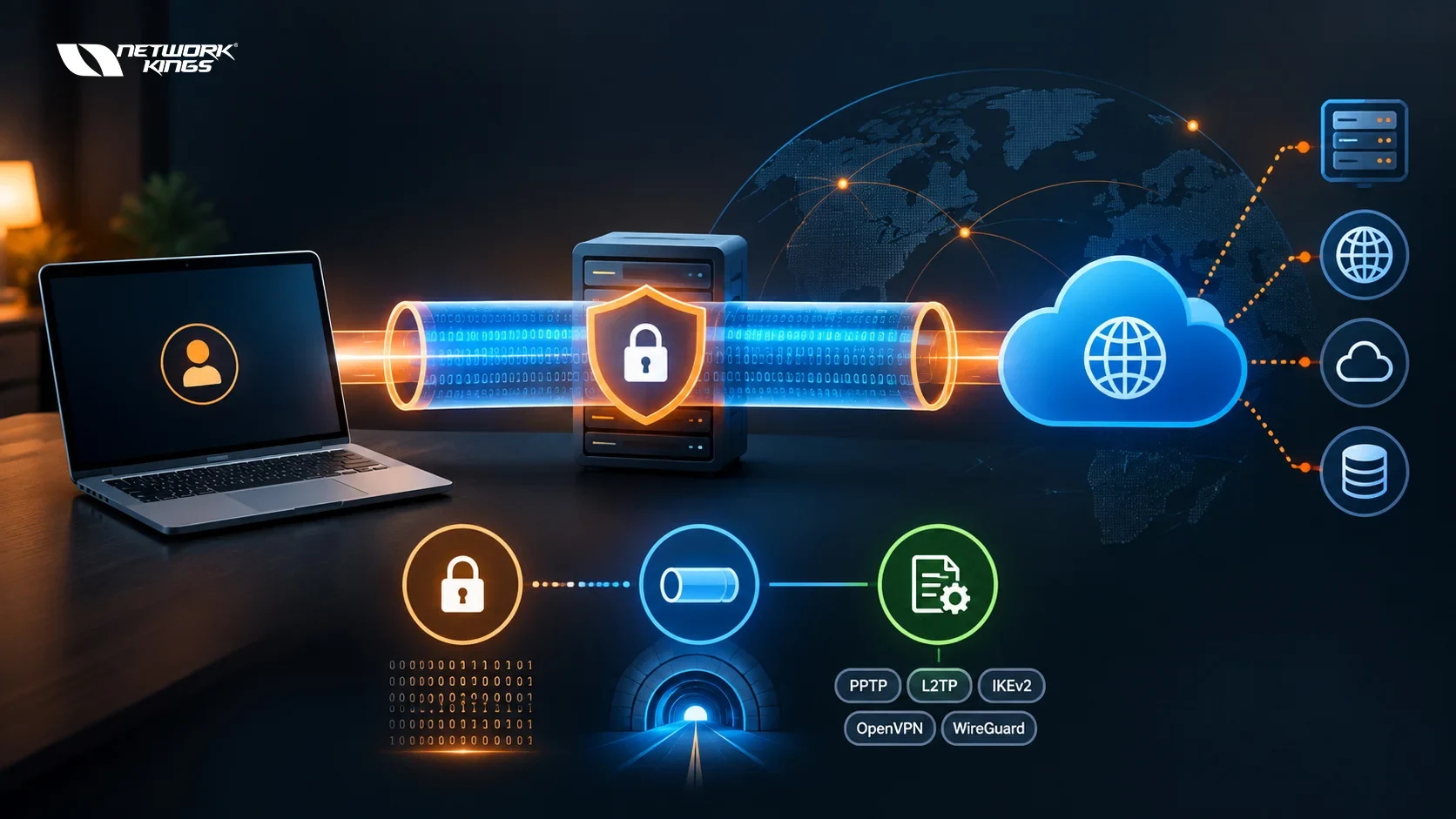
When you connect to a VPN, your device builds a protected connection to another network across the public internet. Three core functions are central to most VPN implementations: authentication, cryptographic protection, and tunneling or encapsulation. Authentication verifies who or what is connecting, encryption protects the data, and tunneling encapsulates that data so it can travel securely between endpoints.
VPN technologies combine these mechanisms through different protocols, cryptographic methods, and gateway architectures. This guide explains how VPNs work step by step, how encryption and tunneling protect traffic, how major VPN protocols such as IPsec, SSL VPN, OpenVPN, and WireGuard differ, and which approaches are commonly used in enterprise and cloud networks.
What VPN Technologies Are and Why They Matter
A virtual private network (VPN) extends a private network across an untrusted network, usually the internet. VPN technology is a broad term covering the protocols, encryption methods, authentication mechanisms, tunneling techniques, client software, and gateway hardware or software used to create that protected connection.
A VPN protocol, by comparison, defines the rules used to establish, authenticate, and protect a VPN connection. IPsec, OpenVPN, and WireGuard are examples of VPN technologies that use defined protocol mechanisms, while SSL VPN generally refers to VPN architectures that use TLS to secure remote access.
The distinction is useful because a VPN is more than encryption alone. A complete VPN solution may involve:
Authentication to verify users or devices
Key exchange to establish cryptographic keys
Encryption to protect data confidentiality
Integrity protection to detect unauthorized changes
Tunneling to encapsulate traffic
VPN gateways or clients to establish and maintain the connection
Access-control policies that determine which resources a user can reach
Traffic crossing public Wi-Fi, shared carrier infrastructure, or the wider internet can be observed or altered if it is not adequately protected. A properly configured VPN reduces that exposure by protecting traffic between defined endpoints.
A VPN does not automatically make a user anonymous. It also does not protect against malware, phishing, unsafe applications, or a compromised endpoint.
How a VPN Works Step by Step
A VPN connection typically follows a sequence of authentication, negotiation, and encrypted data transfer.
1. The Device Connects to a VPN Gateway
The client device contacts a VPN server or gateway over the internet. Depending on the technology, the connection may use IPsec, TLS, UDP, or another supported transport mechanism.
2. The Endpoints Authenticate
The VPN gateway and client establish trust using mechanisms such as digital certificates, pre-shared keys, usernames and passwords, or multifactor authentication.
For example, an enterprise VPN may use a device certificate combined with a user's credentials and a second authentication factor.
3. Cryptographic Keys Are Negotiated
The endpoints perform a key exchange to establish shared cryptographic material. Methods such as Diffie-Hellman or elliptic-curve key exchanges allow the endpoints to derive shared secrets without sending the final encryption key directly across the network.
4. A Secure Tunnel Is Established
The original network traffic is encapsulated inside the VPN connection. Depending on the technology, the original packet may be encrypted and wrapped inside a new packet addressed to the VPN gateway.
5. Data Travels Through the Tunnel
Encrypted traffic crosses the public network. Intermediate routers can generally see information needed to deliver the outer packet, such as the VPN gateway's network address, but cannot read the protected contents of the encrypted payload.
6. The VPN Gateway Decrypts and Forwards Traffic
At the receiving end, the VPN gateway validates the protected traffic, decrypts it, removes the tunnel encapsulation, and forwards the original traffic toward its destination.
The reverse process occurs when traffic returns to the client.
In simplified form:
Client → Authentication → Key Exchange → Encrypted Tunnel → VPN Gateway → Internal Network or Internet
This sequence explains why authentication, encryption, and tunneling are complementary rather than interchangeable technologies.
How VPN Encryption Works
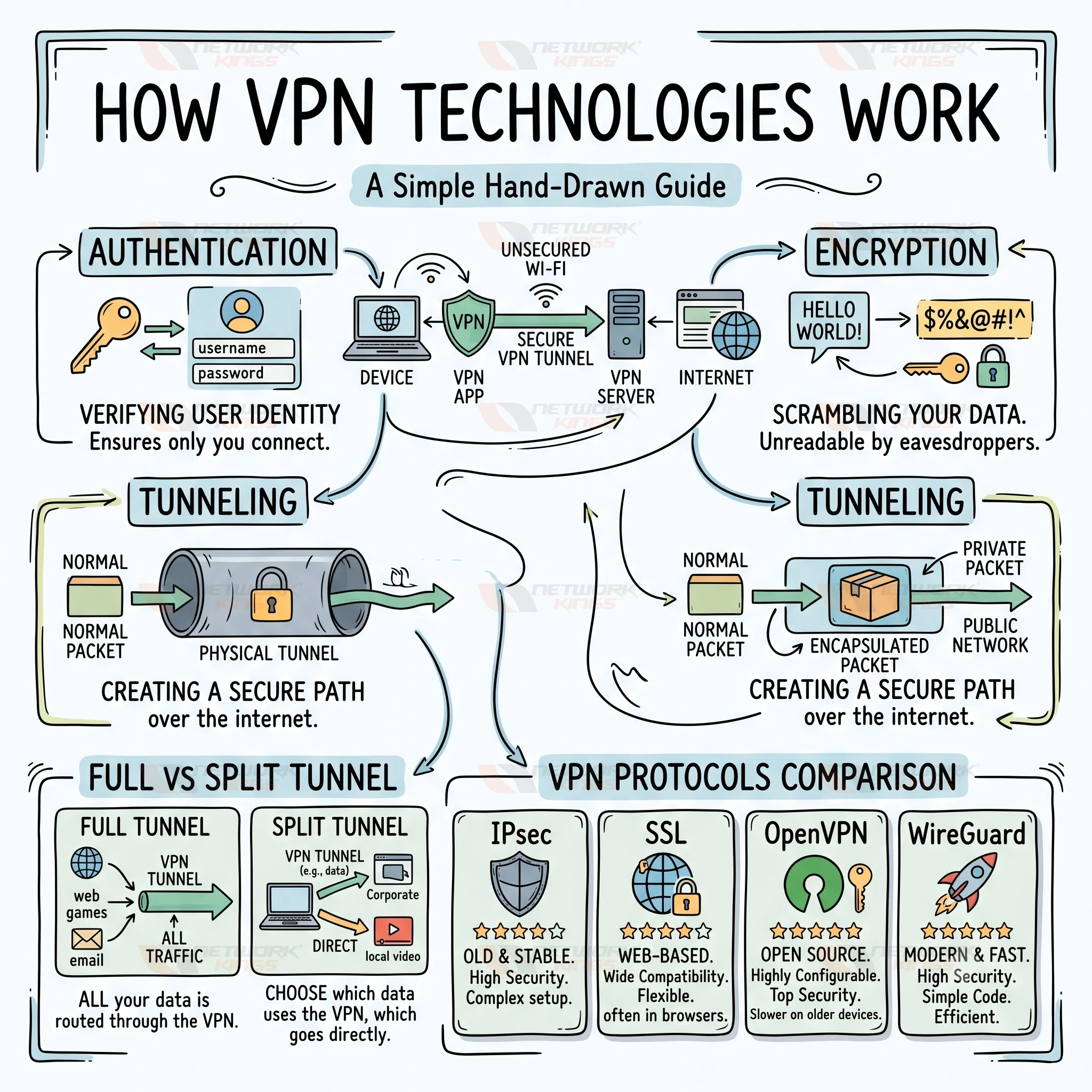
Encryption converts readable data, known as plaintext, into ciphertext that cannot be meaningfully interpreted without the appropriate cryptographic keys.
VPN encryption generally combines asymmetric cryptography for establishing trust or shared secrets with symmetric cryptography for protecting the actual data stream.
Key Exchange and Session Encryption
The two endpoints first establish shared cryptographic material using mechanisms such as Diffie-Hellman or elliptic-curve key exchanges.
Once the necessary keys are established, symmetric encryption is typically used for bulk traffic because it is considerably faster and more efficient than asymmetric cryptography.
Common modern algorithms include:
AES, commonly used in modes such as AES-GCM
ChaCha20-Poly1305, used by technologies such as WireGuard
The exact algorithms and negotiation process depend on the VPN protocol and implementation.
Authentication and Integrity
Encryption alone is not enough. A VPN must also establish whether the endpoint is trusted and whether protected traffic has been modified.
Common authentication mechanisms include:
Pre-shared keys
Digital certificates
Usernames and passwords
Multifactor authentication
Enterprise identity systems
Integrity protection allows the receiver to detect unauthorized changes to protected traffic. Authenticated encryption modes such as AES-GCM provide confidentiality and integrity together.
For example, a remote employee connecting to a corporate gateway may have the gateway present a digital certificate, verify that certificate against a trusted authority, authenticate the user through an identity provider, and require a second factor before allowing access.
How VPN Tunneling Works
VPN tunneling is the process of encapsulating network traffic inside another connection so that it can travel between VPN endpoints.
Consider a packet from a laptop destined for an internal company server. Without a VPN, the packet is routed normally across the network. With a tunnel, the original packet is encapsulated inside a new packet addressed toward the VPN gateway.
Conceptually:
Original packet → VPN protection and encapsulation → Internet → Decapsulation and verification → Decryption → Destination
Routers along the path primarily use the outer packet information to forward the traffic. The protected inner traffic remains unavailable to them until it reaches the appropriate VPN endpoint.
Full Tunnel vs Split Tunnel VPN
Tunneling also creates an important design choice.
Full tunneling sends all or nearly all traffic through the VPN connection. This can allow an organization to apply centralized security inspection and access policies, but it can increase bandwidth consumption and load on VPN infrastructure.
Split tunneling sends only selected traffic through the VPN, usually traffic destined for corporate or private resources. Other internet traffic goes directly through the user's normal connection.
Split tunneling can reduce bandwidth consumption and improve performance, but it may provide less centralized visibility into internet traffic leaving the endpoint.
The appropriate design depends on the organization's security architecture, bandwidth, endpoint controls, and access requirements.
VPN Technology vs VPN Protocol
The terms VPN technology and VPN protocol are sometimes used interchangeably, but they describe different levels of the system.
Term | Meaning |
VPN technology | The broader combination of protocols, encryption, authentication, tunneling, clients, and gateways used to create a VPN |
VPN protocol | The rules and mechanisms used to negotiate and protect a VPN connection |
Encryption | Cryptographic protection that helps keep traffic confidential |
Tunneling | Encapsulation of traffic so it can travel through the VPN connection |
VPN gateway | The endpoint that establishes, terminates, or forwards VPN traffic |
VPN client | Software or functionality on the endpoint that establishes the VPN connection |
Understanding these differences makes it easier to compare solutions without treating encryption, tunneling, and protocols as the same thing.
Understanding VPN Protocols
Different VPN protocols solve the same broad problem in different ways. Their architecture, cryptographic design, configuration options, client support, and deployment models vary.
IPsec
IPsec is a network-layer security framework commonly used for site-to-site VPNs and some remote-access deployments.
It commonly uses Internet Key Exchange (IKE) to negotiate security parameters and establish Security Associations. IKEv2 is widely used in modern IPsec deployments.
IPsec commonly uses Encapsulating Security Payload (ESP) to provide confidentiality and/or integrity and data-origin authentication, depending on the selected algorithms and configuration.
IPsec supports transport and tunnel modes:
Transport mode protects the payload of an IP packet while retaining the original IP header.
Tunnel mode encapsulates the entire original IP packet inside a new IP packet and is commonly used for gateway-to-gateway VPNs.
IPsec can also use NAT traversal mechanisms when VPN traffic must cross devices performing network address translation.
Because IPsec support is built into many enterprise firewalls, routers, operating systems, and cloud networking services, it remains common for connecting offices, data centers, and cloud environments.
SSL VPN and TLS
The term SSL VPN is still widely used, although modern implementations use Transport Layer Security (TLS) rather than the obsolete SSL protocols.
TLS-based VPN solutions can provide browser-based access to specific applications or use dedicated client software for broader network access.
Many TLS-based VPN deployments use TCP port 443, the standard port commonly associated with HTTPS, which can simplify deployment across networks that permit web traffic. This can make deployment easier across networks that permit standard web traffic, although modern firewalls and security systems can still identify and restrict VPN connections.
The capabilities of an SSL VPN depend heavily on the gateway vendor and deployment architecture. Some provide application-level access, while others create a broader network tunnel.
OpenVPN
OpenVPN is an open-source VPN solution that uses TLS for authentication and key negotiation and can operate over UDP or TCP.
Its flexibility has made it common in remote-access and custom VPN deployments. Administrators can configure authentication methods, certificates, encryption settings, routing behavior, and transport options.
That flexibility also means configuration quality matters. A secure deployment requires appropriate cryptographic settings, certificate management, access controls, and regular software updates.
WireGuard
WireGuard is a modern VPN protocol designed around a relatively small codebase and a fixed collection of modern cryptographic primitives.
It uses Curve25519 for key exchange and ChaCha20-Poly1305 for authenticated encryption, with UDP as its transport.
Its relatively simple configuration model can make tunnel deployment straightforward. However, organizations may still need additional tooling for identity management, user lifecycle management, dynamic addressing, centralized policy, and large-scale administration.
Comparing the Major VPN Protocols
Technology | How it works | Common use | Key considerations |
IPsec | IKE negotiates security parameters and ESP protects traffic at the network layer | Site-to-site VPNs, remote access, cloud connectivity | Strong enterprise support, but configuration and interoperability can require careful planning |
SSL VPN (TLS) | Carries protected traffic through a TLS-based connection | Remote access and application-level access | Often convenient for remote users; capabilities depend heavily on the gateway |
OpenVPN | Uses TLS for authentication and key negotiation and supports UDP or TCP transport | Remote access and custom deployments | Highly configurable, but requires careful configuration and client management |
WireGuard | Uses a fixed set of modern cryptographic primitives and UDP-based tunnels | Remote access, site-to-site, and mesh-style deployments | Simple protocol design, but enterprise identity and user management may require additional tooling |
Rather than asking which protocol is universally “best,” network teams generally match the technology to their environment, existing infrastructure, security requirements, and operational model.
VPN Technologies in Real-World Networks
VPNs appear in several common network architectures.
Remote Access VPN
A remote-access VPN connects an individual user or device to corporate resources.
For example, an employee working remotely may authenticate to a corporate VPN gateway before accessing internal applications, servers, or management systems.
Depending on the environment, organizations may use IPsec, TLS-based VPNs, OpenVPN, WireGuard, or other technologies.
Site-to-Site VPN
A site-to-site VPN connects two or more networks through VPN gateways.
For example:
Head Office → VPN Gateway → Encrypted Tunnel → Branch Gateway → Branch Network
IPsec is widely used for these network-to-network connections because many enterprise networking and security platforms support it natively.
Cloud VPN Connectivity
Organizations frequently use VPNs to connect on-premises infrastructure with cloud networks.
A typical architecture may look like:
Corporate Network → Firewall/VPN Gateway → IPsec Tunnel → Cloud VPN Gateway → Cloud Virtual Network
This allows selected private traffic to move between the environments without exposing those internal services directly to the public internet.
Cloud platforms can also combine VPN connectivity with routing controls, private connectivity services, identity policies, and network security mechanisms.
Full Tunnel and Split Tunnel in Enterprise Networks
The choice between full and split tunneling affects both security architecture and network performance.
With full tunneling, an employee's corporate and internet-bound traffic may traverse the organization's VPN infrastructure. This can support centralized inspection, logging, filtering, and security policy enforcement.
With split tunneling, only traffic destined for corporate resources may use the VPN. General internet traffic can continue through the user's local internet connection.
For example:
Requirement | Common approach |
Centralized inspection of remote-user internet traffic | Full tunnel |
Access only to internal applications | Split tunnel may be considered |
Limited corporate VPN bandwidth | Split tunnel may reduce VPN traffic |
Strong centralized security controls | Full tunnel may simplify enforcement |
Minimize latency for general internet traffic | Split tunnel can reduce unnecessary routing through the VPN |
The correct design depends on the organization's endpoint security, traffic inspection architecture, bandwidth capacity, and risk model.
Choosing and Implementing the Right VPN Technology
No single VPN technology suits every environment. The decision should begin with the requirements rather than the protocol name.
Consider the following questions:
Which devices and operating systems must be supported?
Does the organization need user-to-network or network-to-network connectivity?
Are digital certificates required?
Does the environment require multifactor authentication?
Will users connect from restrictive networks?
Does the organization need centralized traffic inspection?
Who will manage certificates, keys, users, and devices?
Does the solution integrate with existing firewalls and identity systems?
How will software and VPN gateways be patched?
What logging and monitoring capabilities are required?
Common Technology Choices by Scenario
Requirement | Technologies commonly considered |
Branch-to-branch connectivity | IPsec |
On-premises to cloud connectivity | IPsec |
Remote workforce access | TLS-based VPN, IPsec, OpenVPN, WireGuard |
Browser-based application access | TLS-based SSL VPN |
Highly configurable VPN deployment | OpenVPN |
Lightweight modern tunnel | WireGuard |
Existing enterprise firewall infrastructure | Often IPsec or the vendor's integrated VPN technology |
These are common deployment patterns rather than universal rules. Compatibility, authentication, security controls, operational requirements, and vendor support should determine the final architecture.
Why VPN Configuration Matters
Selecting a modern protocol does not automatically create a secure VPN.
Outdated technologies such as PPTP are widely considered insecure and should not be selected for modern deployments. Even with a modern protocol, weak authentication, poor key management, inappropriate cryptographic settings, excessive access permissions, or unpatched VPN gateways can introduce significant security weaknesses.
A properly managed VPN should therefore include:
Strong authentication
Appropriate cryptographic settings
Secure certificate and key management
Least-privilege network access
Regular gateway and client patching
Monitoring and logging
Appropriate endpoint security
Periodic review of VPN accounts and permissions
VPN security is ultimately a combination of technology, configuration, identity management, and operational practices.
Bringing the Pieces Together
VPN technologies work by combining authentication, cryptographic key exchange, encryption, integrity protection, and tunneling to create a protected connection across an untrusted network.
The process can be summarized as:
Authenticate → Negotiate Keys → Establish Tunnel → Encrypt Traffic → Transport → Decrypt → Forward
IPsec, TLS-based SSL VPNs, OpenVPN, and WireGuard implement these concepts differently. IPsec is commonly used for site-to-site and cloud connectivity, TLS-based VPNs are widely used for remote access, OpenVPN provides extensive configuration flexibility, and WireGuard uses a comparatively simple design built around a fixed set of modern cryptographic primitives.
The right VPN technology depends on the devices, network architecture, authentication requirements, traffic patterns, operational capabilities, and security controls involved. Regardless of the protocol selected, secure configuration, strong identity controls, regular patching, and appropriate access policies remain essential.
FAQs
How does a VPN work step by step?
A VPN typically authenticates the client and gateway, negotiates cryptographic keys, establishes a tunnel, encrypts traffic, sends it across the network, and decrypts it at the receiving VPN endpoint before forwarding it to the destination.
What is VPN tunneling?
VPN tunneling is the process of encapsulating network traffic inside another connection so that it can travel between VPN endpoints. The protected traffic is typically encrypted before or as part of the encapsulation process.
How does VPN encryption protect data?
VPN encryption converts readable traffic into ciphertext using cryptographic keys. Modern VPN technologies use authenticated encryption or separate integrity mechanisms to help prevent unauthorized parties from reading or modifying protected traffic.
What is the difference between IPsec and SSL VPN?
IPsec operates at the network layer and is widely used for site-to-site and some remote-access connections. SSL VPN is a broad term for VPN solutions that use TLS and can provide browser-based application access or client-based network access.
Is WireGuard more secure than OpenVPN?
Security depends on the protocol implementation, configuration, authentication, software maintenance, and deployment architecture. WireGuard uses a fixed set of modern cryptographic primitives and has a relatively small codebase, while OpenVPN provides extensive configuration flexibility. Neither should be treated as secure simply because of its protocol name.
What is the difference between full tunnel and split tunnel VPN?
A full tunnel sends all or most traffic through the VPN, allowing centralized inspection but potentially increasing VPN bandwidth requirements. Split tunneling sends only selected traffic, such as corporate resources, through the VPN while other traffic uses the normal internet connection.
Does a VPN make you anonymous?
No. A VPN can protect traffic between defined endpoints, but it does not provide complete anonymity. Websites, applications, VPN providers, identity systems, browser characteristics, and other services may still collect information that can identify or correlate activity.