What Is a Personal Area Network? Types, Devices, Range, and Uses
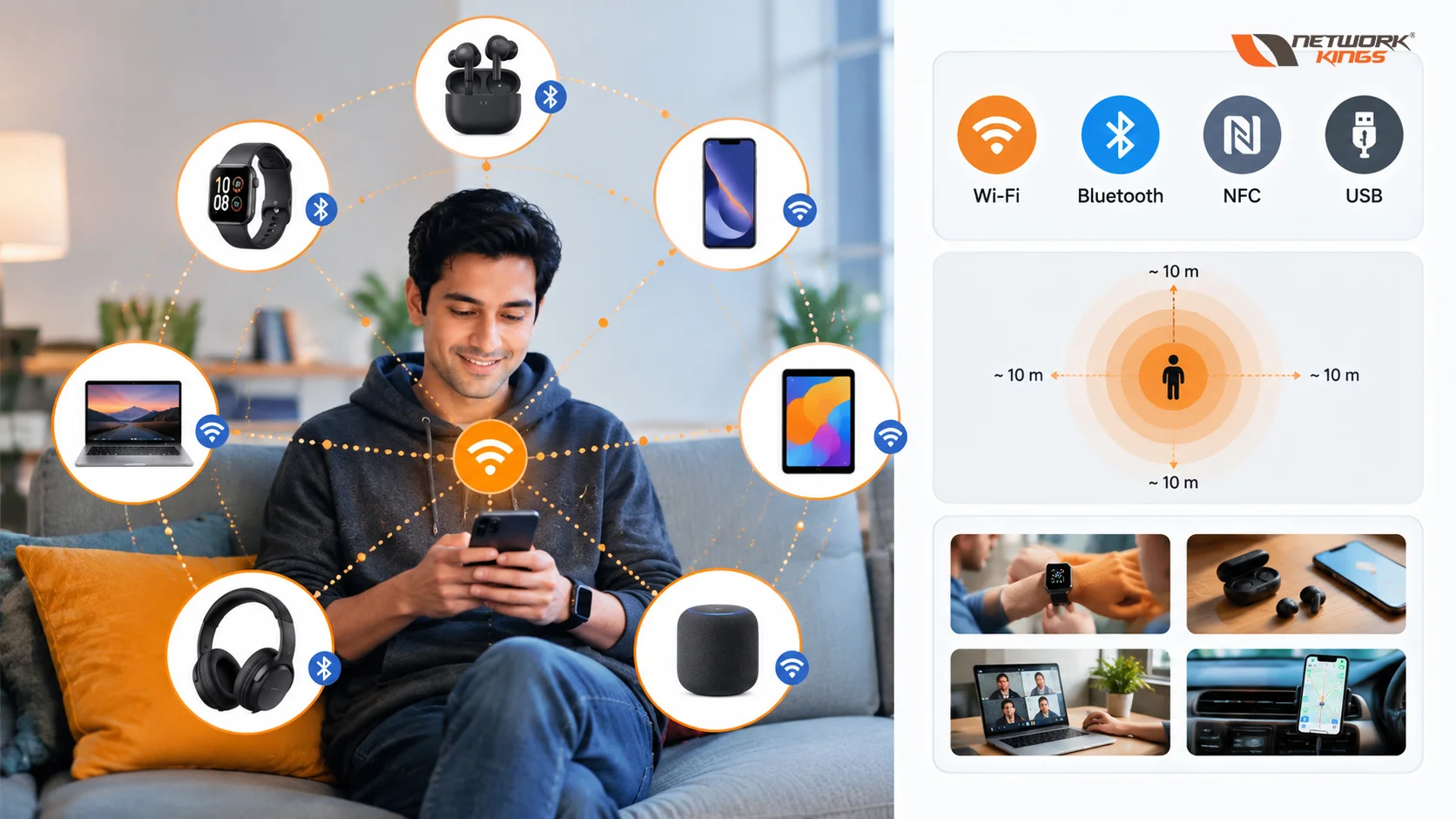
If you've ever connected wireless earbuds to your phone, synced a smartwatch, or plugged a USB keyboard into your laptop, you've already used a personal area network without necessarily calling it that. A personal area network, or PAN, is a small-scale network built around a single person and the devices they use within arm's reach. It connects gadgets like phones, laptops, headphones, and wearables so they can share data without needing a router, switch, or any larger networking infrastructure.
PAN matters because it's the invisible layer that makes modern personal tech feel seamless. Every time your phone talks to your smartwatch or your laptop pairs with a wireless mouse, a PAN is quietly doing the work.
What Is a Personal Area Network
A personal area network is defined less by a specific technology and more by its scope. It's a network centered on an individual, typically covering a range of a few centimeters up to around ten meters, connecting personal devices for tasks like file transfer, audio streaming, or device control. This is an important distinction, because PAN isn't synonymous with Bluetooth or any single protocol. Bluetooth is one of several technologies that can be used to build a PAN, but a PAN can also be wired, and it can use other short-range technologies entirely.
How a Personal Area Network Works
A PAN allows nearby devices to exchange data or share resources without requiring a large network infrastructure. One device may act as a controller or host while other devices connect as peripherals, although the exact architecture depends on the technology being used.
For example, when you pair wireless headphones with a smartphone, Bluetooth establishes a short-range wireless connection between the two devices. The phone can then send audio data to the headphones.
The basic process generally involves:
Devices discovering or being connected
Authentication or pairing when required
Establishing a communication link
Exchanging data through the selected protocol
Managing the connection and disconnecting when it is no longer needed
A PAN does not necessarily require a traditional router or network switch. Its design is centered on nearby personal devices and the communication technology connecting them.
Types of PAN
PANs generally fall into two categories.
A wired PAN uses physical cables to connect devices in proximity. A common example is connecting a laptop to a USB keyboard, mouse, or external hard drive. Wired PANs offer stable, low-latency data transfer and don't have to deal with wireless interference.
Wireless PAN (WPAN) uses radio waves or infrared signals instead of cables. This is the more common form of PAN today, since it includes technologies like Bluetooth, Zigbee, NFC, and infrared. WPANs are what allow a phone to connect to wireless earbuds or a smartwatch without any physical connection at all.
Common PAN Devices
A wide range of everyday devices participate in personal area networks, including:
Smartphones, which often act as the central hub
Laptops and tablets
Smartwatches and fitness trackers
Wireless headphones and earbuds
Wireless keyboards and mice
Bluetooth speakers
Printers connected over short-range links
Smart home sensors and small IoT devices within close range
Technologies Used in PAN
Several technologies can be used to build a PAN, and each one is suited to different needs.
Bluetooth is the most widely recognized, used for audio streaming, file sharing, and connecting peripherals. USB remains the standard for wired PAN connections due to its reliability and speed. NFC, or near-field communication, works over extremely short distances and is common in contactless payments and quick device pairing. Zigbee is a low-power wireless standard often used in smart home and IoT setups where many small devices need to communicate efficiently. Infrared, while largely legacy technology now, was historically used for simple device-to-device communication like older remote controls.
It's worth noting that using Bluetooth to connect two devices doesn't automatically mean a full network architecture is in play. A single Bluetooth link is a connection; a PAN is the broader concept describing how a person's devices interconnect, whether that involves one link or several.
Personal Area Network Range
PAN range isn't fixed. It depends heavily on the technology, device class, and physical environment. NFC typically works within just a few centimeters, making it ideal for secure, intentional pairing like tap-to-pay. Bluetooth range varies significantly depending on the Bluetooth implementation, transmit power, antenna design, environment, and device configuration. Zigbee can extend somewhat further, particularly in mesh configurations. Walls, interference from other wireless signals, and device power output can all reduce effective range in practice.
Technology | Typical Range | Connectivity Method | Common Use Case |
Bluetooth | ~1 to 10 meters | Wireless (radio) | Headphones, wearables, peripherals |
USB | Cable length dependent | Wired | Keyboards, external drives, printers |
NFC | Up to a few centimeters | Wireless (radio) | Contactless payments, quick pairing |
Zigbee | ~10 to 20 meters (mesh capable) | Wireless (radio) | Smart home sensors, IoT devices |
Infrared | Line of sight, short range | Wireless (light) | Legacy remote controls, older peripherals |
Real-World Uses and Applications
PANs show up constantly in daily life. Streaming music to wireless earbuds, syncing a fitness tracker's data to a phone app, transferring photos between devices, using a wireless mouse with a laptop, and tapping a phone to pay at checkout are all PAN applications. PAN is also foundational to many IoT setups, where small sensors and connected devices communicate over short ranges before relaying data onward through a larger network.
PAN Advantages
Easy to set up, often requiring minimal configuration
Low power consumption, especially with technologies like Bluetooth Low Energy
No dependency on external network infrastructure
Supports quick, direct device-to-device communication
PAN Limitations
Limited range compared to LAN or WLAN
Can support fewer simultaneous connections
Wireless PANs are subject to interference from other devices
Not designed for high-bandwidth or long-distance data transfer
PAN Security Considerations
Because PAN devices often exchange personal data, security matters. Good practices include:
Keeping Bluetooth pairing set to non-discoverable when not actively connecting new devices
Using devices that support encrypted pairing protocols
Regularly updating device firmware
Being cautious about accepting unknown pairing requests
Disabling NFC or Bluetooth when not in use
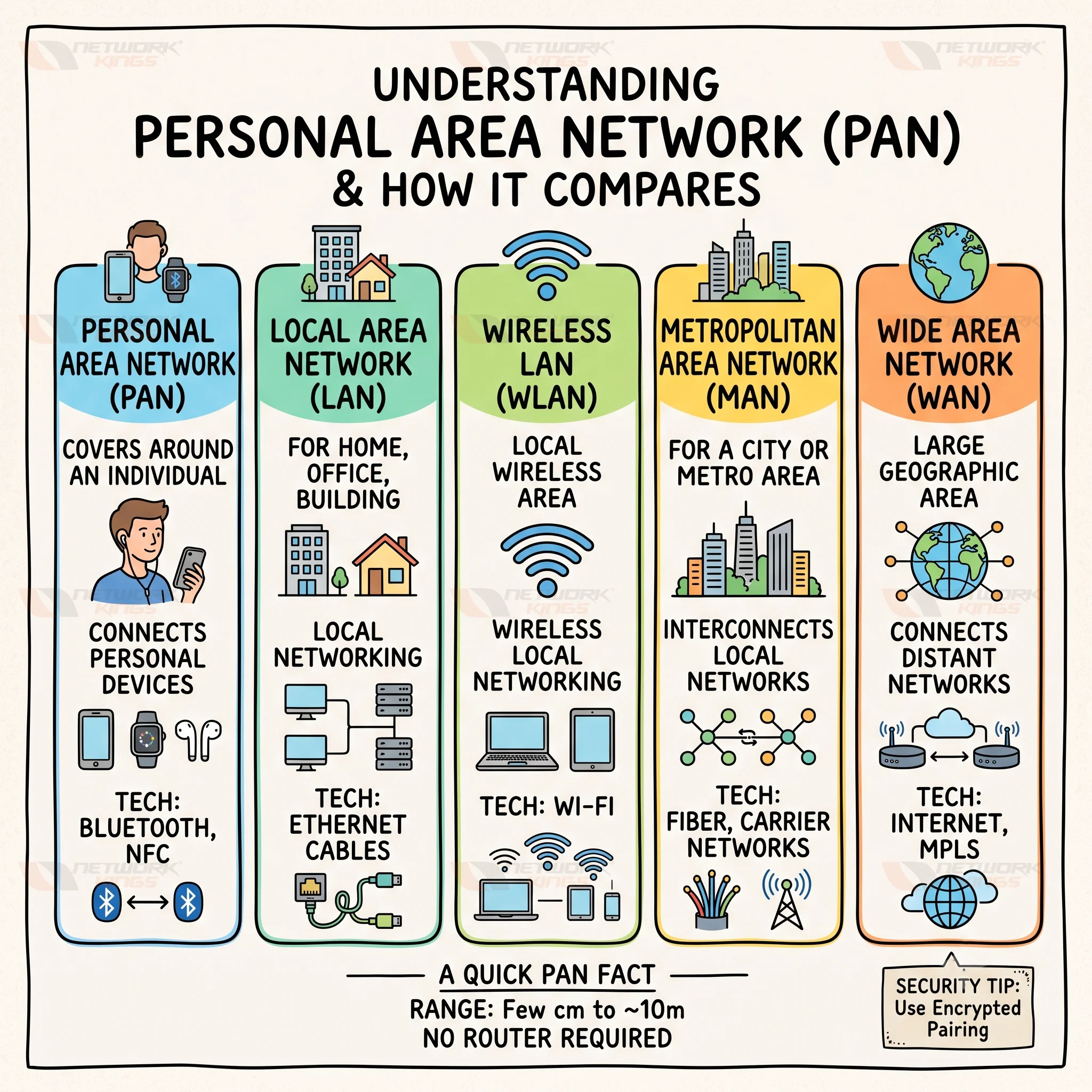
PAN vs LAN, WLAN, MAN and WAN
Network | Coverage | Main purpose | Common technology |
PAN | Around an individual | Personal devices | Bluetooth, NFC |
LAN | Home, office, building | Local networking | Ethernet |
WLAN | Local wireless area | Wireless local networking | Wi-Fi |
MAN | City or metropolitan area | Interconnecting local networks | Fiber, carrier networks |
WAN | Large geographic area | Connecting distant networks | MPLS, Internet, SD-WAN |
Bringing It All Together
A personal area network might be the smallest type of network in terms of range, but it plays an outsized role in how people interact with technology every day. Whether it's a wired USB connection or a wireless Bluetooth link, PANs quietly enable the convenience of connected personal devices, from smartwatches to smart home sensors. Understanding how PAN differs from LAN, WLAN, MAN, and WAN, along with its underlying technologies and security considerations, gives a clearer picture of how the broader networking landscape fits together, one personal device at a time.
Frequently Asked Questions (FAQs)
1. Is Bluetooth always considered a personal area network?
Not necessarily. Bluetooth is a short-range wireless technology that can be used to create personal connections, but a single Bluetooth link is not automatically a complete PAN. PAN describes the networking scope, while Bluetooth is one technology that can provide the connection.
2. What is the difference between PAN and WPAN?
PAN describes a network centered around an individual and their nearby devices. WPAN, or Wireless Personal Area Network, specifically refers to a PAN that uses wireless communication technologies such as Bluetooth, Zigbee, or other short-range wireless standards.
3. Can a personal area network connect multiple devices at the same time?
Yes, depending on the underlying technology and device capabilities. For example, a smartphone can maintain connections with multiple compatible peripherals. The number and type of simultaneous connections depend on the protocol, device implementation, bandwidth, and connection roles.
4. How does Bluetooth Low Energy support personal area networks?
Bluetooth Low Energy (BLE) is designed for efficient wireless communication with relatively low power consumption. It is particularly useful for wearables, sensors, fitness trackers, and IoT devices that may need to exchange small amounts of data while operating on batteries for extended periods.
5. How is security maintained in a wireless personal area network?
Security depends on the technology and its implementation. Wireless PANs can use mechanisms such as device authentication, secure pairing, encryption, and access controls. Users should also keep firmware updated, remove unused paired devices, and avoid accepting unexpected connection or pairing requests.
6. Can PAN technologies be used in IoT networks?
Yes. Short-range, low-power technologies such as Bluetooth Low Energy and Zigbee are commonly relevant to IoT applications. Sensors and other devices can communicate locally and, when necessary, pass information through a gateway or another network to reach cloud or enterprise services.
7. Does a personal area network require a router or access point?
No. A PAN can operate without a traditional router or wireless access point. Many PAN connections are established directly between nearby devices. However, a device in the PAN can also use a gateway, smartphone, or another network connection to forward information to a LAN, the internet, or a cloud service.

The founder of Network Kings, is a renowned Network Engineer with over 12 years of experience at top IT companies like TCS, Aricent, Apple, and Juniper Networks. Starting his journey through a YouTube channel in 2013, he has inspired thousands of students worldwide to build successful careers in networking and IT. His passion for teaching and simplifying complex technologies makes him one of the most admired mentors in the industry.