
IPv4 vs IPv6 Troubleshooting: Real Network Engineer Scenarios
Compare IPv4 vs IPv6 troubleshooting with real network engineer scenarios, practical fixes, and tips to diagnose connectivity issues faster.
If you've spent any time in a network operations center, you already know the feeling — an alert fires, users are screaming about connectivity, and you're staring at a dual-stack environment trying to figure out whether you're dealing with an IPv4 problem, an IPv6 problem, or some unholy combination of both. It's not always obvious, and the troubleshooting approaches differ more than most people realize.
This article pulls from real-world scenarios that network engineers actually face. No textbook theory — just the kind of practical, hard-won knowledge that comes from hours of packet captures and late-night config reviews.
Why IPv4 and IPv6 Troubleshooting Aren't the Same Thing
A lot of engineers treat IPv4 and IPv6 as interchangeable when troubleshooting, and that's usually the first mistake. The two protocols behave fundamentally differently in several areas:
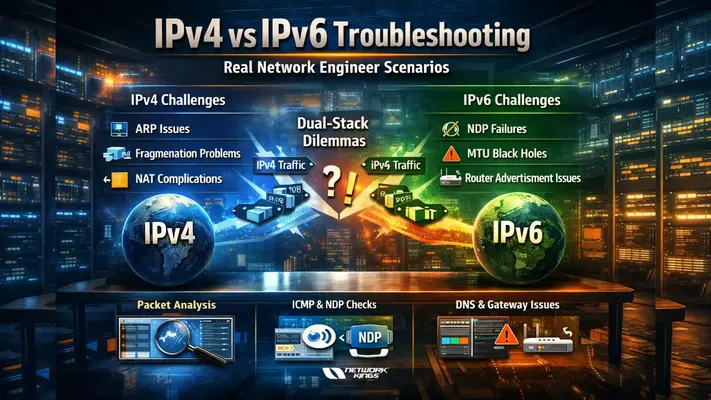
Address resolution: IPv4 uses ARP; IPv6 uses Neighbor Discovery Protocol (NDP). An ARP issue and an NDP issue can look almost identical from a user's perspective but require completely different fixes.
Header structure: IPv6 has a fixed 40-byte header with extension headers for optional features. IPv4's variable-length header means fragmentation behavior differs — and fragmentation is a surprisingly common source of pain.
ICMP dependency: IPv6 is far more reliant on ICMPv6 than IPv4 is on ICMPv4. If your firewall is blocking ICMPv6 too aggressively, things will break in ways that seem completely unrelated to ICMP.
Default gateway behavior: In IPv6, routers send Router Advertisements (RAs) that clients use to autoconfigure. Rogue RA attacks and misconfigured RA timers cause issues you'd never see in a pure IPv4 environment.
Understanding these differences up front changes how you approach a problem.
The Internet Works on My Phone, but Not My Laptop
This one is far more common than it should be. A user says their phone (Android or iOS) browses fine, but their Windows or Linux laptop is crawling or timing out on certain sites.
What's actually happening: Modern mobile operating systems handle Happy Eyeballs (RFC 6555/8305) more aggressively than desktop OSes sometimes do. Happy Eyeballs tries IPv6 first, then falls back to IPv4 almost instantly. If the laptop prefers IPv6 but the IPv6 path is broken (misconfigured prefix, dropped ICMPv6, broken upstream peering), it'll hang waiting for a timeout before falling back.
How to diagnose it:
On the affected machine, run
ping6 google.comorping -6 google.com. If this fails whileping google.com(IPv4) works, you've isolated the issue.Check
ipconfig /all(Windows) orip -6 addr(Linux) to verify the machine actually has a valid global unicast IPv6 address. A link-local address only (fe80::) means SLAAC or DHCPv6 isn't working.Use
traceroute6ortracert -6to see where the IPv6 path dies.
Common fixes: Verify the RA configuration on your router, ensure ICMPv6 type 133–137 is permitted on all firewalls in the path, and check that your upstream ISP is actually handing you a routable IPv6 prefix.
MTU Mismatches and the Silent Black Hole
One of the nastiest IPv6-specific issues is Path MTU Discovery (PMTUD) black holes. The symptoms are maddening: large file transfers fail or hang, but small requests work perfectly. SSH connections drop after a few minutes. Web pages load, but large images or downloads never complete.
The root cause: IPv6 routers do not fragment packets — only the source host does. IPv6 relies entirely on PMTUD using ICMPv6 "Packet Too Big" messages to tell the sender to reduce its packet size. If a firewall or security device is blocking ICMPv6 Packet Too Big messages (type 2), the sender never learns it needs to fragment, and packets silently disappear.
Diagnosis checklist:
Use
ping6 -s 1400 <destination>to test with a larger payload. If 1400-byte pings fail but 1280-byte pings succeed, PMTUD is likely broken.Capture traffic with Wireshark and filter for
ICMPv6.type == 2. If you're not seeing Packet Too Big messages when large transfers fail, a firewall is eating them.Check if the issue is specific to tunneled traffic (6in4, GRE, IPsec) — tunnels reduce effective MTU and are the most common source of this problem.
Fix: Ensure ICMPv6 type 2 is explicitly permitted on all stateful firewalls. For tunnel interfaces, set the interface MTU to account for encapsulation overhead (typically 1480 for 6in4 tunnels over a 1500-byte Ethernet path).
Intermittent Packet Loss That Only Affects Certain Hosts
You're seeing 2–5% packet loss, but only for a handful of IP addresses, and it doesn't follow any obvious geographic or network pattern. Some hosts are IPv4, some are IPv6, and the behavior seems random.
What to look for first: In dual-stack environments, this symptom often points to an ARP or NDP table overflow on a Layer 3 switch or router. When the neighbor table fills up, new entries push out old ones, and traffic to displaced entries gets dropped until the table is refreshed.
On Cisco IOS, check
show ip arp summaryandshow ipv6 neighbors summary. Compare entry counts against your platform's maximums.On Linux routers, check
ip -s neigh showand look atgc_threshvalues in/proc/sys/net/ipv6/neigh/default/.Also check for duplicate address detection (DAD) failures on IPv6 — if two devices end up with the same IPv6 address (common in misconfigured SLAAC or static assignments), you'll see intermittent drops as the two hosts fight over the address.
DNS Is Returning the Wrong Address Family
This one catches people off guard. A service resolves fine, and connectivity seems good, but specific users are reaching the wrong endpoint. The culprit is often DNS returning an AAAA record (IPv6) when the destination IPv6 path is broken, or vice versa.
Quick validation steps:
Use
nslookup -type=AAAA hostnameordig AAAA hostnameto see what IPv6 addresses are being returned.Compare with
dig A hostnamefor the IPv4 record.If the AAAA record points to an address that isn't reachable from your network, the fix might be as simple as removing a broken DNS record or adjusting resolver preferences — not touching the network at all.
A Few Universal Rules That Apply to Both Protocols
Regardless of which protocol is misbehaving, these troubleshooting habits save time:
Always capture at both ends when possible. What leaves your switch and what arrives at the destination can be very different.
Check your firewall logs before blaming the network. ICMP filtering, especially on IPv6, is responsible for a disproportionate number of mysterious connectivity issues.
Document your dual-stack policy. Many networks have inconsistent rules between IPv4 and IPv6 ACLs because they were written at different times by different people. That inconsistency is often where bugs hide.
Don't assume symmetry. In a dual-stack environment, the IPv4 and IPv6 paths may traverse entirely different physical infrastructure, especially if IPv6 is tunneled.
Troubleshooting in a dual-stack world is genuinely harder than a pure IPv4 environment, but it gets easier once you internalize that IPv6 isn't just "IPv4 with bigger addresses." The protocol was designed differently, relies on different mechanisms, and fails differently. The engineers who get comfortable with NDP, ICMPv6, and SLAAC behavior are the ones who resolve dual-stack issues in minutes rather than hours.
The scenarios above are just a starting point. Every network is different, and the specific failure modes you'll encounter depend heavily on your hardware, ISP, and configuration history. But the diagnostic mindset — isolate the address family, verify neighbor resolution, confirm ICMP isn't being over-filtered, and always capture packets — applies universally.
FAQs
1. Why can IPv6 fail even when basic connectivity tests appear normal?
IPv6 can fail silently if ICMPv6 (especially Neighbor Discovery or PMTUD messages) is blocked. Basic tests like small pings may succeed, while real applications fail due to missing control-plane communication.
2. How does NDP failure differ operationally from ARP failure?
NDP failures in IPv6 often impact multiple functions (address resolution, router discovery, reachability), whereas ARP in IPv4 is limited to MAC resolution, making IPv6 issues broader and harder to isolate.
3. What causes IPv6 PMTUD black holes, and how do they manifest?
They occur when ICMPv6 “Packet Too Big” messages are filtered. Symptoms include failed large transfers, hanging HTTPS sessions, and unstable SSH connections despite successful small packets.
4. Why do dual-stack clients sometimes prefer a broken IPv6 path?
Due to address selection policies and delayed fallback mechanisms, some systems prioritize IPv6 even when the path is degraded, leading to latency or timeouts before switching to IPv4.
5. How can Router Advertisement (RA) misconfigurations impact connectivity?
Incorrect RA settings can assign invalid prefixes or gateways, causing hosts to route traffic incorrectly—even if the underlying network is otherwise functional.
6. What role does DNS play in IPv4 vs IPv6 troubleshooting?
DNS may return AAAA (IPv6) records for unreachable paths. Clients attempting IPv6 first can experience failures, even though IPv4 connectivity (A records) works perfectly.