
Networking
CCNA Syllabus: v1.1, the 2027 Refresh and a Lab Checklist
Understand the current CCNA v1.1 syllabus, the February 2027 refresh, and a practical VLAN, subnetting and OSPF lab with a downloadable study checklist.
The CCNA syllabus covers networking fundamentals, switching, routing, IP services, security, and automation. Choose the official blueprint for your intended exam date, then pair study with configuration and troubleshooting practice. As of 16 October 2026, 200-301 v1.1 is the current exam. Cisco has announced that its last testing date is 2 February 2027; v2.0 begins on 3 February 2027. Check Cisco’s transition announcement before booking.
This guide turns the syllabus into an achievable learning sequence and an original branch-network exercise. It is a study aid, not an official question bank. The exercise below is provided for you to perform; no completed lab execution or independent technical review is claimed.
Which CCNA exam version should you study?
If your booked exam falls on or before 2 February 2027, use the v1.1 blueprint. For a date from 3 February 2027, use v2.0. If your date is uncertain, learn the shared foundations now and revisit the vendor announcement before committing to a revision plan. Existing knowledge of addressing, VLANs and routes remains useful across the transition.
The current exam is 120 minutes and the listed price is US$300. Cisco lists no formal certification prerequisites and a three-year certification validity period. Training completion and the Cisco certification are separate: earning CCNA requires passing Cisco’s exam. Fees, scheduling and policies should be checked with Cisco’s exam page and certification overview.
The current CCNA v1.1 syllabus
The percentages below come from the official v1.1 blueprint. Use them to organize revision while covering every domain.
| Domain | Weight | Evidence to work toward |
|---|---|---|
| Network fundamentals | 20% | Explain a packet path; calculate and verify an address plan. |
| Network access | 20% | Verify VLANs, trunks and switching behavior. |
| IP connectivity | 25% | Read routes; configure static routing and single-area OSPFv2. |
| IP services | 10% | Explain services and verify the configurations required by the blueprint. |
| Security fundamentals | 15% | Test access restrictions and explain allowed and denied traffic. |
| Automation and programmability | 10% | Read JSON and explain APIs, automation and AI concepts. |
Pay attention to the verb in each objective. Explaining a feature, interpreting output and configuring a feature require different preparation. A successful ping does not prove you can explain why a packet took that route. Equally, memorizing a definition does not demonstrate configuration skill.
What changes in CCNA v2.0?
The published v2.0 blueprint reorganizes the syllabus into five domains. It emphasizes practical troubleshooting, includes single-area OSPFv3, and introduces tasks involving AI output and recommendations. This is the upcoming syllabus, not the exam available in October 2026.
| Domain | Weight |
|---|---|
| Network infrastructure and connectivity | 25% |
| Switching and network access | 25% |
| IP routing | 20% |
| Network services and security | 20% |
| AI, network operations and management | 10% |
For an AI-assisted troubleshooting exercise, give a tool fictional lab output, ask for hypotheses and tests, then verify each recommendation against the device state. Do not paste workplace credentials or sensitive configurations. Treat a plausible answer as a hypothesis to inspect.
Worked example: divide a /24 into /26 networks
Suppose a branch receives 192.168.10.0/24 and needs four equal subnets. Moving to /26 borrows two bits: four blocks, each containing 64 addresses. For these ordinary IPv4 LAN subnets, exclude the network and broadcast addresses, leaving 62 usable host addresses per block. The mask is 255.255.255.192.
| Network | Usable hosts | Broadcast |
|---|---|---|
| 192.168.10.0/26 | 192.168.10.1–192.168.10.62 | 192.168.10.63 |
| 192.168.10.64/26 | 192.168.10.65–192.168.10.126 | 192.168.10.127 |
| 192.168.10.128/26 | 192.168.10.129–192.168.10.190 | 192.168.10.191 |
| 192.168.10.192/26 | 192.168.10.193–192.168.10.254 | 192.168.10.255 |
Use the first block for VLAN 10 and the second for VLAN 20. PC-A can use 192.168.10.10/26, gateway 192.168.10.1. PC-B can use 192.168.10.74/26, gateway 192.168.10.65. Neither gateway is a special reserved number; both are deliberate choices inside the correct usable ranges.
Exercise: build and verify a small branch network
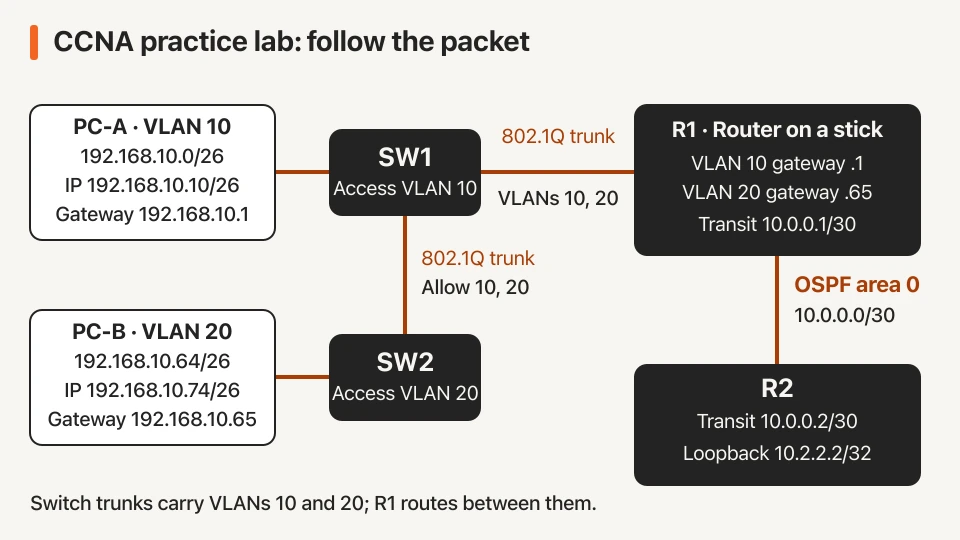
Use isolated training equipment or a simulator with clean lab configurations. S1 and S2 below are SW1 and SW2 in the diagram. The example assumes FastEthernet access ports and GigabitEthernet uplinks; adjust names to your devices. Connect PC-A to S1 Fa0/1, PC-B to S2 Fa0/1, and S1 Gi0/1 to S2 Gi0/1. Connect S1 Gi0/2 to R1 Gi0/0. Use Gi0/1 on both routers for transit.
- Create VLANs 10 and 20 on both switches. Assign S1’s PC port to VLAN 10 and S2’s PC port to VLAN 20 using access mode.
- Configure both ends of the interswitch link, and S1’s router-facing uplink, as trunks allowing VLANs 10 and 20. Verify them with
show interfaces trunk. - On R1, enable its physical router-facing interface and add the following subinterfaces. Set the PCs’ addresses from the worked example.
Cisco’s external-router configuration guide explains the 802.1Q subinterface method used here.
interface GigabitEthernet0/0
 no shutdown
interface GigabitEthernet0/0.10
 encapsulation dot1Q 10
 ip address 192.168.10.1 255.255.255.192
interface GigabitEthernet0/0.20
 encapsulation dot1Q 20
 ip address 192.168.10.65 255.255.255.192
First test each PC’s gateway, then cross-VLAN connectivity. Next, assign 10.0.0.1/30 to R1’s transit interface and 10.0.0.2/30 to R2’s; enable both. Give R2 Loopback0 address 10.2.2.2/32. Configure OSPF process 1 and area 0 on the transit interfaces and advertise the LANs and loopback. Keep user-facing interfaces passive.
On R1, the following OSPF statements cover the two connected LAN subnets and the transit network:
router ospf 1
 router-id 1.1.1.1
 passive-interface default
 no passive-interface GigabitEthernet0/1
 network 192.168.10.0 0.0.0.127 area 0
 network 10.0.0.0 0.0.0.3 area 0
After addressing R2's transit interface and loopback, use these global-configuration statements:
router ospf 1
 router-id 2.2.2.2
 passive-interface default
 no passive-interface GigabitEthernet0/1
 network 10.0.0.0 0.0.0.3 area 0
 network 10.2.2.2 0.0.0.0 area 0
Inspect show ip ospf neighbor and show ip route; test the loopback from both PCs. Accepted commands alone do not prove connectivity. Consult Cisco’s OSPF configuration reference for behavior and platform support.
Troubleshoot one fault at a time
Remove VLAN 20 from the interswitch trunk’s allowed list. PC-B should lose its path to R1. Check its IP settings, physical link, access VLAN and trunk output in that order; compare the observations with your baseline. Restore VLAN 20 and repeat the same test.
Then try a wrong PC-B gateway or a disabled transit interface as separate faults. If PC-B reaches its gateway but cannot reach the loopback, focus on routes and OSPF. If it cannot reach its gateway, fix the local addressing or Layer 2 path first. Record the symptom, evidence, cause, change and retest. This develops a repeatable method instead of command guessing.
CCNA study and practice checklist
Use this list on-page or download the matching text checklist.
- Confirm my target exam date and the matching official blueprint.
- Calculate the four /26 networks, usable ranges and broadcasts without a calculator.
- Record each PC’s address, mask, VLAN and default gateway.
- Verify access VLANs and operational trunks using device output.
- Test each gateway before testing cross-VLAN or remote connectivity.
- Verify the OSPF neighbour and learned routes; explain the forwarding decision.
- Break one configuration item, document the fault and prove the repair.
- Extend practice to DHCP, SSH, ACLs and permitted versus denied traffic.
- Review wireless, IPv6, security and automation objectives outside this lab.
- Save configurations and review weak topics before using an official practice assessment.
The topology covers part of the syllabus. For structured study, explore the CCNA course, the broader Network Engineer Master Program, and networking practice labs. Check each programme’s current syllabus and included access before enrolling.
For further practice, work through the subnetting guide. These foundations also support the cloud computing roadmap.
Compare current learning plans or request career guidance for your starting point.
Sources and editorial note
Certification information checked on 16 October 2026. By Network Kings. Editorial revision prepared with AI assistance; no independent technical review recorded.