Git vs GitHub Key Differences: Features, Benefits, and Use Cases

If you've started learning software development, DevOps, cloud computing, or automation, you've probably heard the terms Git and GitHub used almost everywhere. Many beginners assume they are the same tool, but understanding the difference between them is one of the most important steps in building a strong foundation in modern software development.
When developers work on applications, websites, or infrastructure projects, they need a reliable way to track changes, collaborate with team members, and recover previous versions of their work when something goes wrong. This is where Git and GitHub play a critical role. Git helps developers manage and track code changes efficiently, while GitHub provides a platform for storing repositories, collaborating with teams, and automating development workflows.
In this comprehensive Git vs GitHub guide, you'll learn what Git and GitHub are, how they work, their key differences, major features, benefits, and real-world use cases. Whether you're a student, beginner developer, DevOps engineer, or IT professional, this article will help you understand when to use Git, when to use GitHub, and why most modern development teams rely on both.
What Is Git
Git is a distributed version control system created by Linus Torvalds in 2005 to help manage the Linux kernel source code. Its purpose is simple. It tracks changes to files over time so you can review history, undo mistakes, and collaborate without overwriting each other's work.
How Git Works
Git works by taking snapshots of your project every time you commit. Instead of storing a fresh copy of the entire codebase, it records what changed, when it changed, and who changed it. This creates a complete, searchable history of your project.
Distributed Version Control Explained
The word distributed is key here. Every developer has a full copy of the repository, including its entire history, stored locally on their machine. There is no single point of failure, and you do not need an internet connection to commit changes, view history, or create branches.
Key Git Features
Branching and merging for parallel development
Local commits that work without internet access
Fast performance since operations happen on your machine
Complete version history for every file
Data integrity through checksums
Common Git Commands
Some frequently used Git commands include:
git init
git clone
git add
git commit
git push
git pull
git merge
git branch
Learning these commands is usually the fastest way to get comfortable with Git version control.
Benefits of Using Git
Git gives developers the freedom to experiment safely. You can create a branch, try something risky, and simply delete it if it does not work out. It also protects your work through detailed history, making it far easier to trace bugs back to the exact commit that introduced them.
What Is GitHub
GitHub is a cloud-based platform that hosts Git repositories and adds collaboration tools on top of them. Think of Git as the engine and GitHub as the garage where multiple people can work on that engine together, safely and visibly.
Purpose of GitHub
GitHub was built to solve a problem Git alone does not solve well, which is remote collaboration at scale. It gives teams a shared space to store code, review changes, discuss issues, and automate workflows.
Cloud-Based Repository Hosting
Every GitHub repository lives on GitHub's servers, meaning your code is backed up and accessible from anywhere. This is a major advantage for distributed teams and open-source contributors spread across different time zones.
Collaboration Capabilities
GitHub collaboration features include pull requests, code reviews, inline comments, and team permission settings. These tools make it possible for dozens or even thousands of contributors to work on the same project without stepping on each other's toes.
Pull Requests and Code Reviews
A pull request is a formal request to merge changes from one branch into another. Before that happens, teammates can review the code, leave comments, request changes, and approve it. This process is central to maintaining code quality in professional teams.
GitHub Actions and Automation
GitHub Actions lets you automate testing, building, and deployment directly from your repository. For example, every time someone pushes code, GitHub Actions can automatically run tests and alert the team if something breaks.
Benefits of Using GitHub
GitHub makes collaboration transparent and structured. It also gives projects visibility, whether that means showcasing your work to potential employers or letting open-source contributors discover and improve your project.
Git vs GitHub Key Differences
Aspect | Git | GitHub |
Definition | A distributed version control system | A cloud platform for hosting Git repositories |
Purpose | Tracks and manages code changes | Enables collaboration and code hosting |
Hosting | Installed locally on your computer | Hosted online on GitHub servers |
Internet Requirement | Not required for most operations | Required to push, pull, or collaborate |
Collaboration | Basic, mainly through manual sharing | Built-in tools like pull requests and reviews |
Access Control | Managed manually or via SSH keys | Role-based permissions and team settings |
Pricing | Free and open source | Free tier available, paid plans for advanced features |
Security | Relies on local system and checksums | Adds security scanning, 2FA, and audit logs |
Workflow | Command-line based, local-first | Web interface plus command-line integration |
Use Cases | Version tracking, branching, merging | Team collaboration, open-source hosting, CI/CD |
Learning Curve | Moderate, command-based | Easier, visual interface on top of Git |
Examples | git commit, git branch, git merge | Pull requests, Issues, GitHub Actions |
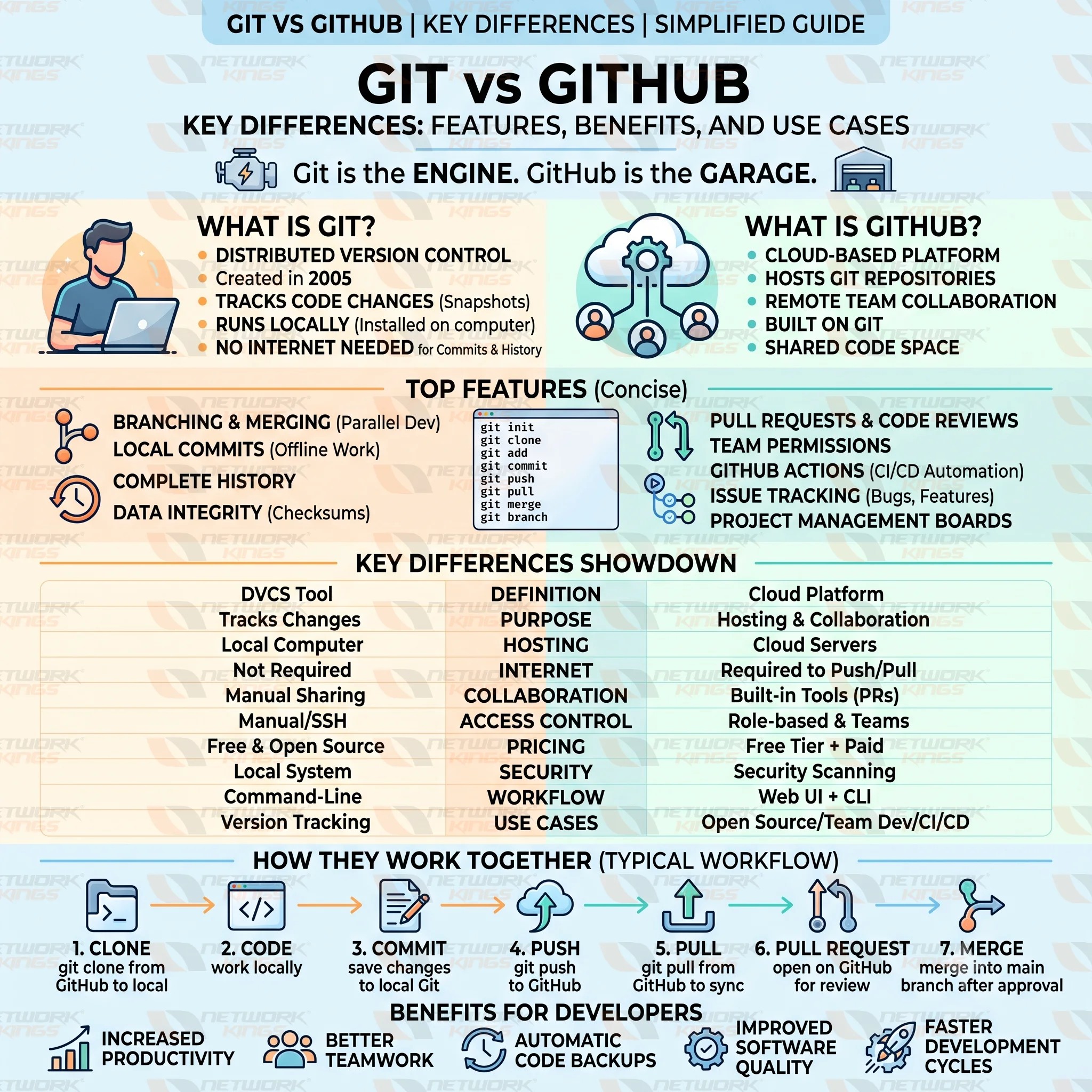
How Git and GitHub Work Together
In practice, Git and GitHub are almost always used together, not as alternatives. Here is how a typical workflow looks.
You start by cloning a remote repository from GitHub to your local machine using git clone. This gives you a local repository with the full project history. As you work, you make changes and save them with git commit, which only updates your local copy.
When you are ready to share your work, you use git push to send your commits to the remote repository on GitHub. If a teammate has made changes you do not have yet, you use git pull to bring those updates into your local repository.
Once your feature is ready, you open a pull request on GitHub. Your team reviews the code, suggests changes if needed, and once approved, merges it into the main branch. This combination of local Git commands and GitHub's collaboration tools is what powers most modern software development workflows.
Top Features of Git
Branching allows developers to work on new features without affecting the main codebase. Merging then combines that work back together once it is ready. Git is also known for its speed, since most operations happen locally rather than over a network.
Its distributed architecture means every clone is a full backup, offline capabilities mean you can keep working without internet access, and its detailed version history combined with checksum-based data integrity ensures your project's history stays accurate and tamper-resistant.
Top Features of GitHub
GitHub repository hosting gives your code a permanent, accessible home. Team collaboration tools, including comments and reviews, keep everyone aligned. Issue tracking helps manage bugs and feature requests in one place.
Pull requests structure how code gets merged; GitHub Actions automates repetitive tasks like testing and deployment; security scanning flags vulnerabilities before they become problems, and built-in project management tools like boards help teams plan and track progress.
Benefits of Git and GitHub for Developers
Together, Git and GitHub noticeably improve productivity by reducing the time spent tracking changes manually. They enable better collaboration across teams of any size, provide automatic code backup, and maintain a clear record of every change made.
This combination also leads to faster development cycles, since teams can work on multiple features simultaneously, and ultimately results in improved software quality thanks to structured code review and automated testing.
Common Use Cases
Individual developers use Git to manage personal projects and experiment safely with new ideas. Development teams rely on GitHub to coordinate work, review code, and avoid conflicts. Open-source projects depend on GitHub's visibility and pull request system to accept contributions from strangers around the world.
DevOps environments use GitHub Actions to build continuous integration and continuous deployment pipelines. Enterprise software teams use both tools together to enforce code standards, manage large codebases, and maintain audit trails for compliance.
Git vs GitHub Which One Should You Learn First
Beginners should start with Git. Understanding commits, branches, and merges builds the foundation everything else depends on. Students benefit the same way, since most computer science courses assume basic Git knowledge.
Developers moving into team environments should quickly follow up by learning GitHub, since most real-world jobs expect familiarity with pull requests and code reviews. DevOps engineers need a strong command of both, with particular focus on GitHub Actions and automation. IT professionals managing infrastructure as code should also prioritize learning both tools together, since they are rarely used in isolation.
Common Misconceptions About Git and GitHub
A lot of beginners believe Git and GitHub are interchangeable, but Git is the tool and GitHub is a service built around it. Another common misconception is that you need GitHub to use Git, when in reality Git works perfectly well entirely offline.
Some people also assume GitHub is the only platform for hosting Git repositories, but alternatives like GitLab and Bitbucket exist too. Others think GitHub is required for teamwork, though small teams can technically collaborate using Git alone with shared servers. Finally, many assume GitHub is always free, but while the free tier is generous, larger teams often need paid plans for advanced features.
Best Practices for Using Git and GitHub
Write clear, descriptive commit messages so your history actually tells a story. Commit often in small, logical chunks rather than one massive commit at the end of the day. Always pull the latest changes before starting new work to avoid painful merge conflicts.
Use branches for every new feature instead of working directly on the main branch. On GitHub, take advantage of pull request templates and required reviews to maintain code quality. Finally, enable two-factor authentication on your GitHub account to keep your repositories secure.
Conclusion
The Git vs GitHub debate is not really a debate at all once you understand what each tool actually does. Git gives you the power to track and manage code changes locally, while GitHub builds a collaborative, cloud-based layer on top of that foundation. Neither tool replaces the other, and in most real-world projects, you will use both together every single day.
If you are just starting, begin with Git. Get comfortable with commits, branches, and merges before moving on to GitHub's collaboration features. Once you understand both, you will have the core skills needed to work confidently on any modern software team.
FAQ
Is Git the same as GitHub?
No. Git is a version control system you install locally, while GitHub is an online platform that hosts Git repositories and adds collaboration features.
Can I use Git without GitHub?
Yes. Git works completely independently and does not require an internet connection or any hosting platform.
Can I use GitHub without Git?
Not really. GitHub is built specifically to host and manage Git repositories, so it requires Git to function properly.
Which is better Git or GitHub?
They are not competitors. Git handles version control, and GitHub adds hosting and collaboration on top of it. Most projects need both.
Why do developers use Git and GitHub?
Developers use Git to track changes safely and GitHub to collaborate, review code, and automate workflows, making the combination essential for modern software development.
What is the difference between a Git repository and a GitHub repository?
A Git repository lives on your local machine and tracks history through commits. A GitHub repository is a cloud-hosted version of that same repository, accessible to your entire team.
Do I need to know command-line Git to use GitHub?
Not strictly, since GitHub offers a web interface and desktop app, but knowing Git commands gives you far more control and is expected in most professional roles.

The founder of Network Kings, is a renowned Network Engineer with over 12 years of experience at top IT companies like TCS, Aricent, Apple, and Juniper Networks. Starting his journey through a YouTube channel in 2013, he has inspired thousands of students worldwide to build successful careers in networking and IT. His passion for teaching and simplifying complex technologies makes him one of the most admired mentors in the industry.